Cashless festival wristband — 250×25 mm
Long-strip festival wristband: festival name, pass type, wristband ID, holder, age flag and QR for top-up and cashless payments.
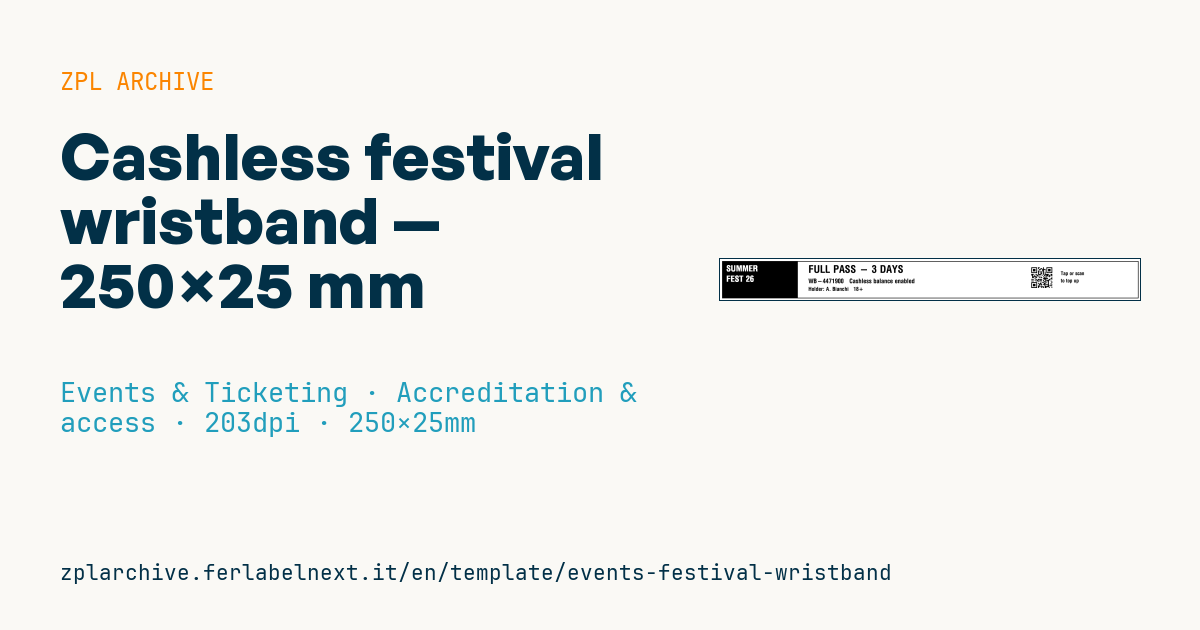
Cashless festival wristband
Long-strip 250×25 mm format worn on the wrist. Festival-name banner on the left, data and cashless top-up QR on the right. The QR links to the attendee's cashless wallet.
Placeholders
festival_top,festival_bottom— festival name on two lines (banner)pass_type— pass type (e.g.FULL PASS - 3 DAYS)wristband_id— wristband IDholderage_flag— age flag (e.g.18+)pay_url— URL in the QR (top-up/payments)
When to use it
Multi-day festivals, music camping events and large outdoor events use it. The wristband is printed and fastened at accreditation or first entry and from then on works as the pass: staff check it by eye at entrances and restricted areas, while the QR takes the attendee to their cashless wallet for top-ups and bar payments.
It has to stay on the wrist for the whole festival, through sun, rain, sweat and showers. That is why synthetic wristband cartridges or rolls for thermal printing are used, with a non-reusable adhesive or clip closure. Check the supplier's stated durability against the number of days you need.
Standards and requirements
There is no specific standard for festival wristbands: the requirements are durability, a tamper-evident closure, a QR readable on a curved surface and clear access data. The QR follows ISO/IEC 18004. The age flag helps bar staff, but the minimum drinking age depends on the country: the wristband does not replace an ID check. Printing the holder's name means processing personal data, so GDPR (Regulation (EU) 2016/679) applies in the EU.
At 203 dpi, 25 mm of width equals 200 dots: set ^PW and ^LL to the actual media and keep the QR centred on the band, away from the edges.
Common mistakes
- Placing the QR near the closure: once on the wrist, the curve distorts it and it will not scan.
- Encoding a payment token without server-side checks: copying it could let someone spend another person's credit.
- Using paper wristbands for a three-day event with rain.
- Printing the holder's name without proper privacy information.
FAQ
Are thermal wristbands waterproof?
Many synthetic thermal wristbands are designed to withstand water and sweat for several days, but durability depends on the material: check the supplier's data sheet.
Does a QR code on a wristband scan reliably?
Yes, if the symbol is large enough, centred on the band and not bent over the closure. Test scanning with the band fastened on a wrist, not flat on a table.
ZPL code
^XA
^LL200
^CI28
^PW2000
^FO10,10^GB1980,180,3^FS
^FO10,10^GB360,180,180^FS
^CF0,40^FO30,30^FR^FD{{festival_top}}^FS
^CF0,40^FO30,80^FR^FD{{festival_bottom}}^FS
^CF0,50^FO420,30^FD{{pass_type}}^FS
^CF0,30^FO420,95^FD{{wristband_id}}   Cashless balance enabled^FS
^CF0,26^FO420,135^FDHolder: {{holder}}   {{age_flag}}^FS
^FO1480,30^BQN,2,4^FDLA,{{pay_url}}^FS
^CF0,24^FO1620,60^FDTap or scan^FS
^FO1620,95^FDto top up^FS
^XZ- Industry: Events & Ticketing
- Category: Accreditation & access
- DPI: 203
- Size: 250×25 mm
- Tags: Access control, Cashless, Event, Festival, QR Code, Wristband
What this label contains
Barcodes
- QR Code
- 2D code for links, text and structured data, readable by any smartphone.
Elements
- 7 text fields
- 7 variable fields to fill in
- boxes and separator lines
Variable fields
| Field | Description | Example |
|---|---|---|
festival_top | Festival (line 1) | SUMMER |
festival_bottom | Festival (line 2) | FEST 26 |
pass_type | Pass type | FULL PASS - 3 DAYS |
wristband_id | Wristband ID | WB-4471900 |
holder | Holder | A. Bianchi |
age_flag | Age flag | 18+ |
pay_url | Top-up URL | https://pay.example/w/WB-4471900 |
Format and printing
250×25 mm (9.84×0.98″) at 203 dpi: 1998×200 dots. Landscape.
Compatible Zebra printers
You need a printer with a 2″ printhead at 203 dpi, for example:
- Zebra ZD411 (desktop)
- Zebra ZD611 (desktop)
- Zebra ZQ220 (mobile)
- Zebra ZQ310 (mobile)
Any Zebra printer with a wider printhead and the same resolution works too.
The code is written for 203 dpi: on a printer with a different resolution the label prints larger or smaller and needs rescaling.
How to use it
- Open “Customize placeholders” and enter your data in the variable fields listed above.
- Check the preview: it is rendered from the same ZPL code you will send to the printer.
- Download the .zpl file or copy the code and send it to the printer: with “Print” through Zebra Browser Print, or as a raw file to port 9100 if the printer is on the network.
- Load 250×25 mm labels and make sure the printer is set to 203 dpi. For a different size use “Duplicate & edit” and adapt the layout in the builder.
Edit it in the editor
To change the layout, use “Duplicate & edit”: the template opens in the online ZPL editor, where you modify it and save it to your account for free.
Related templates
- Press pass — 100×70 mm 203 dpi · Events & Ticketing · Accreditation & access
- Event admission ticket — 100×50 mm 203 dpi · Events & Ticketing · Tickets
- Boarding pass (PDF417) — 100×60 mm 203 dpi · Events & Ticketing · Tickets
- Concert seated ticket — 100×60 mm 203 dpi · Events & Ticketing · Seating & cloakroom
- Retail gift card with logo — 65×40 mm 300 dpi · Events & Ticketing · Vouchers & tokens
- Gift voucher — 85×54 mm CR80 300 dpi · Events & Ticketing · Vouchers & tokens
- Drink token — 40×40 mm 203 dpi · Events & Ticketing · Vouchers & tokens
- Stadium / sports ticket — 100×70 mm 203 dpi · Events & Ticketing · Seating & cloakroom