Drink token — 40×40 mm
Cashless drink token for festivals and event bars: value, token QR, zone, expiry and ID. Compact tear-off format.
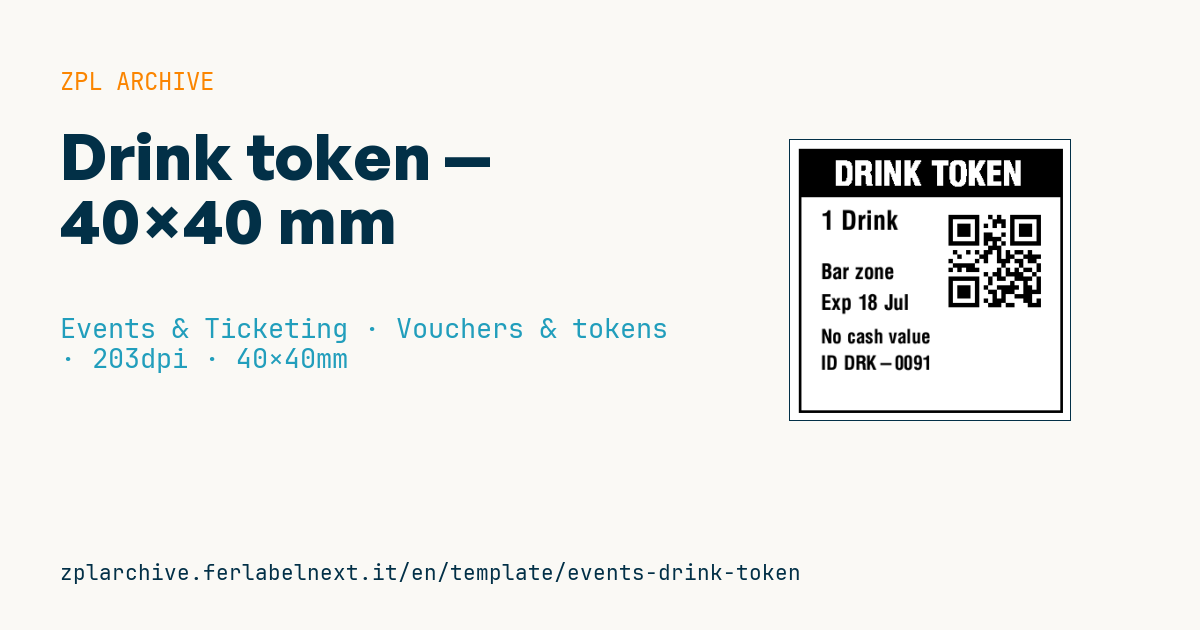
Drink token
Compact 40×40 mm format for cashless drink tokens at festival and event bars. The QR encodes the token ID for redemption at the counter.
Placeholders
-
value— value (e.g.1 Drink) -
token_id— ID in the QR -
zone— bar zone -
expiry— expiry -
token_short— short visible ID
When to use it
Festivals, food fairs, corporate events and venues that separate payment from service use it: the guest pays at a central cash desk, receives one or more tokens and hands them in at the bar. Bar staff scan the QR with a phone or a scanner linked to the system, which redeems the token and blocks reuse; where there is no network, the token is collected physically and the short ID allows a visual check.
The 40×40 mm format prints on rolls of pre-cut labels or tags in direct thermal. A token lives for a few hours but passes through wet hands and damp counters: synthetic or top-coated stock holds up better than plain paper.
Standards and requirements
QR is defined by ISO/IEC 18004. There is no specific standard for drink tokens: the practical requirements are a unique, unguessable ID, clear validity and fast scanning in a queue. Rules on alcohol service and fiscal receipts depend on the country and the event, so check with the organiser and your adviser.
Space is tight on 40 mm: with ^BQN,2,4 at 203 dpi each module is about 0.5 mm, so keep the content short. Use error correction level M or Q in the field data (^FDMA, or ^FDQA,) to tolerate small stains.
Common mistakes
- Encoding a long URL: on 40 mm the symbol becomes too dense for a quick scan.
- Leaving a token valid after the event, so it can be reused on the next date.
- Printing large batches ahead without registering the IDs in the system, so they cannot be redeemed.
- Using the same colour and value for different zones, leaving bar staff unsure where a token is valid.
FAQ
How do you stop a drink token being used twice?
The system must mark each ID as redeemed on first scan and reject later scans. Without a network, collect the token physically at the bar.
How big should the QR be on a token?
Big enough to scan with a phone at 10-20 cm on the first try. With short content, a QR of 15-20 mm per side is usually enough.
ZPL code
^XA
^LL320
^CI28
^PW320
^FO10,10^GB300,300,3^FS
^FO10,10^GB300,55,55^FS
^CF0,38^FO50,24^FR^FDDRINK TOKEN^FS
^CF0,30^FO35,80^FD{{value}}^FS
^FO180,75^BQN,2,5^FDQA,{{token_id}}^FS
^CF0,24^FO35,140^FD{{zone}}^FS
^FO35,175^FDExp {{expiry}}^FS
^CF0,22^FO35,215^FDNo cash value^FS
^FO35,245^FDID {{token_short}}^FS
^XZ- Industry: Events & Ticketing
- Category: Vouchers & tokens
- DPI: 203
- Size: 40×40 mm
- Tags: Cashless, Event, Festival, QR Code, Voucher
What this label contains
Barcodes
- QR Code
- 2D code for links, text and structured data, readable by any smartphone.
Elements
- 6 text fields
- 5 variable fields to fill in
- boxes and separator lines
Variable fields
| Field | Description | Example |
|---|---|---|
value | Value | 1 Drink |
token_id | Token ID | DRK-2026-0091 |
zone | Zone | Bar zone |
expiry | Expiry | 18 Jul |
token_short | Short ID | DRK-0091 |
Format and printing
40×40 mm (1.57×1.57″) at 203 dpi: 320×320 dots. Square.
Compatible Zebra printers
You need a printer with a 2″ printhead at 203 dpi, for example:
- Zebra ZD411 (desktop)
- Zebra ZD611 (desktop)
- Zebra ZQ220 (mobile)
- Zebra ZQ310 (mobile)
Any Zebra printer with a wider printhead and the same resolution works too.
The code is written for 203 dpi: on a printer with a different resolution the label prints larger or smaller and needs rescaling.
How to use it
- Open “Customize placeholders” and enter your data in the variable fields listed above.
- Check the preview: it is rendered from the same ZPL code you will send to the printer.
- Download the .zpl file or copy the code and send it to the printer: with “Print” through Zebra Browser Print, or as a raw file to port 9100 if the printer is on the network.
- Load 40×40 mm labels and make sure the printer is set to 203 dpi. For a different size use “Duplicate & edit” and adapt the layout in the builder.
Edit it in the editor
To change the layout, use “Duplicate & edit”: the template opens in the online ZPL editor, where you modify it and save it to your account for free.
Related templates
- Press pass — 100×70 mm 203 dpi · Events & Ticketing · Accreditation & access
- Event admission ticket — 100×50 mm 203 dpi · Events & Ticketing · Tickets
- Boarding pass (PDF417) — 100×60 mm 203 dpi · Events & Ticketing · Tickets
- Concert seated ticket — 100×60 mm 203 dpi · Events & Ticketing · Seating & cloakroom
- Gift voucher — 85×54 mm CR80 300 dpi · Events & Ticketing · Vouchers & tokens
- Retail gift card with logo — 65×40 mm 300 dpi · Events & Ticketing · Vouchers & tokens
- Cashless festival wristband — 250×25 mm 203 dpi · Events & Ticketing · Accreditation & access
- Stadium / sports ticket — 100×70 mm 203 dpi · Events & Ticketing · Seating & cloakroom