TNT/FedEx Italy Domestic — 100×150 mm
TNT/FedEx Italy domestic label with customer reference and cash on delivery (COD), Code128 tracking.
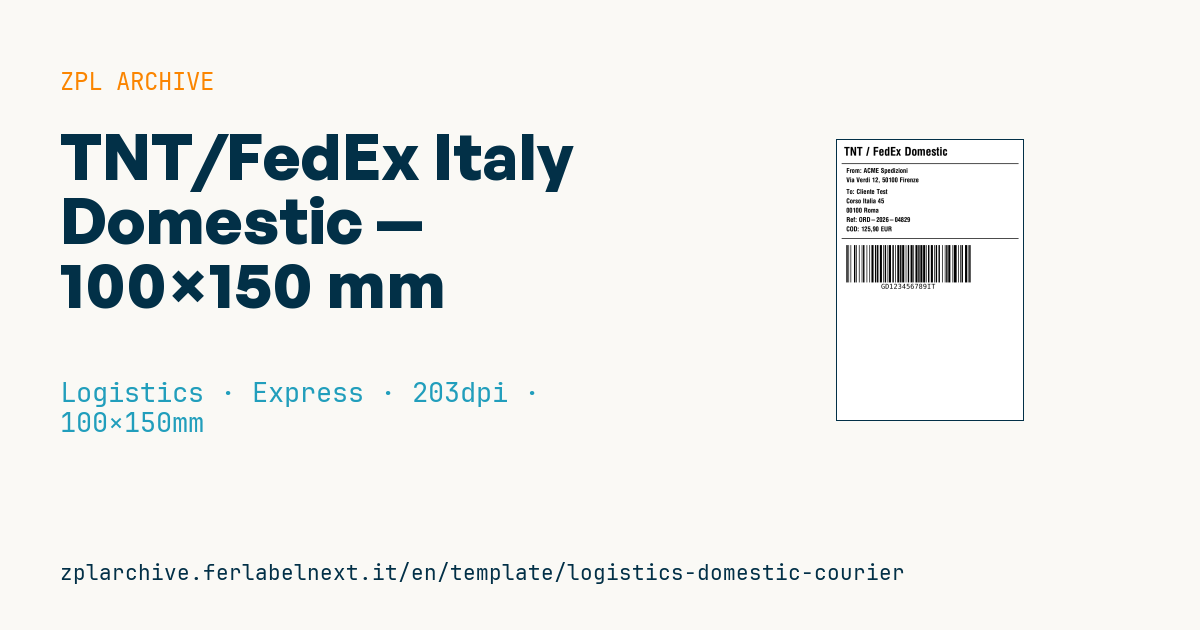
TNT/FedEx Italy Domestic
4×6" format for domestic Italy shipments. Supports cash on delivery (cod_amount).
Placeholders
from_name,from_addressto_name,to_address,to_zip,to_citycustomer_ref— customer referencecod_amount— COD value (0if none)tracking_number
When to use it
This layout reproduces a TNT/FedEx-style domestic shipping label for Italy and is aimed at online shops and small companies sending parcels within the country, including cash on delivery. It is a layout example: labels accepted for pickup are generated by the carrier's own system (portal, software or API) with its routing codes. Use it to prototype an integration, to print internal packing labels or to adapt the layout before you receive the official specification.
The 4×6" size matches the most common direct thermal rolls for desktop shipping printers.
Standards and requirements
There is no public standard: what applies is the technical specification the carrier provides when your account is set up, defining tracking, barcodes, zones and mandatory data. Check with your carrier the shipment number format and the COD rules (collection method, maximum amount, currency). Italian addresses need a five-digit CAP postcode, town and two-letter province code. In ZPL, for a 4×6" label at 203 dpi set ^PW812 and ^LL1218; the Code 128 barcode needs a quiet zone of at least 10 modules on each side.
Common mistakes
- Making up a tracking number instead of using the one assigned by the carrier.
- Printing a COD amount without enabling the service in the booking.
- Formatting the amount with a decimal separator the system does not expect.
- Leaving out the province code or using a generic city-wide postcode.
FAQ
Can I use this label to actually ship with TNT or FedEx?
Only if the layout and codes match the carrier's official specification. Normally you print the label generated by its system.
What goes in the COD field if the parcel is prepaid?
Set it to 0 and, if possible, hide the box, so the driver is in no doubt about collecting payment.
ZPL code
^XA
^PW799
^LL1199
^CI28
^CF0,50^FO30,30^FDTNT / FedEx Domestic^FS
^FO20,100^GB760,3,3^FS
^CF0,28
^FO40,120^FDFrom: {{from_name}}^FS
^FO40,160^FD{{from_address}}^FS
^FO40,210^FDTo: {{to_name}}^FS
^FO40,250^FD{{to_address}}^FS
^FO40,290^FD{{to_zip}} {{to_city}}^FS
^FO40,330^FDRef: {{customer_ref}}^FS
^FO40,370^FDCOD: {{cod_amount}} EUR^FS
^FO20,420^GB760,3,3^FS
^BY3,2,160
^FO40,450^BCN,160,Y,N,N^FD{{tracking_number}}^FS
^XZWhat this label contains
Barcodes
- Code 128
- High-density linear barcode that encodes the full ASCII set: ideal for tracking numbers, internal codes and alphanumeric IDs.
Elements
- 8 text fields
- 9 variable fields to fill in
- boxes and separator lines
Variable fields
| Field | Description | Example |
|---|---|---|
from_name | Sender | Company Srl |
from_address | Sender address | Via Verdi 12, 50100 Firenze |
to_name | Recipient | Cliente Test |
to_address | Address | Corso Italia 45 |
to_zip | ZIP | 00100 |
to_city | City | Roma |
customer_ref | Customer ref | ORD-2026-04829 |
cod_amount | COD amount | 125,90 |
tracking_number | Tracking | GD123456789IT |
Format and printing
100×150 mm (3.94×5.91″) at 203 dpi: 799×1199 dots. Portrait.
Compatible Zebra printers
You need a printer with a 4″ printhead at 203 dpi, for example:
- Zebra ZD421 (desktop)
- Zebra ZD621 (desktop)
- Zebra GK420 (desktop)
- Zebra ZT231 (industrial)
- Zebra ZT411 (industrial)
- Zebra ZT610 (industrial)
- Zebra ZQ521 (mobile)
- Zebra ZQ630 (mobile)
Any Zebra printer with a wider printhead and the same resolution works too.
The code is written for 203 dpi: on a printer with a different resolution the label prints larger or smaller and needs rescaling.
How to use it
- Open “Customize placeholders” and enter your data in the variable fields listed above.
- Check the preview: it is rendered from the same ZPL code you will send to the printer.
- Download the .zpl file or copy the code and send it to the printer: with “Print” through Zebra Browser Print, or as a raw file to port 9100 if the printer is on the network.
- Load 100×150 mm labels and make sure the printer is set to 203 dpi. For a different size use “Duplicate & edit” and adapt the layout in the builder.
Edit it in the editor
To change the layout, use “Duplicate & edit”: the template opens in the online ZPL editor, where you modify it and save it to your account for free.
Related templates
- IATA air baggage tag — 50×220 mm 203 dpi · Logistics · Luggage
- Fragile / Handle with care — 100×70 mm 203 dpi · Logistics · Express
- DHL Express Worldwide AWB — 100×150 mm 203 dpi · Logistics · Express
- Pallet Label GS1 SSCC — 148×210 mm (A5) 203 dpi · Logistics · Pallet
- Generic Return Label — 100×150 mm 203 dpi · Logistics · Return
- ISO 6346 sea container label — 100×70 mm 203 dpi · Logistics · Express
- Basic Sender/Recipient — 100×70 mm 203 dpi · Logistics · Express
- Cross-dock routing label (QR) — 100×50 mm 203 dpi · Logistics · Express