Pallet Label GS1 SSCC — 148×210 mm (A5)
GS1 logistics-compliant pallet label with shipper, consignee, carrier, PO and GS1-128 SSCC barcode.
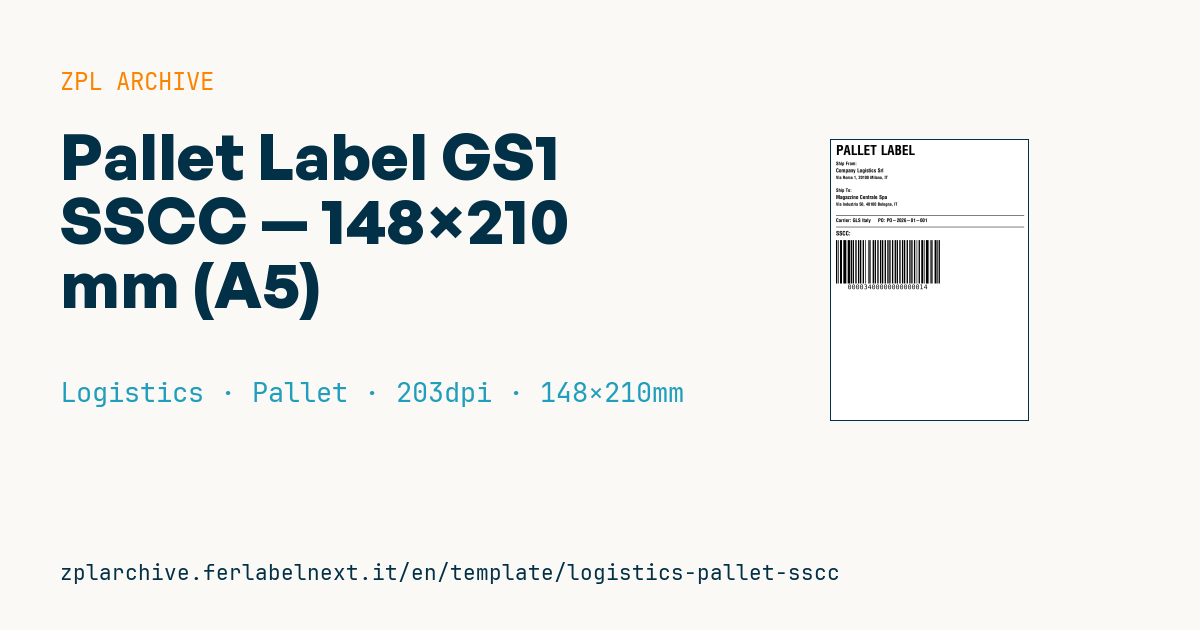
Pallet label with GS1 SSCC
A5 (148×210 mm) format, GS1 standard for logistics unit identification.
Placeholders
shipper_name,shipper_addressconsignee_name,consignee_addresscarrier_name— carrier (DHL, GLS, etc.)po_number— purchase ordersscc_18— 18-digit SSCC (AI 00). First digit is extension, followed by 17 digits company prefix + serial + check.
Compliance notes
- Barcode uses GS1-128 (Code128 with leading FNC1).
- The label should be applied on two adjacent sides of the pallet.
When to use it
Warehouses, manufacturers and 3PLs use it when shipping pallets to retailers or distribution centres that run scan-based receiving. The receiver scans the SSCC at the dock and matches it with the electronic despatch advice (DESADV/ASN), so the pallet can be booked into stock without breaking the wrap. The label stays on the pallet for days or weeks, often in unheated warehouses or cold rooms: thermal transfer on coated paper or synthetic stock is the safer choice, or top-coated direct thermal for short cycles.
Standards and requirements
The reference is the GS1 Logistic Label Guideline, built on the GS1 General Specifications: the SSCC (AI 00) is the only mandatory element and must be encoded in GS1-128 in the bottom section of the label. On pallets, GS1 guidance places the barcode roughly 400 to 800 mm from the base. A used SSCC must not be reallocated within one year of shipment. In ZPL start the field with >;>8 (subset C plus FNC1); at 203 dpi, ^BY4 gives a module of about 0.5 mm. Keep a quiet zone of at least 10 modules on each side.
Common mistakes
- Printing two different SSCCs for the two labels on the same pallet: both must be identical.
- Getting the GS1 mod-10 check digit wrong, or dropping leading zeros by storing the SSCC as a number.
- Applying the label under the stretch wrap, where glare stops scanners.
- Reusing a pallet without removing the old logistics label.
FAQ
What is the difference between an SSCC and a GTIN?
A GTIN identifies a trade item; an SSCC identifies one physical logistic unit. Every pallet gets its own SSCC, never repeated.
Do I need a GS1 company prefix to create SSCCs?
Yes. The SSCC is built on the GS1 company prefix issued by your national GS1 organisation.
Can I use A6 instead of A5?
Yes, as long as the data your customer requires fits. Always check the receiver's specifications.
ZPL code
^XA
^PW1183
^LL1678
^CI28
^CF0,80^FO30,30^FDPALLET LABEL^FS
^CF0,28^FO30,130^FDShip From:^FS
^CF0,32^FO30,170^FD{{shipper_name}}^FS
^CF0,26^FO30,215^FD{{shipper_address}}^FS
^CF0,28^FO30,290^FDShip To:^FS
^CF0,32^FO30,330^FD{{consignee_name}}^FS
^CF0,26^FO30,375^FD{{consignee_address}}^FS
^FO30,450^GB1130,3,3^FS
^CF0,30^FO30,470^FDCarrier: {{carrier_name}}     PO: {{po_number}}^FS
^FO30,520^GB1130,3,3^FS
^CF0,36^FO30,545^FDSSCC:^FS
^BY4,2,260
^FO30,600^BCN,260,Y,N,N^FD>;>800{{sscc_18}}^FS
^XZ- Industry: Logistics
- Category: Pallet
- DPI: 203
- Size: 148×210 mm
- Tags: Compliance 2024, GS1 SSCC, GS1-128, Tracking
What this label contains
Barcodes
- GS1-128
- Code 128 with FNC1 and GS1 Application Identifiers: the logistics barcode, used for SSCC, batch, expiry and weight on pallets and cartons.
Elements
- 9 text fields
- 7 variable fields to fill in
- boxes and separator lines
Variable fields
| Field | Description | Example |
|---|---|---|
shipper_name | Shipper | Company Logistics Srl |
shipper_address | Shipper address | Via Roma 1, 20100 Milano, IT |
consignee_name | Consignee | Magazzino Centrale Spa |
consignee_address | Consignee address | Via Industria 50, 40100 Bologna, IT |
carrier_name | Carrier | GLS Italy |
po_number | PO | PO-2026-01-001 |
sscc_18 | SSCC (18 digits) | 003400000000000014 |
Format and printing
148×210 mm (5.83×8.27″) at 203 dpi: 1183×1678 dots. Portrait.
Compatible Zebra printers
You need a printer with a 6″ printhead at 203 dpi, for example:
- Zebra ZT421 (industrial)
- Zebra ZT620 (industrial)
Any Zebra printer with a wider printhead and the same resolution works too.
The code is written for 203 dpi: on a printer with a different resolution the label prints larger or smaller and needs rescaling.
How to use it
- Open “Customize placeholders” and enter your data in the variable fields listed above.
- Check the preview: it is rendered from the same ZPL code you will send to the printer.
- Download the .zpl file or copy the code and send it to the printer: with “Print” through Zebra Browser Print, or as a raw file to port 9100 if the printer is on the network.
- Load 148×210 mm labels and make sure the printer is set to 203 dpi. For a different size use “Duplicate & edit” and adapt the layout in the builder.
Edit it in the editor
To change the layout, use “Duplicate & edit”: the template opens in the online ZPL editor, where you modify it and save it to your account for free.
Related templates
- IATA air baggage tag — 50×220 mm 203 dpi · Logistics · Luggage
- Fragile / Handle with care — 100×70 mm 203 dpi · Logistics · Express
- DHL Express Worldwide AWB — 100×150 mm 203 dpi · Logistics · Express
- Basic Sender/Recipient — 100×70 mm 203 dpi · Logistics · Express
- Cross-dock routing label (QR) — 100×50 mm 203 dpi · Logistics · Express
- Generic Return Label — 100×150 mm 203 dpi · Logistics · Return
- ISO 6346 sea container label — 100×70 mm 203 dpi · Logistics · Express
- FedEx International AWB — 100×150 mm 203 dpi · Logistics · Air