Basic Sender/Recipient — 100×70 mm
Basic address label without barcode, only sender and recipient data, compact 4×3" format.
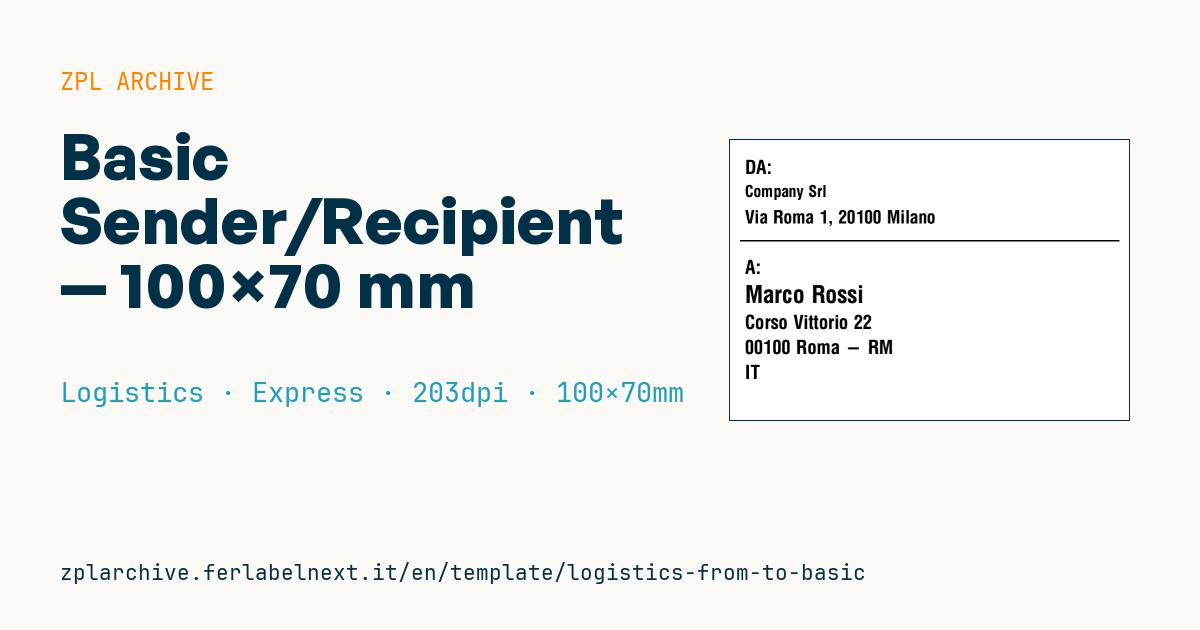
Basic address label
Compact 4×3" format. Useful for shipments where tracking is handled separately.
Placeholders
-
from_name,from_address— sender -
to_name,to_address,to_zip,to_city,to_country— recipient
When to use it
A sender/recipient label without a barcode is used when tracking lives on another document: shipments with an attached consignment note, deliveries by your own vehicles, ordinary postal items, shuttles between sites of the same company. It is also the fallback label when the carrier system is down and you still need to identify the parcel. The 4×3" size suits padded mailers and small boxes.
For trips of a few days, direct thermal paper is enough; for parcels kept in storage or outdoors, choose thermal transfer.
Standards and requirements
There is no specific standard for the label itself, but the address has to follow the rules of the postal service or carrier. For international items, the Universal Postal Union recommends writing the destination country in capitals on the last line. In Italy the order is name, street and number, CAP postcode, town, province code. For accented letters and special characters use ^CI28 and UTF-8 text; non-Latin alphabets need a font downloaded to the printer. With ^FB you limit lines and width, so a long address does not run off the label.
Common mistakes
- Giving the sender the same visual weight as the recipient: the driver reads the wrong block.
- Leaving out the country on an international shipment or placing it mid-address.
- Using this label with a carrier that requires its own barcoded label.
- Printing the postcode in a font too small for postal sorting.
FAQ
Can I ship with this label without tracking?
Yes, with services that do not require it, such as ordinary mail or direct deliveries. A courier needs its own label.
Is the sender address mandatory?
Not always, but it is strongly advised: without it, an undeliverable parcel cannot be returned.
ZPL code
^XA
^PW799
^LL559
^CI28
^CF0,38^FO30,40^FDDA:^FS
^CF0,32^FO30,90^FD{{from_name}}^FS
^CF0,36^FO30,140^FD{{from_address}}^FS
^FO20,200^GB760,3,3^FS
^CF0,38^FO30,240^FDA:^FS
^CF0,48^FO30,290^FD{{to_name}}^FS
^CF0,38^FO30,350^FD{{to_address}}^FS
^FO30,400^FD{{to_zip}} {{to_city}}^FS
^FO30,450^FD{{to_country}}^FS
^XZWhat this label contains
Barcodes
This label contains no barcodes: it is made of text and graphics.
Elements
- 8 text fields
- 7 variable fields to fill in
- boxes and separator lines
Variable fields
| Field | Description | Example |
|---|---|---|
from_name | Sender | Company Srl |
from_address | Sender address | Via Roma 1, 20100 Milano |
to_name | Recipient | Marco Rossi |
to_address | Address | Corso Vittorio 22 |
to_zip | ZIP | 00100 |
to_city | City | Roma - RM |
to_country | Country | IT |
Format and printing
100×70 mm (3.94×2.76″) at 203 dpi: 799×559 dots. Landscape.
Compatible Zebra printers
You need a printer with a 4″ printhead at 203 dpi, for example:
- Zebra ZD421 (desktop)
- Zebra ZD621 (desktop)
- Zebra GK420 (desktop)
- Zebra ZT231 (industrial)
- Zebra ZT411 (industrial)
- Zebra ZT610 (industrial)
- Zebra ZQ521 (mobile)
- Zebra ZQ630 (mobile)
Any Zebra printer with a wider printhead and the same resolution works too.
The code is written for 203 dpi: on a printer with a different resolution the label prints larger or smaller and needs rescaling.
How to use it
- Open “Customize placeholders” and enter your data in the variable fields listed above.
- Check the preview: it is rendered from the same ZPL code you will send to the printer.
- Download the .zpl file or copy the code and send it to the printer: with “Print” through Zebra Browser Print, or as a raw file to port 9100 if the printer is on the network.
- Load 100×70 mm labels and make sure the printer is set to 203 dpi. For a different size use “Duplicate & edit” and adapt the layout in the builder.
Edit it in the editor
To change the layout, use “Duplicate & edit”: the template opens in the online ZPL editor, where you modify it and save it to your account for free.
Related templates
- IATA air baggage tag — 50×220 mm 203 dpi · Logistics · Luggage
- Fragile / Handle with care — 100×70 mm 203 dpi · Logistics · Express
- DHL Express Worldwide AWB — 100×150 mm 203 dpi · Logistics · Express
- Pallet Label GS1 SSCC — 148×210 mm (A5) 203 dpi · Logistics · Pallet
- Cross-dock routing label (QR) — 100×50 mm 203 dpi · Logistics · Express
- ISO 6346 sea container label — 100×70 mm 203 dpi · Logistics · Express
- Generic Return Label — 100×150 mm 203 dpi · Logistics · Return
- FedEx International AWB — 100×150 mm 203 dpi · Logistics · Air