DHL Express Worldwide AWB — 100×150 mm
DHL Express AWB label with Code128 tracking barcode, sender/recipient data and service details. Standard 4×6" format.
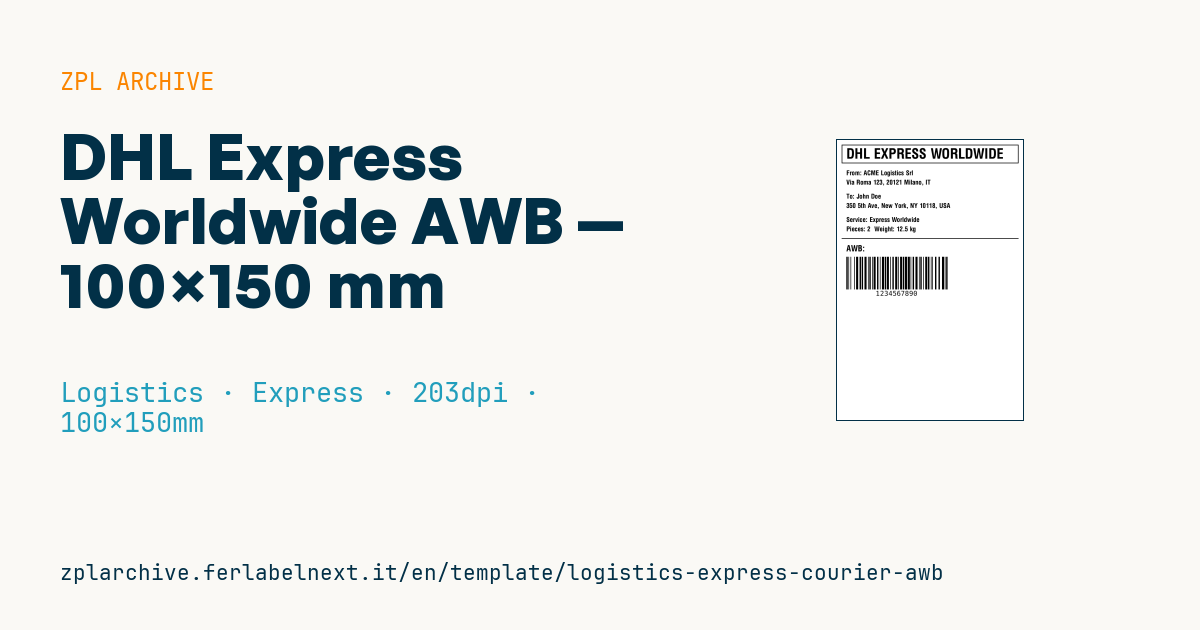
DHL Express AWB label
Standard 4×6" format for international DHL Express shipments. The tracking number is encoded as Code128 below the shipment data.
Placeholders
from_company— sender company namefrom_address— sender address (single line)to_name— recipient nameto_address— recipient addressservice_type— e.g.Express Worldwide,Express 12:00pieces— number of piecesweight_kg— weight in kg (one decimal)tracking_number— AWB number (DHL uses 10 numeric digits)
Notes
- Print at 203 dpi on thermal paper.
- The top frame is decorative; the actual scannable AWB is the bottom barcode.
When to use it
This template reproduces the layout of a DHL Express international label and is meant for anyone sending urgent documents and parcels abroad: export desks, cross-border online shops, companies shipping samples or spare parts. It is a layout example: the label accepted for pickup is generated by the carrier's system (portal, software or API) and includes additional routing barcodes. Use it to prototype an integration, train staff or prepare internal labels.
It prints on 4×6" direct thermal rolls, which suit a shipment that reaches its destination within a few days.
Standards and requirements
The rules come from the carrier's technical specification, not from a public standard: check AWB number format, barcode positions and mandatory data with DHL. Shipments leaving the EU customs union need customs paperwork, usually a commercial or pro forma invoice with goods description, value and tariff code. Dangerous goods such as lithium batteries fall under the IATA Dangerous Goods Regulations and the carrier's own terms. The chargeable weight may be the volumetric weight, calculated with the divisor your carrier specifies. In ZPL, automatic Code 128 mode is set with the last parameter A of ^BC.
Common mistakes
- Shipping with this layout instead of the label generated by the carrier's system.
- Declaring actual weight for a bulky parcel that will be billed on volumetric weight.
- Describing goods vaguely ("parts", "samples"), which slows customs clearance.
- Printing the barcode with too little contrast: raise
~SDor lower the speed with^PR.
FAQ
How many digits does a DHL Express waybill number have?
Usually 10 numeric digits, but formats can change: always use the number returned by the DHL system.
Do I need a commercial invoice to ship to Switzerland or the UK?
Yes for goods, because both are outside the EU customs union. Documents only follow simpler rules: check with the carrier.
ZPL code
^XA
^PW799
^LL1199
^CI28
^FO20,20^GB760,80,3^FS
^CF0,60^FO40,35^FDDHL EXPRESS WORLDWIDE^FS
^CF0,28
^FO40,130^FDFrom: {{from_company}}^FS
^FO40,170^FD{{from_address}}^FS
^FO40,230^FDTo: {{to_name}}^FS
^FO40,270^FD{{to_address}}^FS
^FO40,330^FDService: {{service_type}}^FS
^FO40,370^FDPieces: {{pieces}}  Weight: {{weight_kg}} kg^FS
^FO20,420^GB760,3,3^FS
^CF0,36^FO40,450^FDAWB:^FS
^BY3,2,140
^FO40,500^BCN,140,Y,N,N^FD{{tracking_number}}^FS
^XZ- Industry: Logistics
- Category: Express
- DPI: 203
- Size: 100×150 mm
- Tags: Code 128, Compliance 2024, DHL, Tracking
What this label contains
Barcodes
- Code 128
- High-density linear barcode that encodes the full ASCII set: ideal for tracking numbers, internal codes and alphanumeric IDs.
Elements
- 8 text fields
- 8 variable fields to fill in
- boxes and separator lines
Variable fields
| Field | Description | Example |
|---|---|---|
from_company | Sender company | Company Logistics Srl |
from_address | Sender address | Via Roma 123, 20121 Milano, IT |
to_name | Recipient name | John Doe |
to_address | Recipient address | 350 5th Ave, New York, NY 10118, USA |
service_type | Service | Express Worldwide |
pieces | Pieces | 2 |
weight_kg | Weight (kg) | 12.5 |
tracking_number | AWB number | 1234567890 |
Format and printing
100×150 mm (3.94×5.91″) at 203 dpi: 799×1199 dots. Portrait.
Compatible Zebra printers
You need a printer with a 4″ printhead at 203 dpi, for example:
- Zebra ZD421 (desktop)
- Zebra ZD621 (desktop)
- Zebra GK420 (desktop)
- Zebra ZT231 (industrial)
- Zebra ZT411 (industrial)
- Zebra ZT610 (industrial)
- Zebra ZQ521 (mobile)
- Zebra ZQ630 (mobile)
Any Zebra printer with a wider printhead and the same resolution works too.
The code is written for 203 dpi: on a printer with a different resolution the label prints larger or smaller and needs rescaling.
How to use it
- Open “Customize placeholders” and enter your data in the variable fields listed above.
- Check the preview: it is rendered from the same ZPL code you will send to the printer.
- Download the .zpl file or copy the code and send it to the printer: with “Print” through Zebra Browser Print, or as a raw file to port 9100 if the printer is on the network.
- Load 100×150 mm labels and make sure the printer is set to 203 dpi. For a different size use “Duplicate & edit” and adapt the layout in the builder.
Edit it in the editor
To change the layout, use “Duplicate & edit”: the template opens in the online ZPL editor, where you modify it and save it to your account for free.
Related templates
- IATA air baggage tag — 50×220 mm 203 dpi · Logistics · Luggage
- Fragile / Handle with care — 100×70 mm 203 dpi · Logistics · Express
- Pallet Label GS1 SSCC — 148×210 mm (A5) 203 dpi · Logistics · Pallet
- Generic Return Label — 100×150 mm 203 dpi · Logistics · Return
- ISO 6346 sea container label — 100×70 mm 203 dpi · Logistics · Express
- Basic Sender/Recipient — 100×70 mm 203 dpi · Logistics · Express
- Cross-dock routing label (QR) — 100×50 mm 203 dpi · Logistics · Express
- FedEx International AWB — 100×150 mm 203 dpi · Logistics · Air