FedEx International AWB — 100×150 mm
FedEx international AWB label with origin/destination country, shipment details, declared value and Code128 tracking.
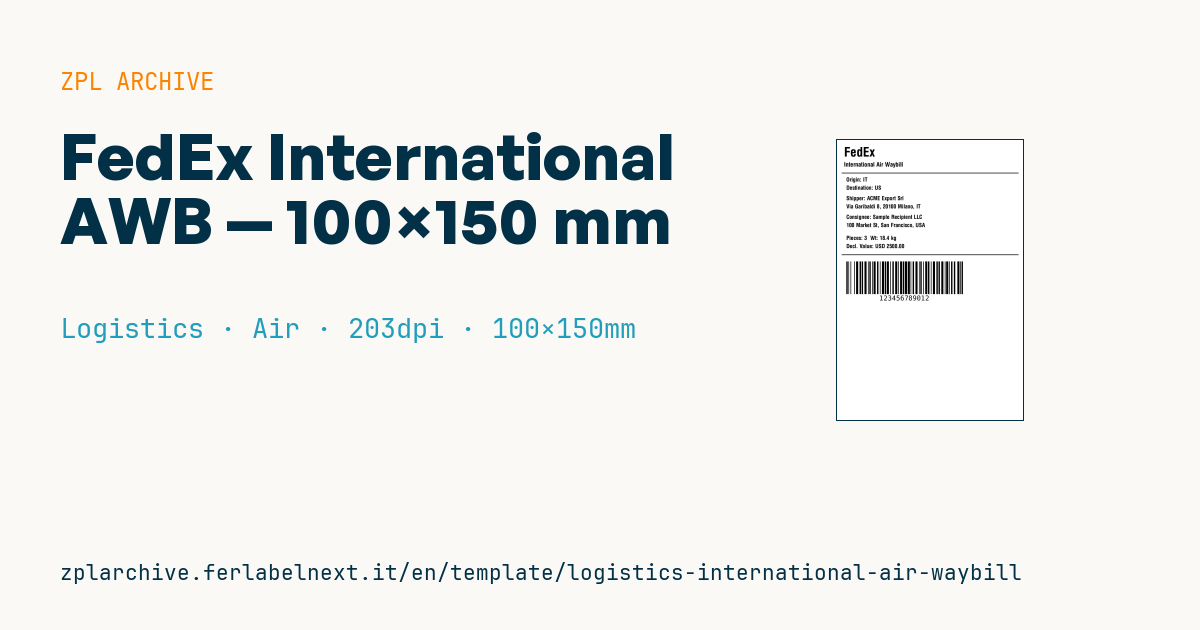
FedEx International AWB label
4×6" format for FedEx international shipments. The AWB is 12 numeric digits.
Placeholders
origin_country,dest_country— ISO code or country nameshipper_name,shipper_address— shipperconsignee_name,consignee_address— consigneepieces,total_weight— count and weightdeclared_value— customs declared value (USD)awb_number— 12 digits
When to use it
This layout reproduces a FedEx International label and is meant for companies shipping samples, spare parts or online orders to non-EU countries. Like every brand label, it is a layout example: the label accepted for pickup is generated by the carrier's system (portal, software or API). Use it to design an integration, check that customs data arrive complete from your ERP or print internal packing labels.
Air shipments pass through several hubs and may be held at customs: direct thermal paper is fine, but do not leave parcels in sunlight or heat before pickup.
Standards and requirements
Technical rules come from the FedEx specification; check AWB format and barcode positions with the carrier. The customs declared value must match the commercial invoice, which states description, HS code, origin and currency; the declared value for carriage, where offered, is a different thing. Who pays duties and taxes depends on the agreed Incoterms rule (ICC Incoterms 2020). Use ISO 3166-1 alpha-2 country codes. Dangerous goods, including many lithium batteries, fall under the IATA Dangerous Goods Regulations. In ZPL, ^FH lets you insert special characters such as currency symbols in hexadecimal.
Common mistakes
- Stating a value in USD that differs from the EUR value on the invoice.
- Confusing customs value with insured value for carriage.
- Writing countries in mixed forms (name, code, local language) the system cannot match.
- Forgetting to put the commercial invoice in the document pouch.
FAQ
Does the declared value set the compensation if the parcel is damaged?
Not the customs value. Compensation depends on the carrier's terms and any declared value for carriage.
Who pays duties on an international shipment?
It depends on the Incoterm and the option chosen at booking: the shipper (DDP) or the recipient (DAP).
ZPL code
^XA
^PW799
^LL1199
^CI28
^CF0,55^FO30,30^FDFedEx^FS
^CF0,26^FO30,95^FDInternational Air Waybill^FS
^FO20,140^GB760,3,3^FS
^CF0,24
^FO40,160^FDOrigin: {{origin_country}}^FS
^FO40,195^FDDestination: {{dest_country}}^FS
^FO40,240^FDShipper: {{shipper_name}}^FS
^FO40,275^FD{{shipper_address}}^FS
^FO40,320^FDConsignee: {{consignee_name}}^FS
^FO40,355^FD{{consignee_address}}^FS
^FO40,410^FDPieces: {{pieces}}  Wt: {{total_weight}} kg^FS
^FO40,445^FDDecl. Value: USD {{declared_value}}^FS
^FO20,490^GB760,3,3^FS
^BY3,2,140
^FO40,520^BCN,140,Y,N,N^FD{{awb_number}}^FS
^XZWhat this label contains
Barcodes
- Code 128
- High-density linear barcode that encodes the full ASCII set: ideal for tracking numbers, internal codes and alphanumeric IDs.
Elements
- 10 text fields
- 10 variable fields to fill in
- boxes and separator lines
Variable fields
| Field | Description | Example |
|---|---|---|
origin_country | Origin country | IT |
dest_country | Destination country | US |
shipper_name | Shipper | Company Export Srl |
shipper_address | Shipper address | Via Garibaldi 8, 20100 Milano, IT |
consignee_name | Consignee | Sample Recipient LLC |
consignee_address | Consignee address | 100 Market St, San Francisco, USA |
pieces | Pieces | 3 |
total_weight | Total weight (kg) | 18.4 |
declared_value | Declared value | 2500.00 |
awb_number | AWB number | 123456789012 |
Format and printing
100×150 mm (3.94×5.91″) at 203 dpi: 799×1199 dots. Portrait.
Compatible Zebra printers
You need a printer with a 4″ printhead at 203 dpi, for example:
- Zebra ZD421 (desktop)
- Zebra ZD621 (desktop)
- Zebra GK420 (desktop)
- Zebra ZT231 (industrial)
- Zebra ZT411 (industrial)
- Zebra ZT610 (industrial)
- Zebra ZQ521 (mobile)
- Zebra ZQ630 (mobile)
Any Zebra printer with a wider printhead and the same resolution works too.
The code is written for 203 dpi: on a printer with a different resolution the label prints larger or smaller and needs rescaling.
How to use it
- Open “Customize placeholders” and enter your data in the variable fields listed above.
- Check the preview: it is rendered from the same ZPL code you will send to the printer.
- Download the .zpl file or copy the code and send it to the printer: with “Print” through Zebra Browser Print, or as a raw file to port 9100 if the printer is on the network.
- Load 100×150 mm labels and make sure the printer is set to 203 dpi. For a different size use “Duplicate & edit” and adapt the layout in the builder.
Edit it in the editor
To change the layout, use “Duplicate & edit”: the template opens in the online ZPL editor, where you modify it and save it to your account for free.
Related templates
- IATA air baggage tag — 50×220 mm 203 dpi · Logistics · Luggage
- Fragile / Handle with care — 100×70 mm 203 dpi · Logistics · Express
- DHL Express Worldwide AWB — 100×150 mm 203 dpi · Logistics · Express
- Pallet Label GS1 SSCC — 148×210 mm (A5) 203 dpi · Logistics · Pallet
- Cross-dock routing label (QR) — 100×50 mm 203 dpi · Logistics · Express
- Generic Return Label — 100×150 mm 203 dpi · Logistics · Return
- ISO 6346 sea container label — 100×70 mm 203 dpi · Logistics · Express
- Basic Sender/Recipient — 100×70 mm 203 dpi · Logistics · Express