ISO 6346 sea container label — 100×70 mm
Label for sea container: ISO 6346 code, type, seal, gross weight and tare, booking, POL/POD ports and Code 128 barcode.
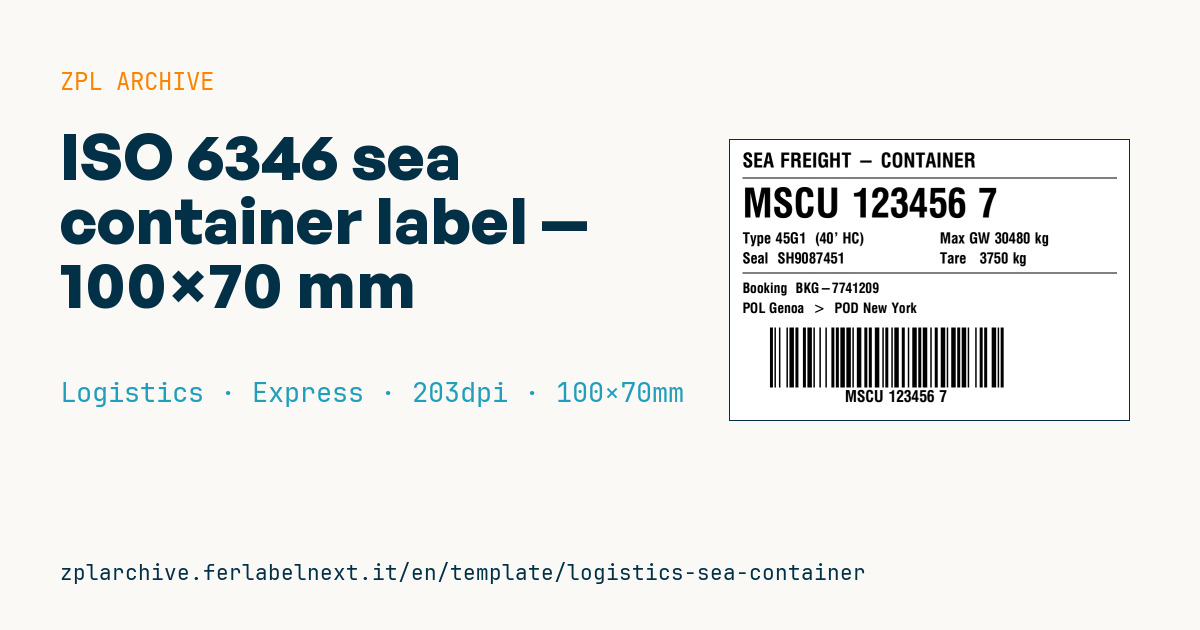
ISO 6346 sea container label
100×70 mm @ 203 dpi. For sea containers. The container ID follows the ISO 6346 standard (4-letter owner prefix + 6 digits + check digit). The container_type uses ISO size/type codes (e.g. 45G1 = 40' High Cube general).
Placeholders
container_id— ISO 6346 codecontainer_type— ISO size/type codeseal— seal numbermax_gross,tare— weightsbooking— booking referencepol,pod— port of loading / dischargebarcode_code— data in the Code 128
When to use it
Forwarders, terminals, container depots and export departments use it to identify a container on load documents and warehouse paperwork, or directly on the box during stuffing. It links the container number to the booking, the seal and the ports of loading and discharge, so whoever checks at the quay or depot does not have to copy anything by hand. If you stick it on the container, it is exposed to salt spray, rain and sun: use synthetic stock (polyester or polypropylene), an outdoor adhesive and thermal transfer with a resin ribbon.
Standards and requirements
The code follows ISO 6346: a 3-letter owner code registered with the BIC, a category letter (U for freight containers, J for detachable equipment, Z for trailers and chassis), a 6-digit serial number and a check digit calculated modulo 11. The 4-character size/type code gives length, height and type (in 45G1, 4 = 40 ft and 5 = 9'6"). For weight, SOLAS has required a verified gross mass (VGM) before loading since 2016; high-security seals refer to ISO 17712. This label does not replace the official painted markings on the container or the CSC plate.
Common mistakes
- Leaving out the check digit or calculating it wrong: many port systems reject the code.
- Confusing tare with the maximum gross mass on the CSC plate or with the declared VGM.
- Using direct thermal stock for an outdoor label: a few days of sun make it unreadable.
- Printing the seal number before the seal has actually been applied.
FAQ
How is the ISO 6346 check digit calculated?
Each letter and digit gets a value, multiplied by a power of 2 according to its position; the sum is divided by 11 and the remainder is the check digit (10 becomes 0).
Does the VGM have to be printed on the label?
Printing it is not required: it must be submitted to the ocean carrier within the deadline the carrier sets. Check your shipping line's procedures.
Should the barcode hold the container number?
Usually yes, since it speeds up checks, but you can encode the booking instead if your process starts from it.
ZPL code
^XA
^LL559
^CI28
^PW800
^CF0,40^FO25,25^FDSEA FREIGHT - CONTAINER^FS
^FO25,75^GB750,2,2^FS
^CF0,80^FO25,95^FD{{container_id}}^FS
^CF0,30^FO25,185^FDType {{container_type}}^FS
^FO25,225^FDSeal  {{seal}}^FS
^FO420,185^FDMax GW {{max_gross}}^FS
^FO420,225^FDTare   {{tare}}^FS
^FO25,265^GB750,2,2^FS
^CF0,28^FO25,285^FDBooking  {{booking}}^FS
^FO25,325^FD{{pol}}  >  {{pod}}^FS
^BY3,2,120
^FO80,375^BCN,120,N,N,N^FD{{barcode_code}}^FS
^CF0,32^FO230,500^FD{{container_id}}^FS
^XZWhat this label contains
Barcodes
- Code 128
- High-density linear barcode that encodes the full ASCII set: ideal for tracking numbers, internal codes and alphanumeric IDs.
Elements
- 9 text fields
- 9 variable fields to fill in
- boxes and separator lines
Variable fields
| Field | Description | Example |
|---|---|---|
container_id | Container ID | MSCU 123456 7 |
container_type | Type | 45G1 (40' HC) |
seal | Seal | SH9087451 |
max_gross | Max GW | 30480 kg |
tare | Tare | 3750 kg |
booking | Booking | BKG-7741209 |
pol | Port of loading | POL Genoa |
pod | Port of discharge | POD New York |
barcode_code | Barcode data | MSCU1234567 |
Format and printing
100×70 mm (3.94×2.76″) at 203 dpi: 799×559 dots. Landscape.
Compatible Zebra printers
You need a printer with a 4″ printhead at 203 dpi, for example:
- Zebra ZD421 (desktop)
- Zebra ZD621 (desktop)
- Zebra GK420 (desktop)
- Zebra ZT231 (industrial)
- Zebra ZT411 (industrial)
- Zebra ZT610 (industrial)
- Zebra ZQ521 (mobile)
- Zebra ZQ630 (mobile)
Any Zebra printer with a wider printhead and the same resolution works too.
The code is written for 203 dpi: on a printer with a different resolution the label prints larger or smaller and needs rescaling.
How to use it
- Open “Customize placeholders” and enter your data in the variable fields listed above.
- Check the preview: it is rendered from the same ZPL code you will send to the printer.
- Download the .zpl file or copy the code and send it to the printer: with “Print” through Zebra Browser Print, or as a raw file to port 9100 if the printer is on the network.
- Load 100×70 mm labels and make sure the printer is set to 203 dpi. For a different size use “Duplicate & edit” and adapt the layout in the builder.
Edit it in the editor
To change the layout, use “Duplicate & edit”: the template opens in the online ZPL editor, where you modify it and save it to your account for free.
Related templates
- IATA air baggage tag — 50×220 mm 203 dpi · Logistics · Luggage
- Fragile / Handle with care — 100×70 mm 203 dpi · Logistics · Express
- DHL Express Worldwide AWB — 100×150 mm 203 dpi · Logistics · Express
- Pallet Label GS1 SSCC — 148×210 mm (A5) 203 dpi · Logistics · Pallet
- Cross-dock routing label (QR) — 100×50 mm 203 dpi · Logistics · Express
- Basic Sender/Recipient — 100×70 mm 203 dpi · Logistics · Express
- Generic Return Label — 100×150 mm 203 dpi · Logistics · Return
- FedEx International AWB — 100×150 mm 203 dpi · Logistics · Air