Generic Return Label — 100×150 mm
Pre-paid return label with merchant address, customer data, RMA and Code128 tracking.
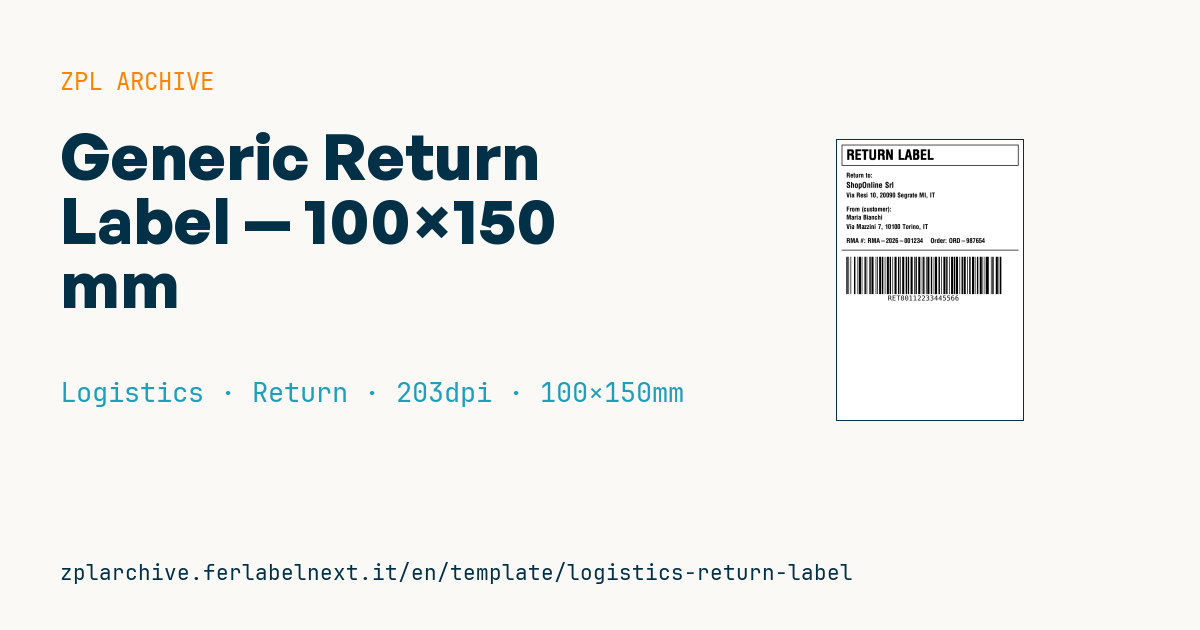
Generic return label
4×6" format for pre-paid returns. The black banner at the top makes it immediately distinguishable from a shipping label.
Placeholders
merchant_name,merchant_return_address— return center addresscustomer_name,customer_address— who is returningrma_number— Return Merchandise Authorizationorder_id— original orderreturn_tracking— return tracking (Code128)
When to use it
E-commerce businesses and brands that sell at a distance use it to make returns easier: the label goes into the box at dispatch, or customer service prints it when the customer opens a return request. At the returns centre the operator scans the tracking number, retrieves the RMA and knows straight away what should be in the parcel, without looking up the order by hand. If the label travels in the box for weeks before use, direct thermal paper may yellow or fade: consider top-coated stock or thermal transfer.
Standards and requirements
There is no specific technical standard for return labels: the carrier collecting the return sets the layout and mandatory data, so check your carrier's specifications and use its real tracking number. On the commercial side, in the EU Directive 2011/83/EU gives consumers 14 days to withdraw from distance purchases, but does not require a prepaid label. For Code 128 keep a quiet zone of at least 10 modules and check with ^BY that the narrowest bar is not below 2 dots at 203 dpi. The black banner is a filled ^GB with ^FR text.
Common mistakes
- Reusing the same tracking number for several returns: the carrier rejects it or links it to the wrong parcel.
- Leaving the old outbound label visible on a reused box.
- Creating the RMA only on the label and not in the order system, so there is nothing to match on receipt.
- Printing the returns centre address too small to read by eye.
FAQ
Do I have to offer a prepaid return label?
No, it is a commercial choice. The legal obligation concerns the right of withdrawal, not paying for return shipping.
Can I print returns on a generic label like this one?
Only if the tracking number is issued by the carrier collecting the parcel and the layout meets its specifications.
What should the RMA look like?
A unique, short code generated by your system, without ambiguous characters such as O and 0.
ZPL code
^XA
^PW799
^LL1199
^CI28
^FO20,20^GB760,90,3,B^FS
^CF0,60^FO40,40^FR^FDRETURN LABEL^FS
^CF0,28
^FO40,140^FDReturn to:^FS
^CF0,34^FO40,180^FD{{merchant_name}}^FS
^CF0,28
^FO40,225^FD{{merchant_return_address}}^FS
^FO40,285^FDFrom (customer):^FS
^FO40,320^FD{{customer_name}}^FS
^FO40,360^FD{{customer_address}}^FS
^FO40,420^FDRMA #: {{rma_number}}    Order: {{order_id}}^FS
^FO20,470^GB760,3,3^FS
^BY3,2,160
^FO40,500^BCN,160,Y,N,N^FD{{return_tracking}}^FS
^XZWhat this label contains
Barcodes
- Code 128
- High-density linear barcode that encodes the full ASCII set: ideal for tracking numbers, internal codes and alphanumeric IDs.
Elements
- 8 text fields
- 7 variable fields to fill in
- boxes and separator lines
Variable fields
| Field | Description | Example |
|---|---|---|
merchant_name | Merchant | ShopOnline Srl |
merchant_return_address | Return address | Via Resi 10, 20090 Segrate MI, IT |
customer_name | Customer | Maria Bianchi |
customer_address | Customer address | Via Mazzini 7, 10100 Torino, IT |
rma_number | RMA | RMA-2026-001234 |
order_id | Order | ORD-987654 |
return_tracking | Return tracking | RET00112233445566 |
Format and printing
100×150 mm (3.94×5.91″) at 203 dpi: 799×1199 dots. Portrait.
Compatible Zebra printers
You need a printer with a 4″ printhead at 203 dpi, for example:
- Zebra ZD421 (desktop)
- Zebra ZD621 (desktop)
- Zebra GK420 (desktop)
- Zebra ZT231 (industrial)
- Zebra ZT411 (industrial)
- Zebra ZT610 (industrial)
- Zebra ZQ521 (mobile)
- Zebra ZQ630 (mobile)
Any Zebra printer with a wider printhead and the same resolution works too.
The code is written for 203 dpi: on a printer with a different resolution the label prints larger or smaller and needs rescaling.
How to use it
- Open “Customize placeholders” and enter your data in the variable fields listed above.
- Check the preview: it is rendered from the same ZPL code you will send to the printer.
- Download the .zpl file or copy the code and send it to the printer: with “Print” through Zebra Browser Print, or as a raw file to port 9100 if the printer is on the network.
- Load 100×150 mm labels and make sure the printer is set to 203 dpi. For a different size use “Duplicate & edit” and adapt the layout in the builder.
Edit it in the editor
To change the layout, use “Duplicate & edit”: the template opens in the online ZPL editor, where you modify it and save it to your account for free.
Related templates
- IATA air baggage tag — 50×220 mm 203 dpi · Logistics · Luggage
- Fragile / Handle with care — 100×70 mm 203 dpi · Logistics · Express
- DHL Express Worldwide AWB — 100×150 mm 203 dpi · Logistics · Express
- Pallet Label GS1 SSCC — 148×210 mm (A5) 203 dpi · Logistics · Pallet
- Basic Sender/Recipient — 100×70 mm 203 dpi · Logistics · Express
- Cross-dock routing label (QR) — 100×50 mm 203 dpi · Logistics · Express
- ISO 6346 sea container label — 100×70 mm 203 dpi · Logistics · Express
- FedEx International AWB — 100×150 mm 203 dpi · Logistics · Air