Extended GS1 SSCC pallet IT — 148×210 mm (A5)
Extended GS1 pallet label for Italian logistics: shipper/consignee GLN, content, gross/net weight, origin country.
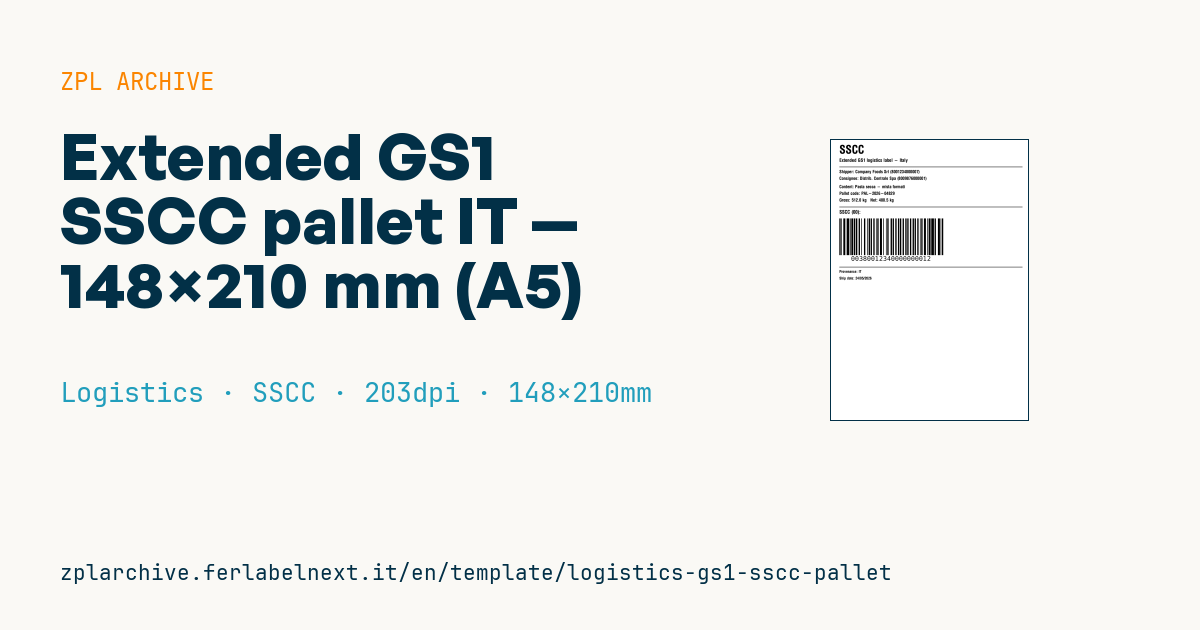
Extended GS1 SSCC pallet IT
A5 (148×210 mm). Extended version with GLN (Global Location Number) for shipper and consignee, designed for regulated Italian supply chains (food, pharma).
Placeholders
shipper_name,shipper_glnconsignee_name,consignee_glncontent_desc— pallet content descriptionpallet_code— internal pallet idgross_kg,net_kg— weightssscc_18— 18-digit SSCC (see GS1-128 AI 00)country_origin— origin countryship_date
When to use it
This A5 pallet label is applied at end of line or at dispatch on pallets bound for retailers, distributors and logistics providers who receive goods with scanners. The consignee reads the SSCC, matches it to the despatch advice (DESADV) received over EDI and books the goods in without opening the pallet. The extended layout with GLNs, weights and country of origin suits supply chains with strict goods-in checks, such as food and pharmaceuticals.
The pallet may sit in a warehouse for weeks, cold stores included: use thermal transfer on coated paper or synthetic stock, with a low-temperature adhesive if needed.
Standards and requirements
The reference is the GS1 Logistic Label Guideline together with the GS1 General Specifications. The SSCC is encoded in GS1-128 with AI (00): extension digit, GS1 company prefix, serial reference and check digit, 18 digits in total, and it must never be reused. Other data can use standard AIs: (330n) gross weight, (310n) net weight, (410) ship-to GLN, (10) batch. For food, traceability is required by Regulation (EC) 178/2002. GS1 guidance sets an X-dimension of 0.495 to 0.940 mm for logistic GS1-128: at 203 dpi, ^BY4 gives 0.5 mm. In ZPL, start the field with >;>8 for FNC1 and subset C.
Common mistakes
- Calculating the check digit by hand or truncating the SSCC to 17 digits.
- Applying a single label: GS1 recommends at least two adjacent sides of the pallet.
- Placing it too low, where forklift tines damage it.
- Reusing the SSCC of a pallet already shipped after it has been rebuilt.
FAQ
Can I use an SSCC without GS1 membership?
No. The SSCC is built on the GS1 company prefix assigned by the GS1 member organisation in your country.
How high should the label be on the pallet?
GS1 guidance places the barcode roughly 400 to 800 mm from the base and at least 50 mm from the vertical edge.
ZPL code
^XA
^PW1183
^LL1678
^CI28
^LH20,0
^CF0,70^FO30,30^FDSSCC^FS
^CF0,28^FO30,110^FDExtended GS1 logistics label - Italy^FS
^FO30,160^GB1100,3,3^FS
^CF0,26
^FO30,180^FDShipper: {{shipper_name}} ({{shipper_gln}})^FS
^FO30,220^FDConsignee: {{consignee_name}} ({{consignee_gln}})^FS
^FO30,270^FDContent: {{content_desc}}^FS
^FO30,310^FDPallet code: {{pallet_code}}^FS
^FO30,350^FDGross: {{gross_kg}} kg   Net: {{net_kg}} kg^FS
^FO30,400^GB1100,3,3^FS
^CF0,30^FO30,420^FDSSCC (00):^FS
^BY4,2,260
^FO30,470^BCN,220,Y,N,N^FD>;>800{{sscc_18}}^FS
^FO30,760^GB1100,3,3^FS
^CF0,22^FO30,780^FDProvenance: {{country_origin}}^FS
^FO30,820^FDShip date: {{ship_date}}^FS
^XZ- Industry: Logistics
- Category: SSCC
- DPI: 203
- Size: 148×210 mm
- Tags: Compliance 2024, GS1 SSCC, GS1-128, Made in Italy
What this label contains
Barcodes
- GS1-128
- Code 128 with FNC1 and GS1 Application Identifiers: the logistics barcode, used for SSCC, batch, expiry and weight on pallets and cartons.
Elements
- 10 text fields
- 11 variable fields to fill in
- boxes and separator lines
Variable fields
| Field | Description | Example |
|---|---|---|
shipper_name | Shipper | Company Foods Srl |
shipper_gln | Shipper GLN | 8001234000007 |
consignee_name | Consignee | Distrib. Centrale Spa |
consignee_gln | Consignee GLN | 8009876000001 |
content_desc | Content | Pasta secca - mista formati |
pallet_code | Pallet code | PAL-2026-04829 |
gross_kg | Gross | 512.0 |
net_kg | Net | 480.5 |
sscc_18 | SSCC | 380012340000000012 |
country_origin | Origin country | IT |
ship_date | Ship date | 24/05/2026 |
Format and printing
148×210 mm (5.83×8.27″) at 203 dpi: 1183×1678 dots. Portrait.
Compatible Zebra printers
You need a printer with a 6″ printhead at 203 dpi, for example:
- Zebra ZT421 (industrial)
- Zebra ZT620 (industrial)
Any Zebra printer with a wider printhead and the same resolution works too.
The code is written for 203 dpi: on a printer with a different resolution the label prints larger or smaller and needs rescaling.
How to use it
- Open “Customize placeholders” and enter your data in the variable fields listed above.
- Check the preview: it is rendered from the same ZPL code you will send to the printer.
- Download the .zpl file or copy the code and send it to the printer: with “Print” through Zebra Browser Print, or as a raw file to port 9100 if the printer is on the network.
- Load 148×210 mm labels and make sure the printer is set to 203 dpi. For a different size use “Duplicate & edit” and adapt the layout in the builder.
Edit it in the editor
To change the layout, use “Duplicate & edit”: the template opens in the online ZPL editor, where you modify it and save it to your account for free.
Related templates
- IATA air baggage tag — 50×220 mm 203 dpi · Logistics · Luggage
- Fragile / Handle with care — 100×70 mm 203 dpi · Logistics · Express
- DHL Express Worldwide AWB — 100×150 mm 203 dpi · Logistics · Express
- Pallet Label GS1 SSCC — 148×210 mm (A5) 203 dpi · Logistics · Pallet
- Cross-dock routing label (QR) — 100×50 mm 203 dpi · Logistics · Express
- Basic Sender/Recipient — 100×70 mm 203 dpi · Logistics · Express
- ISO 6346 sea container label — 100×70 mm 203 dpi · Logistics · Express
- Generic Return Label — 100×150 mm 203 dpi · Logistics · Return