Jewelry certificate + serial — 50×30 mm
Jewelry label with brand, type, metal, gem, total weight, certificate number and QR to authenticity record.
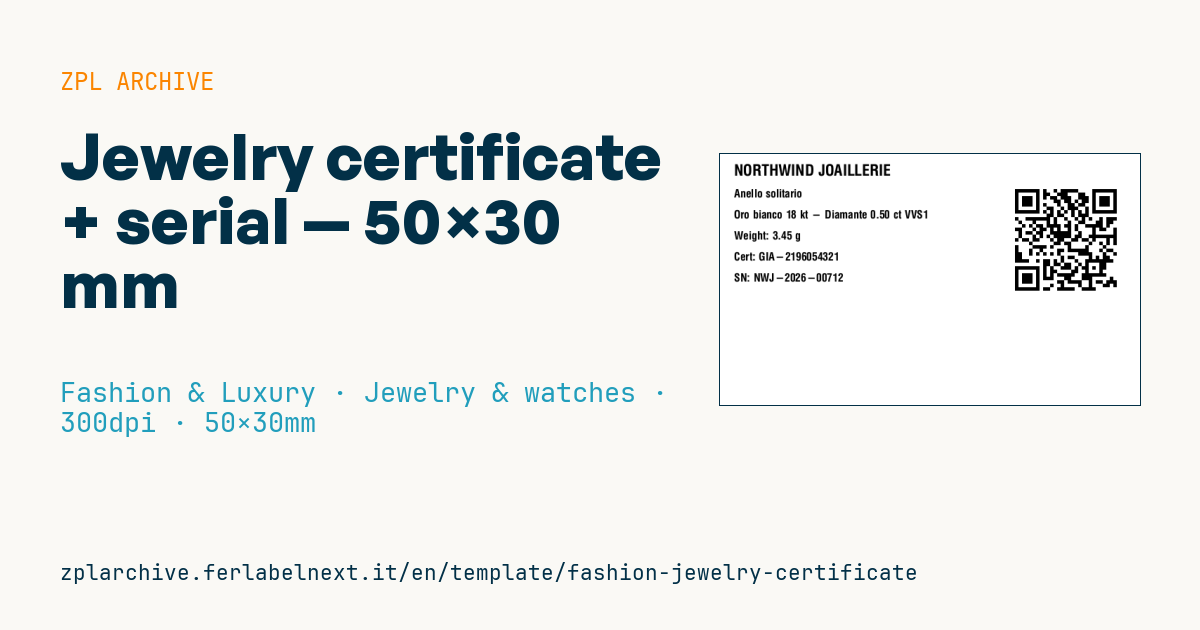
Jewelry label
50×30 mm @ 300 dpi. Hung on the jewel with thread or discreet ring. The QR links to the authenticity certificate with full details (cut, purity, gemological assessment).
Placeholders
brand— jeweler brandpiece_type— e.g.Ring,Bracelet,Necklacemetal— e.g.18kt yellow gold,Platinum 950gem— main gem (e.g.Diamond 0.50 ct)total_weight_g— total jewel weight in gramscert_number— gemological certificate numberserial— jewel serial numbercert_url— online certificate URL
When to use it
The jewellery tag lets jewellers, goldsmith workshops and jewellery brands identify each piece in the display case, in the safe and during stock checks. It is tied to the ring or clasp with a thread, often as a "rat-tail" tag that folds over on itself. It is handled a lot and sits under display lighting, so use a synthetic stock (polypropylene or polyester) printed by thermal transfer: direct thermal paper darkens under the heat of spotlights. The QR links the piece to its certificate, which also helps with repairs, insurance or resale.
Standards and requirements
Metal fineness is expressed in parts per thousand (18 kt gold is 750‰), and legal hallmarks must be struck on the metal under national rules, such as those deriving from the Vienna Convention on the Control of Precious Metals in member countries: the tag does not replace them. For gems, the carat (ct) is a unit of mass equal to 0.2 g. ISO 18323 and the CIBJO Blue Books define diamond nomenclature, including the distinction between natural, synthetic and treated stones.
On 50×30 mm at 300 dpi, a QR built with ^BQN,2,3 has modules of about 0.25 mm: keep the URL short and test scanning with several smartphones. Use ^CI28 if the data contains symbols such as ‰.
Common mistakes
- Mixing up kt (gold fineness) and ct (gem weight) in the metal and gem fields.
- Writing "diamond" for a synthetic stone without qualifying it as such.
- Entering the gem weight as total weight, or mixing dot and comma as decimal separator.
- Linking a certificate number that does not match the laboratory report.
FAQ
Does the tag replace the gemmological certificate?
No. It carries the certificate number and links the piece to its record, but the valid document is still the report issued by the laboratory.
What is the difference between carats and karats?
Carats (ct) for gems measure mass: 1 ct is 0.2 g. Karats (kt) for gold measure purity out of 24 parts.
ZPL code
^XA
^PW591
^LL354
^CI28
^CF0,22^FO20,15^FD{{brand}}^FS
^CF0,16
^FO20,50^FD{{piece_type}}^FS
^FO20,80^FD{{metal}} - {{gem}}^FS
^FO20,110^FDWeight: {{total_weight_g}} g^FS
^FO20,140^FDCert: {{cert_number}}^FS
^FO20,170^FDSN: {{serial}}^FS
^FO420,40^BQN,2,5
^FDLA,{{cert_url}}^FS
^XZ- Industry: Fashion & Luxury
- Category: Jewelry & watches
- DPI: 300
- Size: 50×30 mm
- Tags: Anti-counterfeit, Gem, Jewelry, Precious metal, QR Code, Serial number
What this label contains
Barcodes
- QR Code
- 2D code for links, text and structured data, readable by any smartphone.
Elements
- 6 text fields
- 8 variable fields to fill in
Variable fields
| Field | Description | Example |
|---|---|---|
brand | Brand | NORTHWIND JOAILLERIE |
piece_type | Type | Anello solitario |
metal | Metal | Oro bianco 18 kt |
gem | Gem | Diamante 0.50 ct VVS1 |
total_weight_g | Weight (g) | 3.45 |
cert_number | Certificate | GIA-2196054321 |
serial | Serial | NWJ-2026-00712 |
cert_url | Cert URL | https://northwind.example/cert/NWJ-2026-00712 |
Format and printing
50×30 mm (1.97×1.18″) at 300 dpi: 591×354 dots. Landscape.
Compatible Zebra printers
You need a printer with a 2″ printhead at 300 dpi, for example:
- Zebra ZD411 (desktop)
- Zebra ZD611 (desktop)
Any Zebra printer with a wider printhead and the same resolution works too.
The code is written for 300 dpi: on a printer with a different resolution the label prints larger or smaller and needs rescaling.
How to use it
- Open “Customize placeholders” and enter your data in the variable fields listed above.
- Check the preview: it is rendered from the same ZPL code you will send to the printer.
- Download the .zpl file or copy the code and send it to the printer: with “Print” through Zebra Browser Print, or as a raw file to port 9100 if the printer is on the network.
- Load 50×30 mm labels and make sure the printer is set to 300 dpi. For a different size use “Duplicate & edit” and adapt the layout in the builder.
Edit it in the editor
To change the layout, use “Duplicate & edit”: the template opens in the online ZPL editor, where you modify it and save it to your account for free.
Related templates
- Garment hangtag — 50×80 mm 203 dpi · Fashion & Luxury · Hangtag
- Premium hangtag with anti-counterfeit QR — 60×90 mm 300 dpi · Fashion & Luxury · Hangtag
- Swing ticket with logo — 45×80 mm 300 dpi · Fashion & Luxury · Hangtag
- Boutique price + brand — 60×40 mm 203 dpi · Fashion & Luxury · Boutique price & brand
- Authenticity tag with logo — 50×50 mm 300 dpi · Fashion & Luxury · Anti-counterfeit
- Premium care label with logo — 40×60 mm 300 dpi · Fashion & Luxury · Care label
- Multilingual textile care label — 40×60 mm 203 dpi · Fashion & Luxury · Care label
- Shoe box label with logo — 70×50 mm 203 dpi · Fashion & Luxury · Boutique price & brand