Multilingual textile care label — 40×60 mm
Wash label sewn inside the garment with composition, instructions in 4 languages, size, country and RN/CA code.
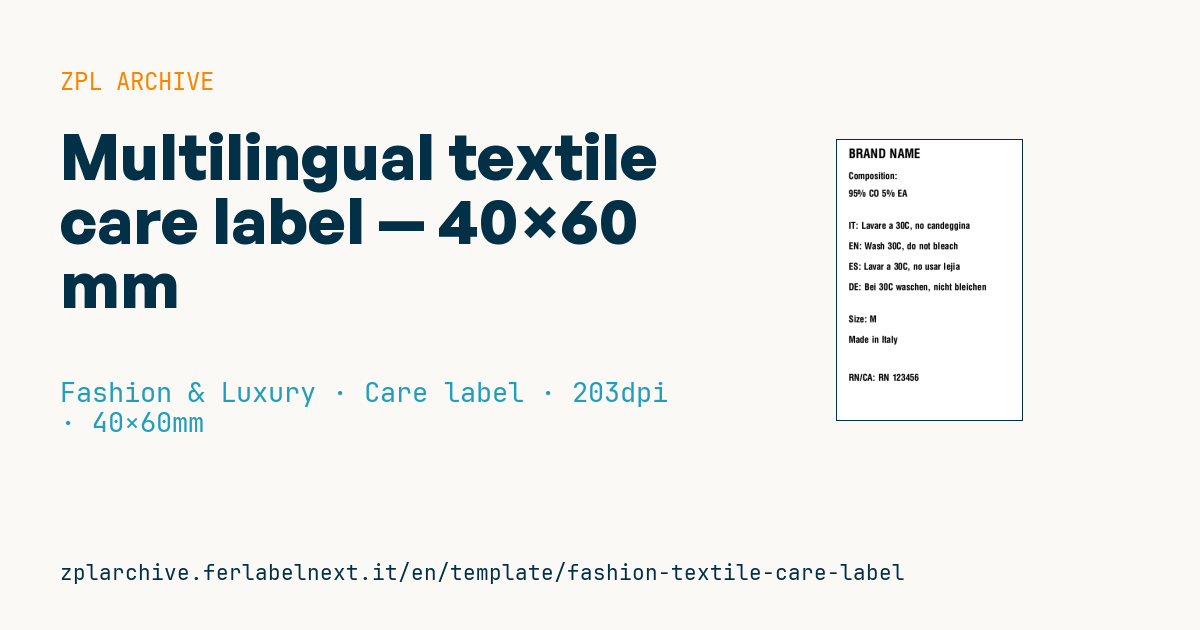
Multilingual care label
40×60 mm @ 203 dpi. Printed on textile ribbon sewn inside the garment. Wash instructions are typically abbreviated for space economy.
Placeholders
-
brand -
composition— composition (e.g.60% CO 40% PA) -
care_it/en/es/de— instructions in 4 languages (max 30 chars each) -
size -
country— production country -
rn_ca— US RN or Canadian CA code
When to use it
The multilingual care label is sewn into the garment when the same item is sold in several countries with a single label: typical for makers producing in Italy and exporting to Europe and North America. It is printed on textile tape by thermal transfer with a resin ribbon for fabrics, and must survive repeated washing and drying. The RN or CA number is needed when goods enter the US or Canadian market.
Standards and requirements
In the EU, Regulation (EU) No 1007/2011 requires the fibre composition using the names listed in Annex I, in the language of the country of sale: that is why it is repeated in several languages. In the United States the FTC requires fibre content, country of origin and manufacturer identity, for which the RN number can replace the company name, and the Care Labeling Rule makes care instructions mandatory. In Canada the CA number can replace name and address, and fibre content must be in English and French.
In ZPL use ^CI28 and send UTF-8 for ñ, ü, ß and accents; without it, some characters print as wrong symbols. With four languages on 40 mm, use ^FB with a fixed width and check that the longest text does not exceed the configured number of lines.
Common mistakes
- Selling in Canada with Italian, English, Spanish and German instructions but no French.
- Translating instructions inconsistently, such as 30 °C in one language and 40 °C in another.
- Abbreviating so heavily to fit 30 characters that the text becomes unreadable.
- Making up an RN or CA number: it must be requested from the competent authority and is tied to your company.
FAQ
What is the RN number on clothing labels?
It is a registration number issued by the FTC to US businesses that manufacture, import or distribute textile products. It can appear on the label instead of the company name.
Does the EU require the composition in every language?
It must be in the official language or languages of the country where the garment is sold. A multilingual label covers several markets with a single item.
ZPL code
^XA
^PW320
^LL480
^CI28
^CF0,22^FO20,15^FD{{brand}}^FS
^CF0,16
^FO20,55^FDComposition:^FS
^FO20,85^FD{{composition}}^FS
^FO20,140^FDIT: {{care_it}}^FS
^FO20,175^FDEN: {{care_en}}^FS
^FO20,210^FDES: {{care_es}}^FS
^FO20,245^FDDE: {{care_de}}^FS
^FO20,300^FDSize: {{size}}^FS
^FO20,335^FDMade in {{country}}^FS
^FO20,400^FDRN/CA: {{rn_ca}}^FS
^XZ- Industry: Fashion & Luxury
- Category: Care label
- DPI: 203
- Size: 40×60 mm
- Tags: Care label, Fabric composition, Made in Italy, Multi-language
What this label contains
Barcodes
This label contains no barcodes: it is made of text and graphics.
Elements
- 10 text fields
- 9 variable fields to fill in
Variable fields
| Field | Description | Example |
|---|---|---|
brand | Brand | BRAND NAME |
composition | Composition | 95% CO 5% EA |
care_it | Care IT | Lavare a 30C, no candeggina |
care_en | Care EN | Wash 30C, do not bleach |
care_es | Care ES | Lavar a 30C, no usar lejia |
care_de | Care DE | Bei 30C waschen, nicht bleichen |
size | Size | M |
country | Country | Italy |
rn_ca | RN/CA | RN 123456 |
Format and printing
40×60 mm (1.57×2.36″) at 203 dpi: 320×480 dots. Portrait.
Compatible Zebra printers
You need a printer with a 2″ printhead at 203 dpi, for example:
- Zebra ZD411 (desktop)
- Zebra ZD611 (desktop)
- Zebra ZQ220 (mobile)
- Zebra ZQ310 (mobile)
Any Zebra printer with a wider printhead and the same resolution works too.
The code is written for 203 dpi: on a printer with a different resolution the label prints larger or smaller and needs rescaling.
How to use it
- Open “Customize placeholders” and enter your data in the variable fields listed above.
- Check the preview: it is rendered from the same ZPL code you will send to the printer.
- Download the .zpl file or copy the code and send it to the printer: with “Print” through Zebra Browser Print, or as a raw file to port 9100 if the printer is on the network.
- Load 40×60 mm labels and make sure the printer is set to 203 dpi. For a different size use “Duplicate & edit” and adapt the layout in the builder.
Edit it in the editor
To change the layout, use “Duplicate & edit”: the template opens in the online ZPL editor, where you modify it and save it to your account for free.
Related templates
- Garment hangtag — 50×80 mm 203 dpi · Fashion & Luxury · Hangtag
- Premium hangtag with anti-counterfeit QR — 60×90 mm 300 dpi · Fashion & Luxury · Hangtag
- Swing ticket with logo — 45×80 mm 300 dpi · Fashion & Luxury · Hangtag
- Authenticity tag with logo — 50×50 mm 300 dpi · Fashion & Luxury · Anti-counterfeit
- Boutique price + brand — 60×40 mm 203 dpi · Fashion & Luxury · Boutique price & brand
- Premium care label with logo — 40×60 mm 300 dpi · Fashion & Luxury · Care label
- Jewelry certificate + serial — 50×30 mm 300 dpi · Fashion & Luxury · Jewelry & watches
- Shoe box label with logo — 70×50 mm 203 dpi · Fashion & Luxury · Boutique price & brand