Premium hangtag with anti-counterfeit QR — 60×90 mm
Premium fashion hangtag with brand, product, composition, price, authenticity code and QR pointing to verification page.
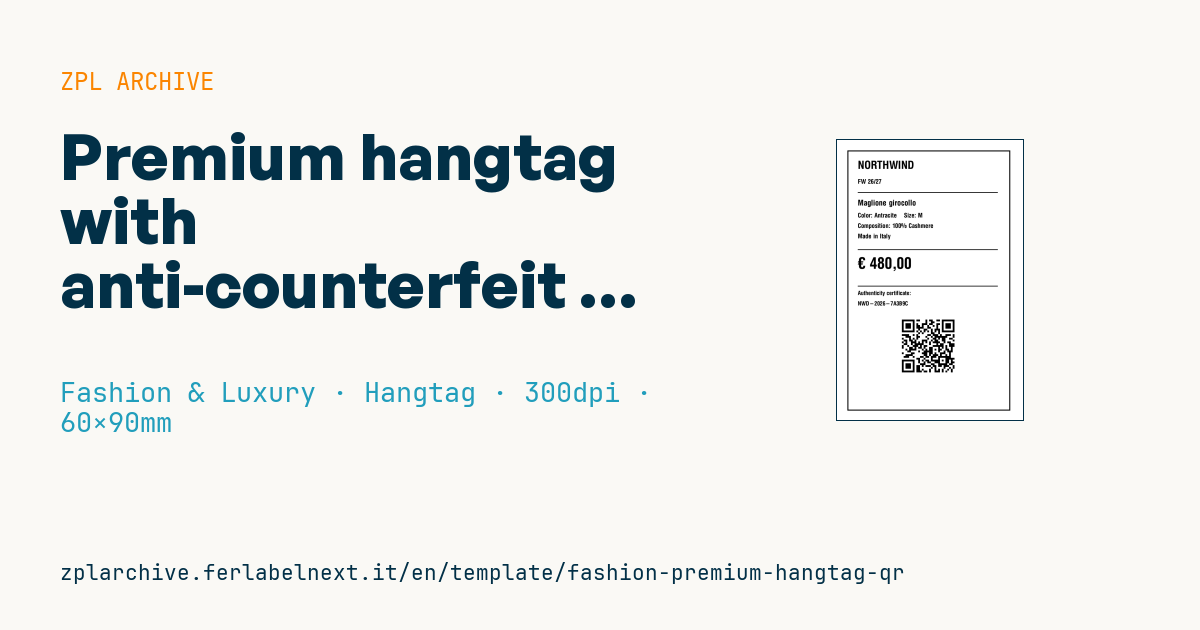
Premium hangtag
60×90 mm @ 300 dpi (high res for luxury segment). The QR links to the brand's authenticity verification page.
Placeholders
brand,collectionproduct_name,color,sizecomposition— e.g.100% Cashmerecountry— production countrycurrency,priceauth_code— unique authenticity code (e.g. UUID or serial)auth_url— verification URLhttps://brand.com/auth?c=<code>
When to use it
This large hangtag is for knitwear, outerwear and luxury collections, where one ticket carries the price, product data and a unique authenticity code for each garment. Variable data is often printed onto pre-printed boards with hot-foil or embossed logos: that requires thermal transfer and accurate registration against the artwork. Customers scan the QR in store or after an online purchase to verify the item.
The format's limit is that the hangtag comes off after purchase: if you want the garment to remain verifiable on resale, the same code must appear on a permanent element, such as the sewn-in label or an NFC tag.
Standards and requirements
The QR follows ISO/IEC 18004. If the garment has a GTIN, consider GS1 Digital Link, which encodes the GTIN and serial number (AI 21) in a standard URL readable both by smartphones and by GS1-aware systems. The price follows the rules on showing the final consumer price.
In ZPL, if you use ^FH for hexadecimal characters, the underscore becomes the escape character: an _ in the URL must be written as _5F. On pre-printed boards with a black mark, set the sensor with ^MNM and adjust the position with ^LH, otherwise the data drifts away from the artwork.
Common mistakes
- Generating a new authenticity code when you reprint the ticket for a price change, breaking the link to the registered garment.
- Using the order number or a sequential number as code, which is easy to guess.
- Using long UUIDs when a shorter random alphanumeric code would make the QR less dense.
- Printing QR codes that point to a domain or verification page that is not live yet.
FAQ
Can the code still be verified after the hangtag is removed?
Only if the customer keeps the tag or the same code is printed on a permanent part of the garment. For resale, a sewn-in label or NFC tag with the same code works better.
What is GS1 Digital Link?
It is the GS1 standard for putting a GTIN, serial and other data into a URL. The same QR opens a web page and stays readable by systems that interpret GS1 identifiers.
ZPL code
^XA
^PW709
^LL1063
^CI28
^FO40,40^GB628,1000,4^FS
^CF0,42^FO80,80^FD{{brand}}^FS
^CF0,24^FO80,150^FD{{collection}}^FS
^FO80,200^GB540,3,3^FS
^CF0,30^FO80,230^FD{{product_name}}^FS
^CF0,24^FO80,280^FDColor: {{color}}    Size: {{size}}^FS
^FO80,320^FDComposition: {{composition}}^FS
^FO80,360^FDMade in {{country}}^FS
^FO80,420^GB540,3,3^FS
^CF0,60^FO80,450^FD{{currency}} {{price}}^FS
^FO80,560^GB540,3,3^FS
^CF0,22^FO80,580^FDAuthenticity certificate:^FS
^FO80,620^FD{{auth_code}}^FS
^FO250,680^BQN,2,7
^FDLA,{{auth_url}}^FS
^XZ- Industry: Fashion & Luxury
- Category: Hangtag
- DPI: 300
- Size: 60×90 mm
- Tags: Anti-counterfeit, Hangtag, Luxury, QR Code
What this label contains
Barcodes
- QR Code
- 2D code for links, text and structured data, readable by any smartphone.
Elements
- 9 text fields
- 11 variable fields to fill in
- boxes and separator lines
Variable fields
| Field | Description | Example |
|---|---|---|
brand | Brand | NORTHWIND |
collection | Collection | FW 26/27 |
product_name | Product | Maglione girocollo |
color | Color | Antracite |
size | Size | M |
composition | Composition | 100% Cashmere |
country | Country | Italy |
currency | Currency | € |
price | Price | 480,00 |
auth_code | Auth code | NWD-2026-7A3B9C |
auth_url | Verify URL | https://northwind.example/auth?c=NWD-2026-7A3B9C |
Format and printing
60×90 mm (2.36×3.54″) at 300 dpi: 709×1063 dots. Portrait.
Compatible Zebra printers
You need a printer with a 4″ printhead at 300 dpi, for example:
- Zebra ZD421 (desktop)
- Zebra ZD621 (desktop)
- Zebra ZT231 (industrial)
- Zebra ZT411 (industrial)
- Zebra ZT610 (industrial)
Any Zebra printer with a wider printhead and the same resolution works too.
The code is written for 300 dpi: on a printer with a different resolution the label prints larger or smaller and needs rescaling.
How to use it
- Open “Customize placeholders” and enter your data in the variable fields listed above.
- Check the preview: it is rendered from the same ZPL code you will send to the printer.
- Download the .zpl file or copy the code and send it to the printer: with “Print” through Zebra Browser Print, or as a raw file to port 9100 if the printer is on the network.
- Load 60×90 mm labels and make sure the printer is set to 300 dpi. For a different size use “Duplicate & edit” and adapt the layout in the builder.
Edit it in the editor
To change the layout, use “Duplicate & edit”: the template opens in the online ZPL editor, where you modify it and save it to your account for free.
Related templates
- Garment hangtag — 50×80 mm 203 dpi · Fashion & Luxury · Hangtag
- Swing ticket with logo — 45×80 mm 300 dpi · Fashion & Luxury · Hangtag
- Boutique price + brand — 60×40 mm 203 dpi · Fashion & Luxury · Boutique price & brand
- Premium care label with logo — 40×60 mm 300 dpi · Fashion & Luxury · Care label
- Authenticity tag with logo — 50×50 mm 300 dpi · Fashion & Luxury · Anti-counterfeit
- Multilingual textile care label — 40×60 mm 203 dpi · Fashion & Luxury · Care label
- Shoe box label with logo — 70×50 mm 203 dpi · Fashion & Luxury · Boutique price & brand
- Jewelry certificate + serial — 50×30 mm 300 dpi · Fashion & Luxury · Jewelry & watches