Organic / bio label — 40×40 mm
Label for organic products with a leaf symbol drawn in ZPL, certification body, code and origin. Square, clean, high impact.
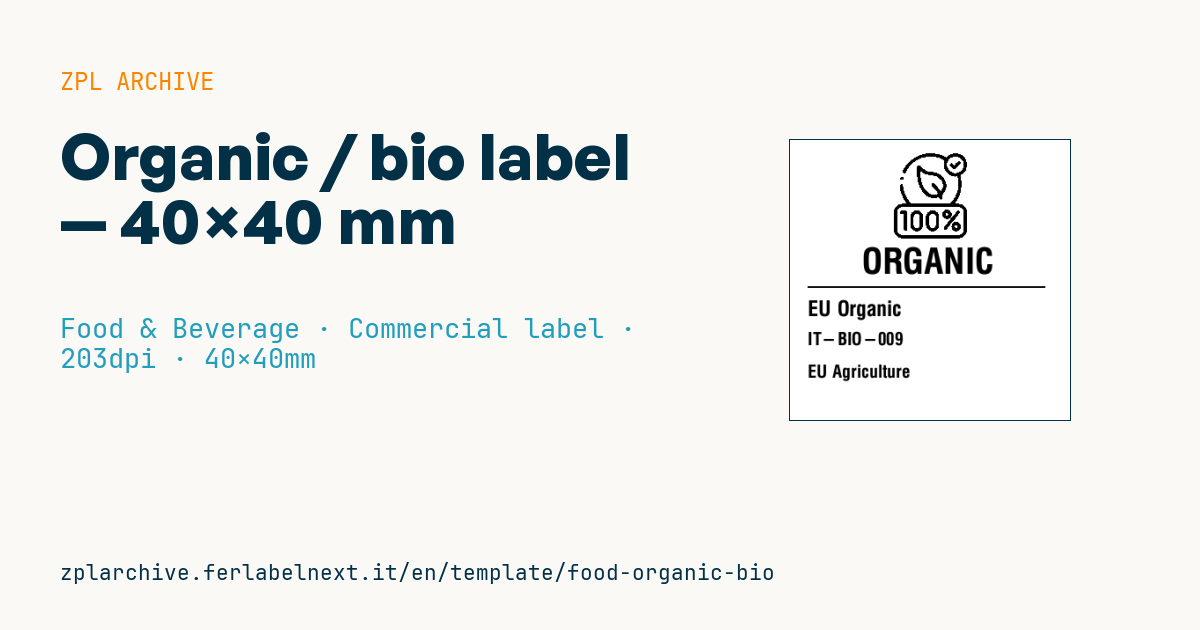
Organic / bio label
40×40 mm @ 203 dpi. Leaf drawn with ZPL primitives, title, certification body, code and origin.
Placeholders
title_label— title (e.g.ORGANIC)cert_body— certification bodycert_code— certification codeorigin— origin (e.g.EU Agriculture)
When to use it
Certified organic farms, processors and shops use it to flag organic products on plain packaging, produce crates, jars and repacked bulk goods. The square format works as a seal on the front or on the lid, next to the main label with the other mandatory information.
For crates and fresh produce exposed to moisture you need a synthetic or water-resistant face stock; for preserves and dry goods coated paper with thermal transfer is fine.
Standards and requirements
The reference is Regulation (EU) 2018/848, applicable since 2022. For prepacked organic food produced in the EU the EU organic logo is mandatory, together with the code number of the control body in country-term-number format (e.g. IT-BIO-000) and the place where the agricultural raw materials were farmed: "EU Agriculture", "non-EU Agriculture" or "EU/non-EU Agriculture", placed below the code. The term "organic" in the sales name is allowed if at least 95% by weight of the agricultural ingredients are organic and the operator is certified.
The leaf drawn in ZPL is not the EU logo: the official logo has a shape, proportions and minimum size set by the regulation and must be added as a ^GF graphic. The black-and-white version is allowed where colour is not practicable, as with thermal printing.
Common mistakes
- Using only the drawn leaf in the belief that it replaces the EU logo.
- Writing the name of the certifier instead of the control body code, or guessing the code format.
- Stating "EU Agriculture" when some raw materials come from outside the EU.
- Printing organic labels for a supplier not yet certified for that activity.
FAQ
Can I use the word "organic" without certification?
No: terms such as "organic" and "bio" are reserved for products from operators under the control system set out in the regulation.
Can the EU organic logo be printed in black?
Yes, the black-and-white version is allowed where printing in colour is not practicable, as long as it follows the official model.
ZPL code
^XA
^PW320
^LL320
^CI28
^FO111,15^GFA,1261,1261,13,00000000001ffc00003f0000000000000001ffffe001ffe00000000000000ffffffc07fff80000000000003fffffff0ffffc000000000000ffe001ffdfc0fe000000000003fc00001ffe003f000000000007f0000007fc001f00000000001fc0000001f8000f80000000003f00000000f8000780000000007e00000000f000c38000000000f800000000f001e3c000000001f000000000e087e3c000000003e000000000e1c7c3c000000007c000000000e3ef83c00000000f8038000000e1ff03c00000000f007c000000f0fe03c00000001f007e000000f07c03800000003e007f000000f83807800000003c007fc00000780007800000007c007fe000007c000f8000000078007ff800003e001f00000000780079fff0001f807e00000000300078ffff000fe3fc000000000000783fffc007fff80000000000007803fff003ffe000000000000078000ff800ffe0000000000000780000fc0009e000000001c0003800007e0001e000000003c0003c00003f0000e000000003c0003c00001f0000e00000000000003c0000078000e00000000000003c0000078000f00000000000003c000003c000f00000000000001e000003c000f00000000000001e003803c000f00000000180001e003c01e000f00000000380000f003e01e000f00000000380000f003f01e000f000000003c0000f801f81e000f000000003c00007800f83c000e000000003c00003c007c3c000e000000003c00003e003e7c000e000000003c00001f001f78001e000000001e00001f800ff8001e000000001e00000fc00ff0001e000000001e000007e007e0003c000000000f000003f80fe0003c000000000f000001ffffc0007c0000000007800000ffffc0007800000000078000003fffc000780000000007c0000007f3c000f00000000003c000000001c001f00000000003e0000000008001e00000000001f0000000000003e00000000000f0000000000007c00000000000f800000000000f8000000000007c00000000001f80000000000ffffffffffffffff800000000ffffffffffffffffff80000001ffffffffffffffffffc0000003ffffffffffffffffffe0000007e00000000000000003f000000f800000000000000000f800000f0000000000000000007800001e0000000000000780003c00001e1f803f000fc00fe0183c00001e3fc07f801fe01fe03c3c00001e3fc1ffc07ff83ff07c3c00001e3fc1ffe07ff83cf8783c00001e03c3e1f0f87c3c78f03c00001e03c3c0f0f03c3cf9f03c00001e03c3c0f1e01c3ff3e03c00001e03c380f1e01c1ff7c03c00001e03c380f1e01c0fef803c00001e03c380f1e01c039f803c00001e03c380f1e01c001f003c00001e03c380f1e01c003e003c00001e03c380f1e01c007c003c00001e03c380f1e01c00f9f03c00001e03c380f1e01c00f3f83c00001e03c380f1e01c01e7fc3c00001e03c380f1e01c03e7fe3c00001e03c3c0f0f03c07c71e3c00001e03c3c0f0f03c0f8f1e3c00001e03c3e1e0f87c0f079e3c00001e03c1ffe07ff80f07fe3c00001e03c0ffc03ff00e07fc3c00001e01c07f801fe00003f83c00001e00001e0007800000e03c00001e0000000000000000003c00000f0000000000000000007800000f800000000000000000f8000007e00000000000000003f0000003ffffffffffffffffffe0000001ffffffffffffffffffc0000000ffffffffffffffffff800000001ffffffffffffffffc00000^FS
^CF0,40^FO82,122^FD{{title_label}}^FS
^FO20,166^GB270,2,2^FS
^CF0,24^FO20,182^FD{{cert_body}}^FS
^CF0,20^FO20,218^FD{{cert_code}}^FS
^CF0,20^FO20,255^FD{{origin}}^FS
^XZ- Industry: Food & Beverage
- Category: Commercial label
- DPI: 203
- Size: 40×40 mm
- Tags: Food, Made in Italy, Organic
What this label contains
Barcodes
This label contains no barcodes: it is made of text and graphics.
Elements
- 4 text fields
- 4 variable fields to fill in
- embedded logo or graphic
- boxes and separator lines
Variable fields
| Field | Description | Example |
|---|---|---|
title_label | Title | ORGANIC |
cert_body | Body | EU Organic |
cert_code | Code | IT-BIO-009 |
origin | Origin | EU Agriculture |
Format and printing
40×40 mm (1.57×1.57″) at 203 dpi: 320×320 dots. Square.
Compatible Zebra printers
You need a printer with a 2″ printhead at 203 dpi, for example:
- Zebra ZD411 (desktop)
- Zebra ZD611 (desktop)
- Zebra ZQ220 (mobile)
- Zebra ZQ310 (mobile)
Any Zebra printer with a wider printhead and the same resolution works too.
The code is written for 203 dpi: on a printer with a different resolution the label prints larger or smaller and needs rescaling.
How to use it
- Open “Customize placeholders” and enter your data in the variable fields listed above.
- Check the preview: it is rendered from the same ZPL code you will send to the printer.
- Download the .zpl file or copy the code and send it to the printer: with “Print” through Zebra Browser Print, or as a raw file to port 9100 if the printer is on the network.
- Load 40×40 mm labels and make sure the printer is set to 203 dpi. For a different size use “Duplicate & edit” and adapt the layout in the builder.
Edit it in the editor
To change the layout, use “Duplicate & edit”: the template opens in the online ZPL editor, where you modify it and save it to your account for free.
Related templates
- Wine gift label with logo — 50×90 mm 300 dpi · Food & Beverage · Commercial label
- Beverage bottle label — 40×80 mm 300 dpi · Food & Beverage · Commercial label
- GS1 DataMatrix traceability — 30×30 mm 300 dpi · Food & Beverage · GS1 DataMatrix
- Cooking instructions label — 70×50 mm 203 dpi · Food & Beverage · Commercial label
- Food label with allergens — 70×100 mm 300 dpi · Food & Beverage · Commercial label
- Price per kg label — 50×40 mm 203 dpi · Food & Beverage · Commercial label
- Artisan jam label with logo — 50×60 mm 203 dpi · Food & Beverage · Commercial label
- Food nutrition label — 70×100 mm 300 dpi · Food & Beverage · Nutritional label