GS1 DataMatrix traceability — 30×30 mm
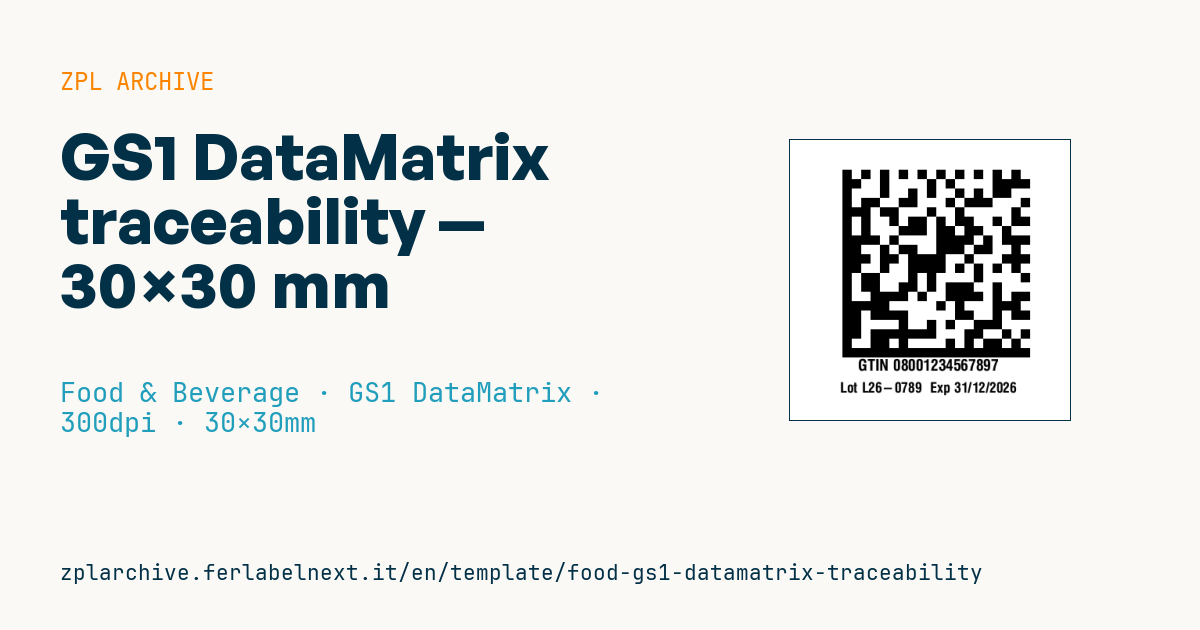
Food traceability label with a GS1 DataMatrix (GTIN, lot, expiry in GS1 format) and human-readable data. Compact, high-density, for the supply chain.
GS1 DataMatrix traceability
30×30 mm @ 300 dpi. GS1 DataMatrix (^BXN) carrying the GS1 string (AI 01 GTIN, 10 lot, 17 expiry) and readable data below.
Placeholders
-
gs1_data— GS1 string with FNC1 (e.g.0108001234567890101LOT123etc.) -
gtin— readable GTIN -
lot/expiry— readable lot and expiry
Replace
gs1_datawith your real GS1 string (AIs in brackets). Verify FNC1 encoding on your system.
When to use it
Producers and packers use it to carry GTIN, lot and expiry in one small symbol that 2D scanners can read in the warehouse, at goods-in or at the checkout of retailers already equipped for it. It goes on trays, jars, pouches or cases where there is no room for a GS1-128 and automatic traceability is needed, for example to manage withdrawals and recalls or first-expiry-first-out rotation.
At 30×30 mm the symbol is small, so print must be sharp and consistent: use thermal transfer on coated paper or a synthetic stock if the product goes into the fridge or stays on the shelf for long.
Standards and requirements
The reference is the GS1 General Specifications: the symbol must be ECC 200 with FNC1 in the first position, otherwise it is a generic Data Matrix rather than a GS1 DataMatrix. Typical AIs are (01) 14-digit GTIN, (17) expiry date as YYMMDD and (10) lot, alphanumeric up to 20 characters; if (10) is not the last element it needs an FNC1 separator after it, so put it at the end. In (17) a day of 00 means the last day of the month. Print quality is assessed to ISO/IEC 15415.
In ZPL ^BXN uses quality 200 and the module size is the second parameter, in dots. To confirm the FNC1 is right, scan the code with a reader that shows the symbology identifier: a GS1 DataMatrix returns ]d2.
Common mistakes
- Encoding the AI brackets in the data: they belong only in the human-readable line.
- Placing the lot before the expiry without a separator, so the scanner reads 17 as part of the lot.
- Dropping to 2-dot modules to make the code fit: many scanners can no longer read it.
- Assuming every checkout reads 2D: check with the retailer before removing the EAN-13.
FAQ
Can a GS1 DataMatrix replace the EAN-13 on the product?
GS1 is promoting a gradual move to 2D codes at the point of sale, but replacement depends on your retailers: many still ask for the EAN-13 next to the 2D code.
What format must the expiry have in the code?
Six digits YYMMDD after AI (17), for example 261231 for 31 December 2026; the human-readable date can follow the format used on the label.
ZPL code
^XA
^PW354
^LL354
^CI28
^FO65,38^BXN,12,200,,,,_^FD_1{{gs1_data}}^FS
^CF0,20^FO20,280^FB315,1,0,C^FDGTIN {{gtin}}^FS
^CF0,18^FO20,310^FB315,1,0,C^FDLot {{lot}}  Exp {{expiry}}^FS
^XZ- Industry: Food & Beverage
- Category: GS1 DataMatrix
- DPI: 300
- Size: 30×30 mm
- Tags: DataMatrix, Food, GS1-128, Traceability
What this label contains
Barcodes
- GS1 DataMatrix
- 2D code with GS1 Application Identifiers: used for pharmaceutical serialisation (GTIN, batch, expiry, serial number) and for medical device UDI.
Elements
- 2 text fields
- 4 variable fields to fill in
Variable fields
| Field | Description | Example |
|---|---|---|
gs1_data | GS1 data | 01080012345678971726123110L26-0789 |
gtin | GTIN | 08001234567897 |
lot | Lot | L26-0789 |
expiry | Expiry | 31/12/2026 |
Format and printing
30×30 mm (1.18×1.18″) at 300 dpi: 354×354 dots. Square.
Compatible Zebra printers
You need a printer with a 2″ printhead at 300 dpi, for example:
- Zebra ZD411 (desktop)
- Zebra ZD611 (desktop)
Any Zebra printer with a wider printhead and the same resolution works too.
The code is written for 300 dpi: on a printer with a different resolution the label prints larger or smaller and needs rescaling.
How to use it
- Open “Customize placeholders” and enter your data in the variable fields listed above.
- Check the preview: it is rendered from the same ZPL code you will send to the printer.
- Download the .zpl file or copy the code and send it to the printer: with “Print” through Zebra Browser Print, or as a raw file to port 9100 if the printer is on the network.
- Load 30×30 mm labels and make sure the printer is set to 300 dpi. For a different size use “Duplicate & edit” and adapt the layout in the builder.
Edit it in the editor
To change the layout, use “Duplicate & edit”: the template opens in the online ZPL editor, where you modify it and save it to your account for free.
Related templates
- Wine gift label with logo — 50×90 mm 300 dpi · Food & Beverage · Commercial label
- Beverage bottle label — 40×80 mm 300 dpi · Food & Beverage · Commercial label
- Cooking instructions label — 70×50 mm 203 dpi · Food & Beverage · Commercial label
- Food label with allergens — 70×100 mm 300 dpi · Food & Beverage · Commercial label
- Price per kg label — 50×40 mm 203 dpi · Food & Beverage · Commercial label
- Artisan jam label with logo — 50×60 mm 203 dpi · Food & Beverage · Commercial label
- Food nutrition label — 70×100 mm 300 dpi · Food & Beverage · Nutritional label
- Compact lot + expiry — 50×25 mm 300 dpi · Food & Beverage · Traceability