Food label with allergens — 70×100 mm
Food label compliant with EU reg. 1169/2011: ingredients, allergens highlighted in uppercase, lot, expiry, net weight.
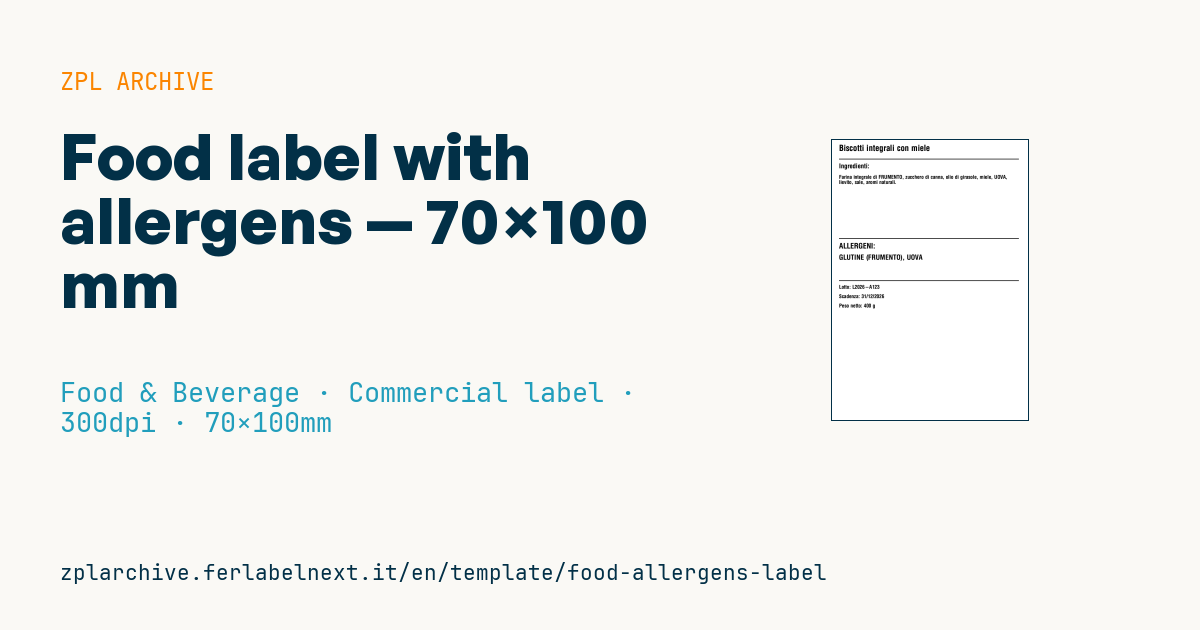
Food allergens label
70×100 mm @ 300 dpi. EU spec requires allergens to be graphically highlighted (uppercase, bold or underlined).
Placeholders
product_nameingredients— full comma-separated listallergens_upper— allergens only, UPPERCASElot,expiry,net_weight
When to use it
This is the main label of a prepacked food made on a small scale: fresh pasta workshops, delis packing ready meals, pastry shops, sauce and preserve producers. It is applied to sealed trays, bags or jars at packing, when lot and date are known. For fresh products lasting a few days direct thermal paper is enough; for long-life products or those exposed to light and heat, thermal transfer is better, because date and lot must stay legible to the end.
Standards and requirements
Regulation (EU) No 1169/2011 lists the mandatory particulars: besides those in the template you need, among others, the name and address of the food business operator, storage conditions where needed and, unless exempt, the nutrition declaration. Annex II allergens must be emphasised within the ingredients list. Use "use by" for highly perishable foods and "best before" in other cases. Directive 2011/91/EU on lot identification requires the code to be preceded by the letter "L", unless it is clearly distinguishable.
Mandatory particulars need an x-height of at least 1.2 mm (0.9 mm if the largest surface of the pack is under 80 cm²): measure the printed character, not the font parameter. For the ingredients list use ^FB: text beyond the configured number of lines is printed over the last line.
Common mistakes
- Writing allergens in capitals only in the dedicated field and not in the ingredients list too.
- Letting a longer recipe overprint the last line of the ingredients list.
- Confusing the use-by date with the best-before date.
- Forgetting the operator's name and address, which the template does not include.
FAQ
How should allergens be highlighted on the label?
With a typeface that sets them apart from the other ingredients, such as capitals, bold, underlining or a different background, within the ingredients list.
Is a nutrition table always required?
For prepacked food, as a rule, yes. Annex V sets out exemptions, including some handcrafted foods supplied in small quantities directly to consumers or local retailers: check whether your case qualifies.
ZPL code
^XA
^PW827
^LL1181
^CI28
^CF0,36^FO30,20^FD{{product_name}}^FS
^FO30,80^GB770,3,3^FS
^CF0,28^FO30,100^FDIngredienti:^FS
^CF0,22
^FO30,150^FB770,8,0,L,0^FD{{ingredients}}^FS
^FO30,420^GB770,3,3^FS
^CF0,32^FO30,440^FDALLERGENI:^FS
^CF0,30^FO30,490^FD{{allergens_upper}}^FS
^FO30,600^GB770,3,3^FS
^CF0,22
^FO30,620^FDLotto: {{lot}}^FS
^FO30,660^FDScadenza: {{expiry}}^FS
^FO30,700^FDPeso netto: {{net_weight}}^FS
^XZ- Industry: Food & Beverage
- Category: Commercial label
- DPI: 300
- Size: 70×100 mm
- Tags: Allergens, Compliance 2024
What this label contains
Barcodes
This label contains no barcodes: it is made of text and graphics.
Elements
- 8 text fields
- 6 variable fields to fill in
- boxes and separator lines
Variable fields
| Field | Description | Example |
|---|---|---|
product_name | Product | Biscotti integrali con miele |
ingredients | Ingredients | Farina integrale di FRUMENTO, zucchero di canna, olio di girasole, miele, UOVA, lievito, sale, aromi naturali. |
allergens_upper | Allergens | GLUTINE (FRUMENTO), UOVA |
lot | Lot | L2026-A123 |
expiry | Expiry | 31/12/2026 |
net_weight | Net weight | 400 g |
Format and printing
70×100 mm (2.76×3.94″) at 300 dpi: 827×1181 dots. Portrait.
Compatible Zebra printers
You need a printer with a 4″ printhead at 300 dpi, for example:
- Zebra ZD421 (desktop)
- Zebra ZD621 (desktop)
- Zebra ZT231 (industrial)
- Zebra ZT411 (industrial)
- Zebra ZT610 (industrial)
Any Zebra printer with a wider printhead and the same resolution works too.
The code is written for 300 dpi: on a printer with a different resolution the label prints larger or smaller and needs rescaling.
How to use it
- Open “Customize placeholders” and enter your data in the variable fields listed above.
- Check the preview: it is rendered from the same ZPL code you will send to the printer.
- Download the .zpl file or copy the code and send it to the printer: with “Print” through Zebra Browser Print, or as a raw file to port 9100 if the printer is on the network.
- Load 70×100 mm labels and make sure the printer is set to 300 dpi. For a different size use “Duplicate & edit” and adapt the layout in the builder.
Edit it in the editor
To change the layout, use “Duplicate & edit”: the template opens in the online ZPL editor, where you modify it and save it to your account for free.
Related templates
- Wine gift label with logo — 50×90 mm 300 dpi · Food & Beverage · Commercial label
- Beverage bottle label — 40×80 mm 300 dpi · Food & Beverage · Commercial label
- GS1 DataMatrix traceability — 30×30 mm 300 dpi · Food & Beverage · GS1 DataMatrix
- Cooking instructions label — 70×50 mm 203 dpi · Food & Beverage · Commercial label
- Price per kg label — 50×40 mm 203 dpi · Food & Beverage · Commercial label
- Artisan jam label with logo — 50×60 mm 203 dpi · Food & Beverage · Commercial label
- Food nutrition label — 70×100 mm 300 dpi · Food & Beverage · Nutritional label
- Compact lot + expiry — 50×25 mm 300 dpi · Food & Beverage · Traceability