Contractor badge — 54×86 mm CR80
Badge for contractors and external firms in CR80 format: name, company, trade, permit no., validity, induction date and Code 128.
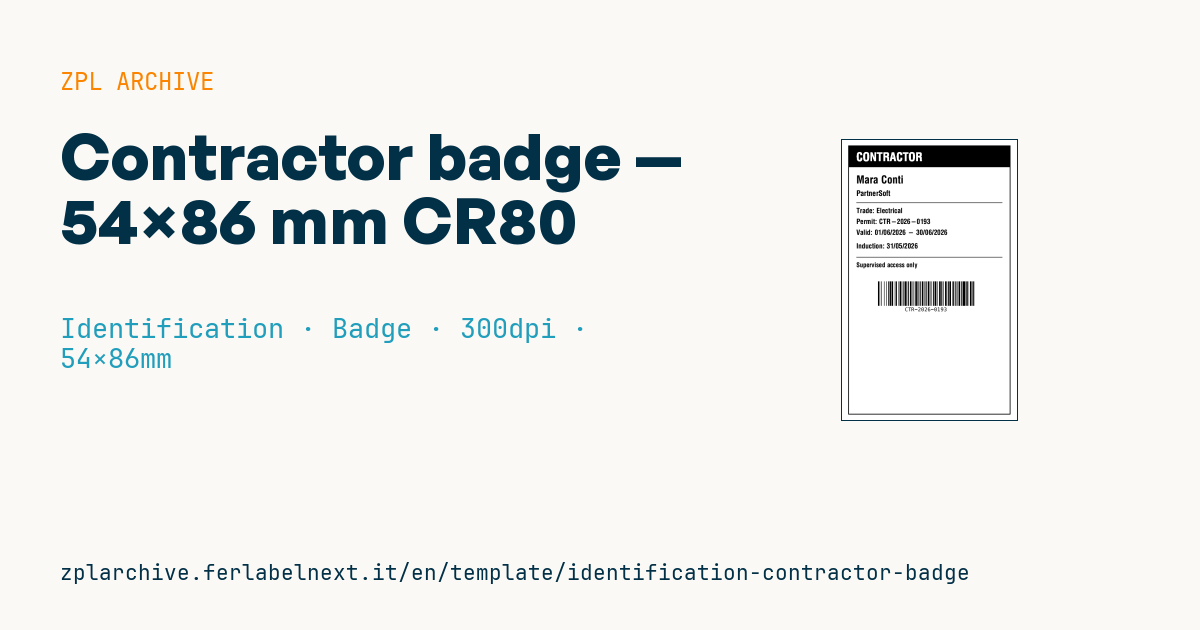
Contractor badge
54×86 mm CR80 format. Identifies external-firm personnel entering the site; the CONTRACTOR banner sets them apart from employees. The Code 128 encodes the permit number for turnstile clocking.
Placeholders
-
full_name,company -
trade— trade (e.g.Electrical) -
permit_no— work permit number -
valid_from,valid_to—dd/mm/yyyy -
induction_date— safety induction date
When to use it
Purchasing, gatehouse and HSE teams at plants, construction sites and logistics centres use this badge to identify external contractors' staff for the duration of a job. The banner sets contractors apart from employees at a glance; the barcode is read at turnstiles or by the attendance log.
Zebra label printers print on adhesive media, not on PVC cards, so the badge is usually printed on a thermal transfer polyester label and slipped into a rigid holder or applied to a blank card. It is worn for weeks or months, exposed to sweat, dust and sunlight.
Standards and requirements
The CR80 size is defined by ISO/IEC 7810 (ID-1, 85.60 × 53.98 mm). In Italy, Legislative Decree 81/2008, article 26(8), requires contractor and subcontractor staff to carry an identification card with a photo, the worker's details and the employer's name. This layout has no photo, so add one (a ^GF image or an affixed photo). In other countries, check national rules and the site's own requirements.
For the Code 128 at 300 dpi a ^BY2 module (about 0.17 mm) fits the badge width comfortably; leave at least 10 modules of quiet zone on each side.
Common mistakes
- Relying on the printed dates: expiry must also be enforced in the access control system, or an expired badge still opens the turnstile.
- Leaving out the photo or employer name where the law requires them.
- Encoding a number in the barcode that differs from the one registered in access control.
- Printing on direct thermal media, which fades in a pocket or in the sun before the job ends.
FAQ
Does a contractor badge need a photo?
In Italy, yes: Legislative Decree 81/2008 requires it for contractor and subcontractor workers. Elsewhere it depends on local law and site rules.
Can I print this badge on a card printer?
Card printers generally do not use ZPL and rely on their own driver or SDK, so check what your model supports. This template is meant for label printers using adhesive media.
ZPL code
^XA
^LL1016
^CI28
^PW640
^FO20,20^GB600,990,3^FS
^FO20,20^GB600,80,80^FS
^CF0,44^FO50,45^FR^FDCONTRACTOR^FS
^CF0,40^FO50,130^FD{{full_name}}^FS
^CF0,28^FO50,185^FD{{company}}^FS
^FO50,230^GB540,2,2^FS
^CF0,26^FO50,250^FDTrade: {{trade}}^FS
^FO50,290^FDPermit: {{permit_no}}^FS
^FO50,330^FDValid: {{valid_from}} - {{valid_to}}^FS
^FO50,380^FDInduction: {{induction_date}}^FS
^FO50,430^GB540,2,2^FS
^CF0,24^FO50,450^FDSupervised access only^FS
^BY2,2,90^FO130,520^BCN,90,Y,N,N^FD{{permit_no}}^FS
^XZ- Industry: Identification
- Category: Badge
- DPI: 300
- Size: 54×86 mm
- Tags: Access control, Badge, Code 128, Contractor, Identification
What this label contains
Barcodes
- Code 128
- High-density linear barcode that encodes the full ASCII set: ideal for tracking numbers, internal codes and alphanumeric IDs.
Elements
- 8 text fields
- 7 variable fields to fill in
- boxes and separator lines
Variable fields
| Field | Description | Example |
|---|---|---|
full_name | Name | Mara Conti |
company | Company | PartnerSoft |
trade | Trade | Electrical |
permit_no | Permit | CTR-2026-0193 |
valid_from | Valid from | 01/06/2026 |
valid_to | Valid to | 30/06/2026 |
induction_date | Induction | 31/05/2026 |
Format and printing
54×86 mm (2.13×3.39″) at 300 dpi: 638×1016 dots. Portrait.
Compatible Zebra printers
You need a printer with a 2″ printhead at 300 dpi, for example:
- Zebra ZD411 (desktop)
- Zebra ZD611 (desktop)
Any Zebra printer with a wider printhead and the same resolution works too.
The code is written for 300 dpi: on a printer with a different resolution the label prints larger or smaller and needs rescaling.
How to use it
- Open “Customize placeholders” and enter your data in the variable fields listed above.
- Check the preview: it is rendered from the same ZPL code you will send to the printer.
- Download the .zpl file or copy the code and send it to the printer: with “Print” through Zebra Browser Print, or as a raw file to port 9100 if the printer is on the network.
- Load 54×86 mm labels and make sure the printer is set to 300 dpi. For a different size use “Duplicate & edit” and adapt the layout in the builder.
Edit it in the editor
To change the layout, use “Duplicate & edit”: the template opens in the online ZPL editor, where you modify it and save it to your account for free.
Related templates
- Lockout/Tagout tag — 70×100 mm 203 dpi · Identification · Safety
- VIP / backstage pass (QR) — 100×70 mm 300 dpi · Identification · Badge
- Parking permit — 100×60 mm 203 dpi · Identification · Badge
- Tamper-evident security seal — 80×20 mm 203 dpi · Identification · Safety
- Document confidentiality label — 70×40 mm 203 dpi · Identification · Documents
- Membership card — 86×54 mm CR80 300 dpi · Identification · Badge
- File folder spine label — 90×30 mm 203 dpi · Identification · Documents
- Evidence chain of custody — 100×50 mm 203 dpi · Identification · Documents