File folder spine label — 90×30 mm
Label for the spine of archive binders/folders: title, file reference, department, year and Code 128 for retrieval.
File folder spine label
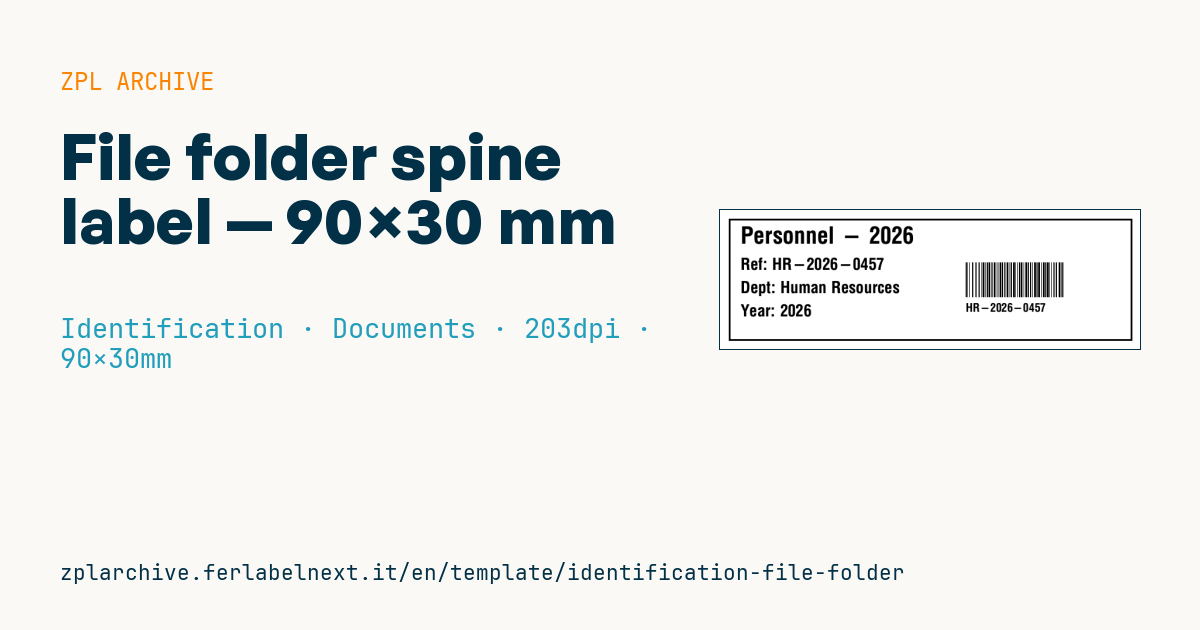
90×30 mm format for the spine of binders and folders. The Code 128 encodes the file reference for quick archive retrieval.
Placeholders
file_title— file titlefile_ref— reference (also in the barcode)departmentyear
When to use it
Corporate archives, law and accounting firms, public bodies and HR departments use this label on the spines of binders, lever-arch files and archive boxes. The Code 128 lets you log loans, moves and disposals with a scanner instead of typing the reference. Binders sit on shelves for years, often near windows or in unconditioned rooms: use thermal transfer on coated paper or polypropylene, never direct thermal.
Standards and requirements
There is no standard for the label format. ISO 15489 on records management does require each record or file to be uniquely identified and linked to the classification scheme, so the printed reference must match the one in your records system. Retention periods depend on the rules of your country and sector.
For Code 128 use ^BCN,,Y,N,N,A: automatic mode switches to subset C for digits and shortens the symbol. Within the 30 mm height keep the barcode short but at least 8-10 mm tall, with a 10-module quiet zone.
Common mistakes
- Using references with spaces, slashes or accented letters that the records software then fails to match.
- Printing on direct thermal media: on PVC binders, plasticisers and light erase the text.
- Placing the barcode too close to the curved edge of the spine, where scanners cannot read it.
- Reprinting a file with a new reference without updating the register.
FAQ
Code 128 or QR on a binder spine?
On a narrow, tall spine Code 128 reads even with laser scanners at a distance; QR is worth it only if you need more data or want to scan with a phone.
How long does an archive label last?
With thermal transfer and a wax-resin ribbon on coated paper in an office environment, many years; direct thermal yellows and fades much sooner.
Can I print the label vertically?
Yes, rotate the fields with ^FWR or the orientation parameter of each field, and set ^PW and ^LL to match the stock you load.
ZPL code
^XA
^LL240
^CI28
^PW720
^FO15,15^GB690,210,3^FS
^CF0,40^FO35,28^FD{{file_title}}^FS
^CF0,28^FO35,82^FDRef: {{file_ref}}^FS
^FO35,122^FDDept: {{department}}^FS
^FO35,162^FDYear: {{year}}^FS
^BY1,2,60^FO420,90^BCN,60,N,N,N^FD{{file_ref}}^FS
^CF0,20^FO420,160^FD{{file_ref}}^FS
^XZ- Industry: Identification
- Category: Documents
- DPI: 203
- Size: 90×30 mm
- Tags: Archive, Code 128, Document, Identification
What this label contains
Barcodes
- Code 128
- High-density linear barcode that encodes the full ASCII set: ideal for tracking numbers, internal codes and alphanumeric IDs.
Elements
- 5 text fields
- 4 variable fields to fill in
- boxes and separator lines
Variable fields
| Field | Description | Example |
|---|---|---|
file_title | Title | Personnel - 2026 |
file_ref | Reference | HR-2026-0457 |
department | Department | Human Resources |
year | Year | 2026 |
Format and printing
90×30 mm (3.54×1.18″) at 203 dpi: 719×240 dots. Landscape.
Compatible Zebra printers
You need a printer with a 4″ printhead at 203 dpi, for example:
- Zebra ZD421 (desktop)
- Zebra ZD621 (desktop)
- Zebra GK420 (desktop)
- Zebra ZT231 (industrial)
- Zebra ZT411 (industrial)
- Zebra ZT610 (industrial)
- Zebra ZQ521 (mobile)
- Zebra ZQ630 (mobile)
Any Zebra printer with a wider printhead and the same resolution works too.
The code is written for 203 dpi: on a printer with a different resolution the label prints larger or smaller and needs rescaling.
How to use it
- Open “Customize placeholders” and enter your data in the variable fields listed above.
- Check the preview: it is rendered from the same ZPL code you will send to the printer.
- Download the .zpl file or copy the code and send it to the printer: with “Print” through Zebra Browser Print, or as a raw file to port 9100 if the printer is on the network.
- Load 90×30 mm labels and make sure the printer is set to 203 dpi. For a different size use “Duplicate & edit” and adapt the layout in the builder.
Edit it in the editor
To change the layout, use “Duplicate & edit”: the template opens in the online ZPL editor, where you modify it and save it to your account for free.
Related templates
- Lockout/Tagout tag — 70×100 mm 203 dpi · Identification · Safety
- Parking permit — 100×60 mm 203 dpi · Identification · Badge
- VIP / backstage pass (QR) — 100×70 mm 300 dpi · Identification · Badge
- Tamper-evident security seal — 80×20 mm 203 dpi · Identification · Safety
- Contractor badge — 54×86 mm CR80 300 dpi · Identification · Badge
- Membership card — 86×54 mm CR80 300 dpi · Identification · Badge
- Document confidentiality label — 70×40 mm 203 dpi · Identification · Documents
- Emergency assembly point — 100×100 mm 203 dpi · Identification · Safety