Membership card — 86×54 mm CR80
Membership card in horizontal card format: organization, member name, tier, number, join year, validity and DataMatrix.
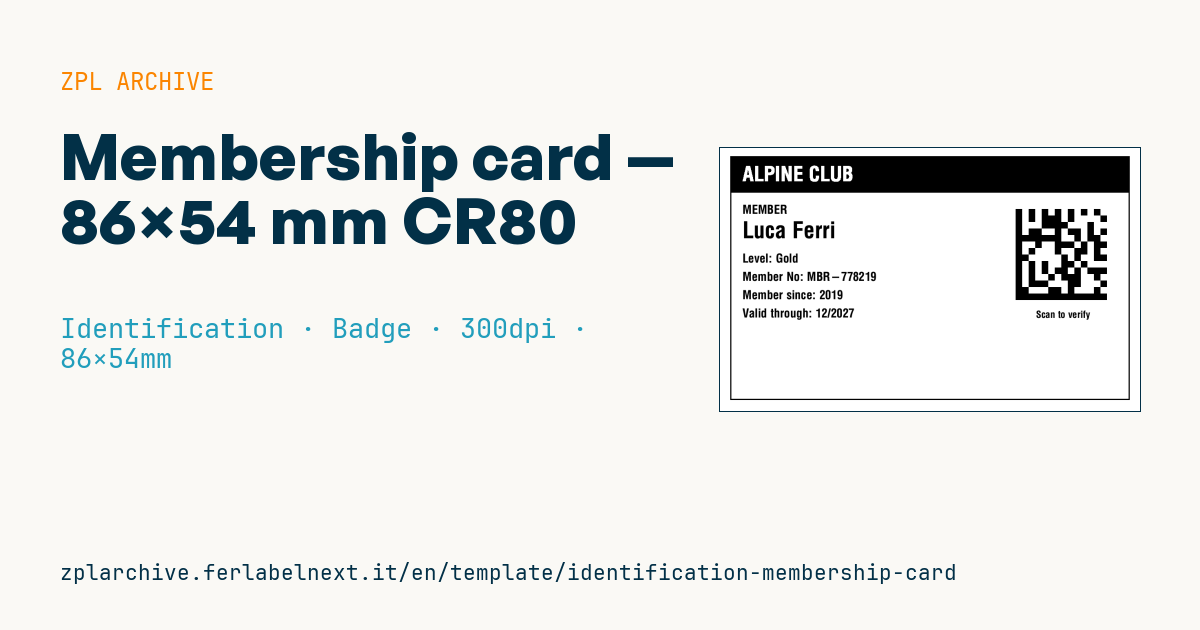
Membership card
Horizontal card format 86×54 mm CR80. For clubs, associations, gyms, libraries. The DataMatrix encodes the card number for entry verification.
Placeholders
-
org_name— organization (banner) -
member_name -
tier— level (e.g.Gold) -
member_no— card number -
since_year— join year -
valid_through—mm/yyyy
When to use it
Sports clubs, gyms, cultural associations, libraries and societies use this card to give members something to show at the door or to scan. Zebra label printers print on adhesive media, so the card is usually printed on a thermal transfer polyester label and applied to a blank PVC card or laminated. It lives in a wallet for a year or more, bent and rubbed.
Standards and requirements
The credit card size is ID-1 in ISO/IEC 7810 (85.60 × 53.98 mm). There is no specific standard for membership cards; durability, legibility and privacy are what matter. Under the GDPR the DataMatrix should hold only the card number, not name, date of birth or email; the data stays in your membership system.
Use an ECC 200 DataMatrix with ^BXN,6,200: at 300 dpi the module is about 0.5 mm, readable even by a phone camera. Leave at least one module of quiet zone around the symbol and keep it away from the card edge.
Common mistakes
- Encoding personal data in the DataMatrix instead of just the card number.
- Reissuing a lost card with the same number without deactivating the old one.
- Applying the label too close to the card's rounded corners, where it lifts within weeks.
- Printing validity as
12/26without making clear it runs to the end of that month.
FAQ
Can I use the card with my library system?
It depends on the software: many library systems read only specific linear barcodes. Check the supported symbology before printing in bulk.
How do I make the card harder to forge?
Use non-sequential numbers, always validate the code against your system, and add a hologram sticker or a patterned laminate.
DataMatrix or QR?
For the same data, DataMatrix is more compact and fits neatly in a corner of the card; QR is better if members need to open a link on their phone.
ZPL code
^XA
^LL638
^CI28
^PW1020
^FO20,20^GB980,600,3^FS
^FO20,20^GB980,90,90^FS
^CF0,50^FO50,45^FR^FD{{org_name}}^FS
^CF0,30^FO50,140^FDMEMBER^FS
^CF0,56^FO50,180^FD{{member_name}}^FS
^CF0,30^FO50,260^FDLevel: {{tier}}^FS
^FO50,305^FDMember No: {{member_no}}^FS
^FO50,350^FDMember since: {{since_year}}^FS
^FO50,395^FDValid through: {{valid_through}}^FS
^FO720,150^BXN,16,200^FD{{member_no}}^FS
^CF0,24^FO770,400^FDScan to verify^FS
^XZ- Industry: Identification
- Category: Badge
- DPI: 300
- Size: 86×54 mm
- Tags: Badge, DataMatrix, Identification, Membership
What this label contains
Barcodes
- Data Matrix
- Very compact 2D code, readable even at a few millimetres: component marking, PCBs and asset tags.
Elements
- 8 text fields
- 6 variable fields to fill in
- boxes and separator lines
Variable fields
| Field | Description | Example |
|---|---|---|
org_name | Organization | ALPINE CLUB |
member_name | Member | Luca Ferri |
tier | Tier | Gold |
member_no | Member No | MBR-778219 |
since_year | Since | 2019 |
valid_through | Valid through | 12/2027 |
Format and printing
86×54 mm (3.39×2.13″) at 300 dpi: 1016×638 dots. Landscape.
Compatible Zebra printers
You need a printer with a 4″ printhead at 300 dpi, for example:
- Zebra ZD421 (desktop)
- Zebra ZD621 (desktop)
- Zebra ZT231 (industrial)
- Zebra ZT411 (industrial)
- Zebra ZT610 (industrial)
Any Zebra printer with a wider printhead and the same resolution works too.
The code is written for 300 dpi: on a printer with a different resolution the label prints larger or smaller and needs rescaling.
How to use it
- Open “Customize placeholders” and enter your data in the variable fields listed above.
- Check the preview: it is rendered from the same ZPL code you will send to the printer.
- Download the .zpl file or copy the code and send it to the printer: with “Print” through Zebra Browser Print, or as a raw file to port 9100 if the printer is on the network.
- Load 86×54 mm labels and make sure the printer is set to 300 dpi. For a different size use “Duplicate & edit” and adapt the layout in the builder.
Edit it in the editor
To change the layout, use “Duplicate & edit”: the template opens in the online ZPL editor, where you modify it and save it to your account for free.
Related templates
- Lockout/Tagout tag — 70×100 mm 203 dpi · Identification · Safety
- VIP / backstage pass (QR) — 100×70 mm 300 dpi · Identification · Badge
- Parking permit — 100×60 mm 203 dpi · Identification · Badge
- Contractor badge — 54×86 mm CR80 300 dpi · Identification · Badge
- Tamper-evident security seal — 80×20 mm 203 dpi · Identification · Safety
- Document confidentiality label — 70×40 mm 203 dpi · Identification · Documents
- File folder spine label — 90×30 mm 203 dpi · Identification · Documents
- Evidence chain of custody — 100×50 mm 203 dpi · Identification · Documents