Evidence chain of custody — 100×50 mm
Evidence label with chain of custody: case, item, collector, date/time, location, seal and DataMatrix for traceability.
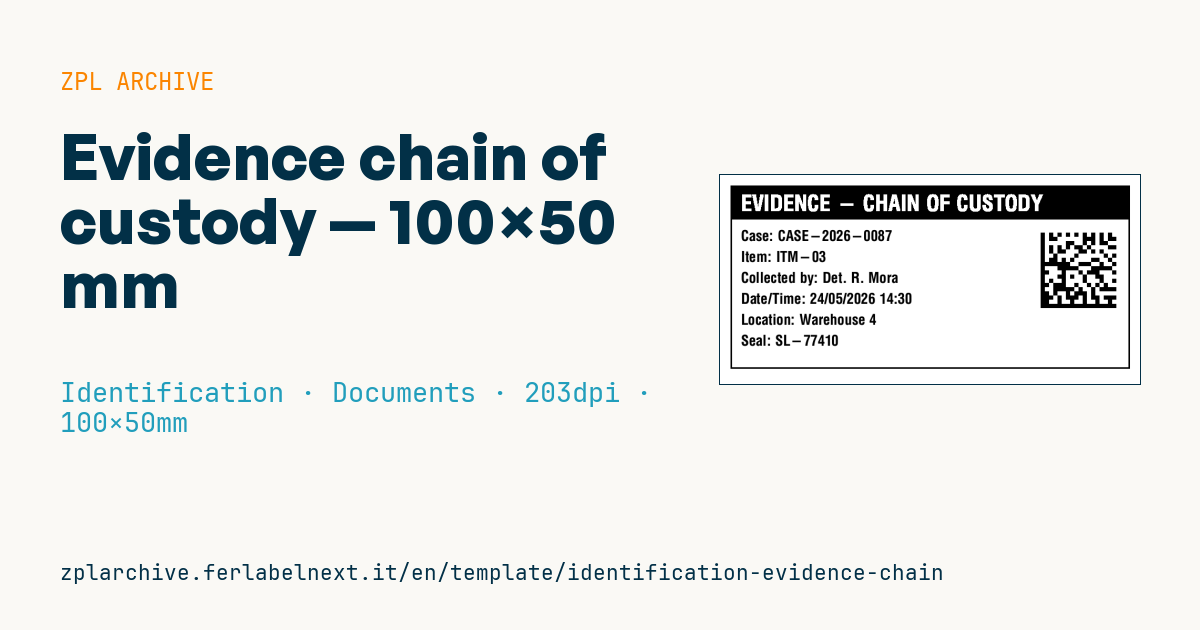
Chain of custody
100×50 mm format for evidence, forensic samples or exhibits. The DataMatrix encodes case+item for traceability along the whole chain of custody.
Placeholders
case_no— case numberitem_no— item numbercollector— who collected itcollected_at— collection date/timelocation— collection locationseal_no— seal number
When to use it
Police, forensic laboratories, expert witnesses, legal teams and internal audit use this label to identify exhibits, samples and seized digital media. It goes on evidence bags, containers, tubes or drives and must stay legible after storage in a fridge, freezer or damp room: thermal transfer with a resin ribbon on polyester or polypropylene, with a permanent low-temperature adhesive.
The label physically links the item to the chain-of-custody record, where every handover is logged.
Standards and requirements
Collection and custody rules depend on the jurisdiction and on your laboratory's or agency's procedures, so check them. For digital evidence, ISO/IEC 27037 gives guidance on identification, collection and preservation; accredited testing laboratories work to ISO/IEC 17025, which requires unique identification of test items.
The ECC 200 DataMatrix (^BXN,5,200) should encode a unique identifier, for example case and item number with a separator, not just the case number. For date and time use an unambiguous format such as 2026-10-18 14:30, and state the time zone if exhibits move between countries.
Common mistakes
- Encoding only the case number in the DataMatrix, so every item in the case looks identical.
- Correcting printed data by hand instead of reprinting and recording the correction in the log.
- Using direct thermal paper: heat and solvents blacken it and the item loses its identification.
- Sticking the label over the seal, so its integrity can no longer be checked.
FAQ
Does the label replace the chain-of-custody form?
No. The label identifies the item; every transfer, signature and time must be recorded on the form or in the evidence management system.
Which label works for samples kept in a freezer?
Polyester or polypropylene printed by thermal transfer with a resin ribbon, with an adhesive rated for low temperatures and applied to a dry container.
Should the DataMatrix contain the full description?
No. Keep it to the unique identifier; descriptions belong in the record, and a short code prints larger and reads more reliably.
ZPL code
^XA
^LL400
^CI28
^PW800
^FO20,20^GB760,350,3^FS
^FO20,20^GB760,65,65^FS
^CF0,42^FO40,38^FR^FDEVIDENCE - CHAIN OF CUSTODY^FS
^CF0,28^FO40,105^FDCase: {{case_no}}^FS
^FO40,145^FDItem: {{item_no}}^FS
^FO40,185^FDCollected by: {{collector}}^FS
^FO40,225^FDDate/Time: {{collected_at}}^FS
^FO40,265^FDLocation: {{location}}^FS
^FO40,305^FDSeal: {{seal_no}}^FS
^FO610,110^BXN,8,200^FD{{case_no}}-{{item_no}}^FS
^XZ- Industry: Identification
- Category: Documents
- DPI: 203
- Size: 100×50 mm
- Tags: Chain of custody, DataMatrix, Identification, Traceability
What this label contains
Barcodes
- Data Matrix
- Very compact 2D code, readable even at a few millimetres: component marking, PCBs and asset tags.
Elements
- 7 text fields
- 6 variable fields to fill in
- boxes and separator lines
Variable fields
| Field | Description | Example |
|---|---|---|
case_no | Case | CASE-2026-0087 |
item_no | Item | ITM-03 |
collector | Collected by | Det. R. Mora |
collected_at | Date/Time | 24/05/2026 14:30 |
location | Location | Warehouse 4 |
seal_no | Seal | SL-77410 |
Format and printing
100×50 mm (3.94×1.97″) at 203 dpi: 799×400 dots. Landscape.
Compatible Zebra printers
You need a printer with a 4″ printhead at 203 dpi, for example:
- Zebra ZD421 (desktop)
- Zebra ZD621 (desktop)
- Zebra GK420 (desktop)
- Zebra ZT231 (industrial)
- Zebra ZT411 (industrial)
- Zebra ZT610 (industrial)
- Zebra ZQ521 (mobile)
- Zebra ZQ630 (mobile)
Any Zebra printer with a wider printhead and the same resolution works too.
The code is written for 203 dpi: on a printer with a different resolution the label prints larger or smaller and needs rescaling.
How to use it
- Open “Customize placeholders” and enter your data in the variable fields listed above.
- Check the preview: it is rendered from the same ZPL code you will send to the printer.
- Download the .zpl file or copy the code and send it to the printer: with “Print” through Zebra Browser Print, or as a raw file to port 9100 if the printer is on the network.
- Load 100×50 mm labels and make sure the printer is set to 203 dpi. For a different size use “Duplicate & edit” and adapt the layout in the builder.
Edit it in the editor
To change the layout, use “Duplicate & edit”: the template opens in the online ZPL editor, where you modify it and save it to your account for free.
Related templates
- Lockout/Tagout tag — 70×100 mm 203 dpi · Identification · Safety
- Parking permit — 100×60 mm 203 dpi · Identification · Badge
- VIP / backstage pass (QR) — 100×70 mm 300 dpi · Identification · Badge
- Tamper-evident security seal — 80×20 mm 203 dpi · Identification · Safety
- Contractor badge — 54×86 mm CR80 300 dpi · Identification · Badge
- Membership card — 86×54 mm CR80 300 dpi · Identification · Badge
- Document confidentiality label — 70×40 mm 203 dpi · Identification · Documents
- File folder spine label — 90×30 mm 203 dpi · Identification · Documents