Tamper-evident security seal — 80×20 mm
Seal strip for closures and access points: SECURITY SEAL reverse band, serial number, VOID IF REMOVED warning, date and operator. Print on tamper-evident stock.
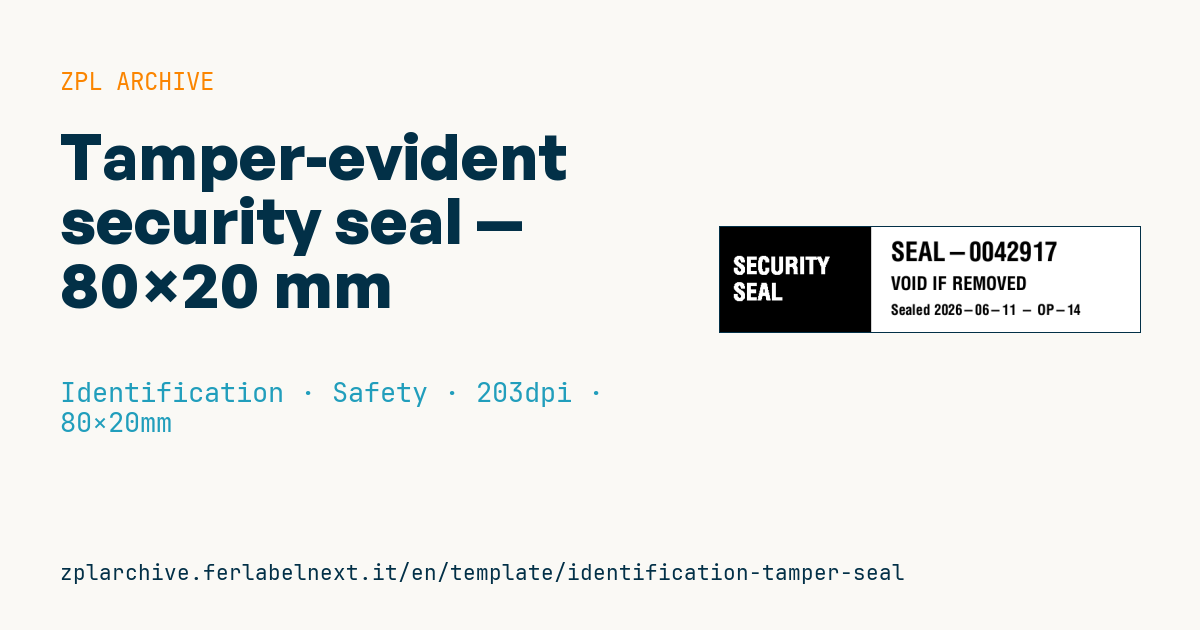
Tamper-evident security seal
80×20 mm @ 203 dpi. Strip to apply across doors, electrical panels, parcels or containers. The layout records the seal number, date and operator for audit checks.
The actual VOID effect requires tamper-evident stock (checkerboard/void labels): ZPL prints the data, the material does the rest.
Placeholders
seal_no— seal serial numbersealed_date— sealing dateoperator— sealing operator
When to use it
This strip is for anyone who needs to prove that a closure has not been opened: maintenance teams sealing electrical panels or meters, warehouses closing high-value cartons or spare-part boxes, labs sealing samples, IT departments locking cases and USB ports. It goes across two parts (door and frame, lid and box) so that opening it destroys the seal. The serial number links each seal to a register: an inspector compares number, date and operator against the log.
Choose the stock for the surface and the environment: destructible PET or vinyl film for metal and plastic, VOID-pattern materials for smooth surfaces, permanent adhesives for outdoor use or areas with oil and dust. These materials are almost always printed by thermal transfer with a resin ribbon.
Standards and requirements
There is no single standard for printed adhesive seals. ISO 17712 covers mechanical seals for freight containers, not labels. The requirements are practical: unique, non-reusable numbering, a register of issued and voided seals, abrasion-resistant print and adhesion tested on the real surface. On a 20 mm strip, use a scalable font with ^A0 and keep text inside ^FB so it does not overflow.
Common mistakes
- Printing duplicate numbers after restarting a sequence: keep the counter in software, not by hand.
- Using direct thermal paper: it fades and peels off cleanly, leaving no evidence of tampering.
- Applying to oily or cold surfaces: the adhesive does not key and the seal comes off in one piece.
- Not logging spoiled or misprinted seals, which leaves gaps in the register.
FAQ
Can I get the VOID effect with plain paper labels?
No. The VOID message comes from the structure of the material, not from the print, so you need dedicated tamper-evident stock.
Which ribbon should I use for void labels?
Usually a resin ribbon, since PET films need good resistance to scratches and solvents. Check compatibility with the material supplier.
ZPL code
^XA
^PW639
^LL160
^CI28
^FO0,0^GB230,160,160^FS
^FR^CF0,36^FO20,45^FDSECURITY^FS
^FR^FO20,85^FDSEAL^FS
^CF0,40^FO260,22^FD{{seal_no}}^FS
^CF0,28^FO260,75^FDVOID IF REMOVED^FS
^CF0,22^FO260,118^FDSealed {{sealed_date}} - {{operator}}^FS
^XZ- Industry: Identification
- Category: Safety
- DPI: 203
- Size: 80×20 mm
- Tags: Safety, Seal, Serial number, Tamper-evident
What this label contains
Barcodes
This label contains no barcodes: it is made of text and graphics.
Elements
- 5 text fields
- 3 variable fields to fill in
- boxes and separator lines
Variable fields
| Field | Description | Example |
|---|---|---|
seal_no | Seal no. | SEAL-0042917 |
sealed_date | Date | 2026-06-11 |
operator | Operator | OP-14 |
Format and printing
80×20 mm (3.15×0.79″) at 203 dpi: 639×160 dots. Landscape.
Compatible Zebra printers
You need a printer with a 4″ printhead at 203 dpi, for example:
- Zebra ZD421 (desktop)
- Zebra ZD621 (desktop)
- Zebra GK420 (desktop)
- Zebra ZT231 (industrial)
- Zebra ZT411 (industrial)
- Zebra ZT610 (industrial)
- Zebra ZQ521 (mobile)
- Zebra ZQ630 (mobile)
Any Zebra printer with a wider printhead and the same resolution works too.
The code is written for 203 dpi: on a printer with a different resolution the label prints larger or smaller and needs rescaling.
How to use it
- Open “Customize placeholders” and enter your data in the variable fields listed above.
- Check the preview: it is rendered from the same ZPL code you will send to the printer.
- Download the .zpl file or copy the code and send it to the printer: with “Print” through Zebra Browser Print, or as a raw file to port 9100 if the printer is on the network.
- Load 80×20 mm labels and make sure the printer is set to 203 dpi. For a different size use “Duplicate & edit” and adapt the layout in the builder.
Edit it in the editor
To change the layout, use “Duplicate & edit”: the template opens in the online ZPL editor, where you modify it and save it to your account for free.
Related templates
- Lockout/Tagout tag — 70×100 mm 203 dpi · Identification · Safety
- VIP / backstage pass (QR) — 100×70 mm 300 dpi · Identification · Badge
- Parking permit — 100×60 mm 203 dpi · Identification · Badge
- Contractor badge — 54×86 mm CR80 300 dpi · Identification · Badge
- Membership card — 86×54 mm CR80 300 dpi · Identification · Badge
- Document confidentiality label — 70×40 mm 203 dpi · Identification · Documents
- File folder spine label — 90×30 mm 203 dpi · Identification · Documents
- Evidence chain of custody — 100×50 mm 203 dpi · Identification · Documents