Warranty / serial number — 50×30 mm
Label with model, serial number and warranty end date. Typical for small appliances and electronics.
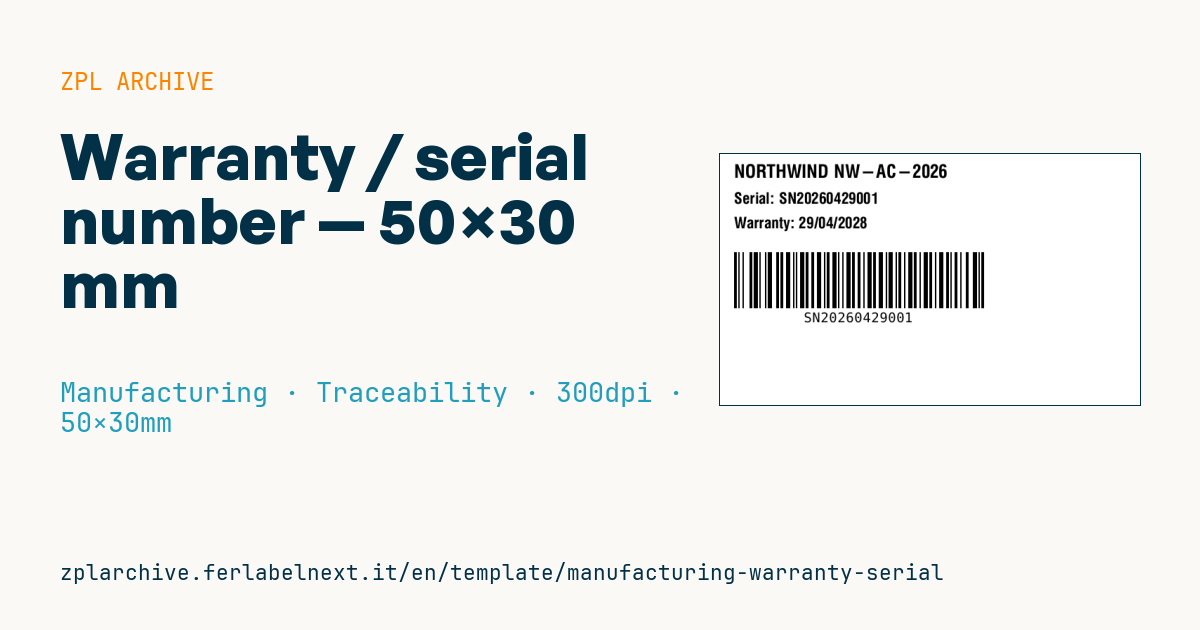
Warranty + serial label
50×30 mm @ 300 dpi. Applied on product bottom or on paper warranty card.
Placeholders
brand,modelserial— unique serial numberwarranty_until— warranty end date (dd/mm/yyyy)
When to use it
It is applied at end of line to small appliances, power tools, electronic devices or to the paper warranty card. Service centres and customer support scan the serial to open a case, check whether the product is covered and trace the production batch when defects recur.
The label stays on the product for years, often underneath, where it meets heat, moisture, abrasion and cleaning agents: use thermal transfer polyester with a resin or wax-resin ribbon.
Standards and requirements
In the EU the consumer's legal guarantee, at least two years from delivery, comes from Directive (EU) 2019/771 and applies regardless of what is printed. The date on the label can only refer to an additional commercial warranty, so say so clearly. The label does not replace mandatory markings such as CE, the WEEE symbol (Directive 2012/19/EU) or the electrical rating plate.
For labels that must last, many manufacturers require UL 969 certified materials. With long alphanumeric serials, check that the Code 128 fits within 50 mm: at 300 dpi ^BY2 gives a module of about 0.17 mm.
Common mistakes
- Calculating warranty end from the production date, when the product may sit in stock for months before sale.
- Encoding a serial in the barcode that differs from the human-readable one or carries undocumented prefixes.
- Applying the label near heating elements or hot vents, where the adhesive fails.
- Generating duplicate serials on two lines printing in parallel.
FAQ
Does the warranty date on the label replace the legal guarantee?
No. The legal guarantee applies by law in any case; the printed date can only document a manufacturer's commercial warranty, which comes on top of it.
Where should the serial number label go?
Somewhere visible once the product is installed but away from heat and wear, such as the bottom or back.
ZPL code
^XA
^PW591
^LL354
^CI28
^CF0,26^FO20,15^FD{{brand}} {{model}}^FS
^CF0,22^FO20,55^FDSerial: {{serial}}^FS
^FO20,90^FDWarranty: {{warranty_until}}^FS
^BY2,2,80
^FO20,140^BCN,80,Y,N,N^FD{{serial}}^FS
^XZ- Industry: Manufacturing
- Category: Traceability
- DPI: 300
- Size: 50×30 mm
- Tags: Code 128, Serial number
What this label contains
Barcodes
- Code 128
- High-density linear barcode that encodes the full ASCII set: ideal for tracking numbers, internal codes and alphanumeric IDs.
Elements
- 3 text fields
- 4 variable fields to fill in
Variable fields
| Field | Description | Example |
|---|---|---|
brand | Brand | NORTHWIND |
model | Model | NW-AC-2026 |
serial | Serial | SN20260429001 |
warranty_until | Warranty until | 29/04/2028 |
Format and printing
50×30 mm (1.97×1.18″) at 300 dpi: 591×354 dots. Landscape.
Compatible Zebra printers
You need a printer with a 2″ printhead at 300 dpi, for example:
- Zebra ZD411 (desktop)
- Zebra ZD611 (desktop)
Any Zebra printer with a wider printhead and the same resolution works too.
The code is written for 300 dpi: on a printer with a different resolution the label prints larger or smaller and needs rescaling.
How to use it
- Open “Customize placeholders” and enter your data in the variable fields listed above.
- Check the preview: it is rendered from the same ZPL code you will send to the printer.
- Download the .zpl file or copy the code and send it to the printer: with “Print” through Zebra Browser Print, or as a raw file to port 9100 if the printer is on the network.
- Load 50×30 mm labels and make sure the printer is set to 300 dpi. For a different size use “Duplicate & edit” and adapt the layout in the builder.
Edit it in the editor
To change the layout, use “Duplicate & edit”: the template opens in the online ZPL editor, where you modify it and save it to your account for free.
Related templates
- Company asset tag with QR — 50×50 mm 203 dpi · Manufacturing · Asset
- Generic GS1-128 — 100×50 mm 203 dpi · Manufacturing · GS1-128
- Kanban card — 100×70 mm 203 dpi · Manufacturing · Commercial label
- Document control label — 60×40 mm 203 dpi · Manufacturing · Documents
- Fixed asset with QR — 50×30 mm 203 dpi · Manufacturing · Asset
- Preventive maintenance — 60×40 mm 203 dpi · Manufacturing · Asset
- Machine asset DataMatrix — 40×25 mm 300 dpi · Manufacturing · Asset
- Daily visitor pass — 100×70 mm 203 dpi · Manufacturing · Badge