Machine asset DataMatrix — 40×25 mm
Micro asset label for machines and equipment: DataMatrix of the asset ID, readable code, machine name and department. For maintenance and plant inventory.
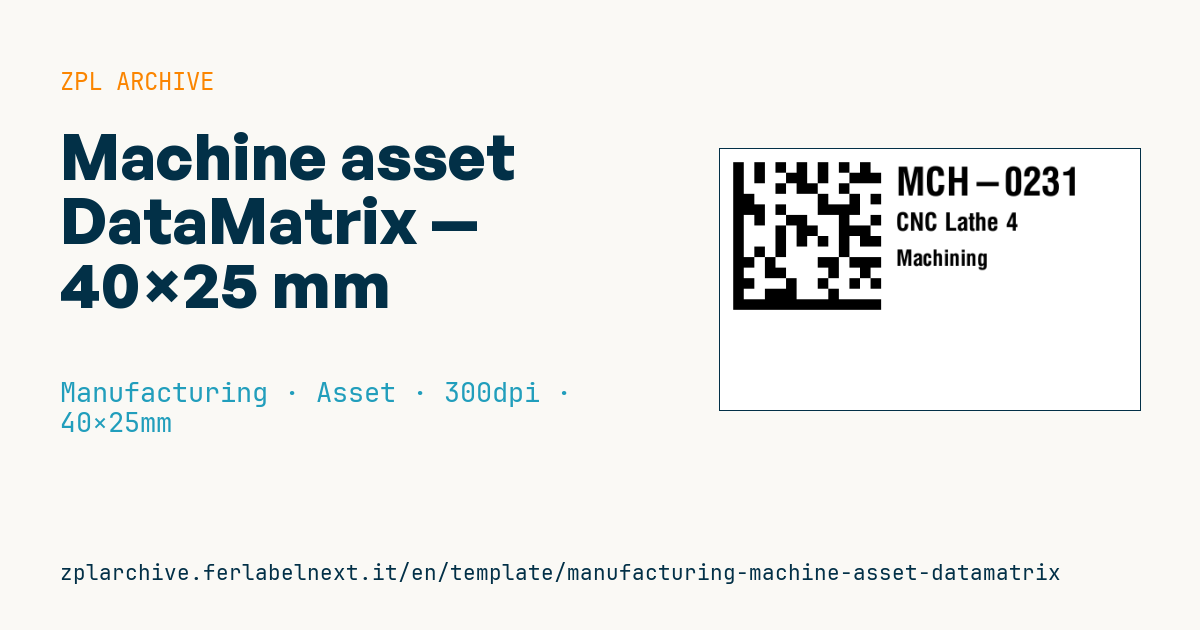
Machine asset DataMatrix
40×25 mm @ 300 dpi. DataMatrix of the asset ID, readable code, machine name and department. Robust for industrial surfaces.
Placeholders
-
asset_id— asset ID -
machine_name— machine name -
department— department
When to use it
This is the identification tag for machines, equipment, moulds and tooling in a plant asset register. Maintenance technicians scan it with a handheld to open a work order in the CMMS, log a breakdown or confirm an inspection without typing codes. The DataMatrix fits in a few millimetres and goes on guards, electrical cabinets or curved parts where a linear barcode will not.
The environment is often harsh: oils, coolants, washdowns, vibration and heat. You need polyester or polyimide with a resin ribbon and an adhesive suited to painted metal or low-surface-energy plastics; on very dirty surfaces consider a laminated tag.
Standards and requirements
The symbology is defined by ISO/IEC 16022 (DataMatrix ECC 200, produced in ZPL with ^BX and quality level 200); 2D print quality is graded according to ISO/IEC 15415. No standard mandates the asset ID itself; if you want a globally unique one, GS1 defines the GIAI with AI (8004), encoded as GS1 DataMatrix with a leading FNC1.
At 300 dpi one dot is about 0.085 mm: a 4-dot module (about 0.34 mm) balances size and readability with standard imagers. Keep a quiet zone of at least one module around the symbol.
Common mistakes
- Shrinking the module to 2 dots to make the code fit: many handhelds fail on a reflective surface.
- Applying the tag to bare metal without degreasing it.
- Placing it where the technician cannot reach with a scanner while the machine is running.
- Encoding text in the DataMatrix that differs from the human-readable ID.
FAQ
Why use DataMatrix instead of QR for asset tags?
For the same data, DataMatrix takes less space and tolerates partial damage well. QR is only preferable if you want a smartphone to open a URL.
Which label survives on a machine exposed to oil and coolant?
Polyester or polyimide with a resin ribbon, laminated if needed. Run an adhesion test on the real surface before tagging the whole plant.
ZPL code
^XA
^PW472
^LL295
^CI28
^FO15,15^BXN,12,200^FD{{asset_id}}^FS
^CF0,44^FO200,20^FD{{asset_id}}^FS
^CF0,28^FO200,72^FD{{machine_name}}^FS
^CF0,25^FO200,115^FD{{department}}^FS
^XZ- Industry: Manufacturing
- Category: Asset
- DPI: 300
- Size: 40×25 mm
- Tags: Asset tag, DataMatrix, Maintenance, Manufacturing
What this label contains
Barcodes
- Data Matrix
- Very compact 2D code, readable even at a few millimetres: component marking, PCBs and asset tags.
Elements
- 3 text fields
- 3 variable fields to fill in
Variable fields
| Field | Description | Example |
|---|---|---|
asset_id | Asset ID | MCH-0231 |
machine_name | Machine | CNC Lathe 4 |
department | Department | Machining |
Format and printing
40×25 mm (1.57×0.98″) at 300 dpi: 472×295 dots. Landscape.
Compatible Zebra printers
You need a printer with a 2″ printhead at 300 dpi, for example:
- Zebra ZD411 (desktop)
- Zebra ZD611 (desktop)
Any Zebra printer with a wider printhead and the same resolution works too.
The code is written for 300 dpi: on a printer with a different resolution the label prints larger or smaller and needs rescaling.
How to use it
- Open “Customize placeholders” and enter your data in the variable fields listed above.
- Check the preview: it is rendered from the same ZPL code you will send to the printer.
- Download the .zpl file or copy the code and send it to the printer: with “Print” through Zebra Browser Print, or as a raw file to port 9100 if the printer is on the network.
- Load 40×25 mm labels and make sure the printer is set to 300 dpi. For a different size use “Duplicate & edit” and adapt the layout in the builder.
Edit it in the editor
To change the layout, use “Duplicate & edit”: the template opens in the online ZPL editor, where you modify it and save it to your account for free.
Related templates
- Company asset tag with QR — 50×50 mm 203 dpi · Manufacturing · Asset
- Generic GS1-128 — 100×50 mm 203 dpi · Manufacturing · GS1-128
- Document control label — 60×40 mm 203 dpi · Manufacturing · Documents
- Kanban card — 100×70 mm 203 dpi · Manufacturing · Commercial label
- Fixed asset with QR — 50×30 mm 203 dpi · Manufacturing · Asset
- Preventive maintenance — 60×40 mm 203 dpi · Manufacturing · Asset
- Daily visitor pass — 100×70 mm 203 dpi · Manufacturing · Badge
- Mandatory PPE area — 100×150 mm 203 dpi · Manufacturing · Safety