Generic GS1-128 — 100×50 mm
Canonical GS1-128 example with 4 application identifiers: GTIN, expiry, lot, serial.
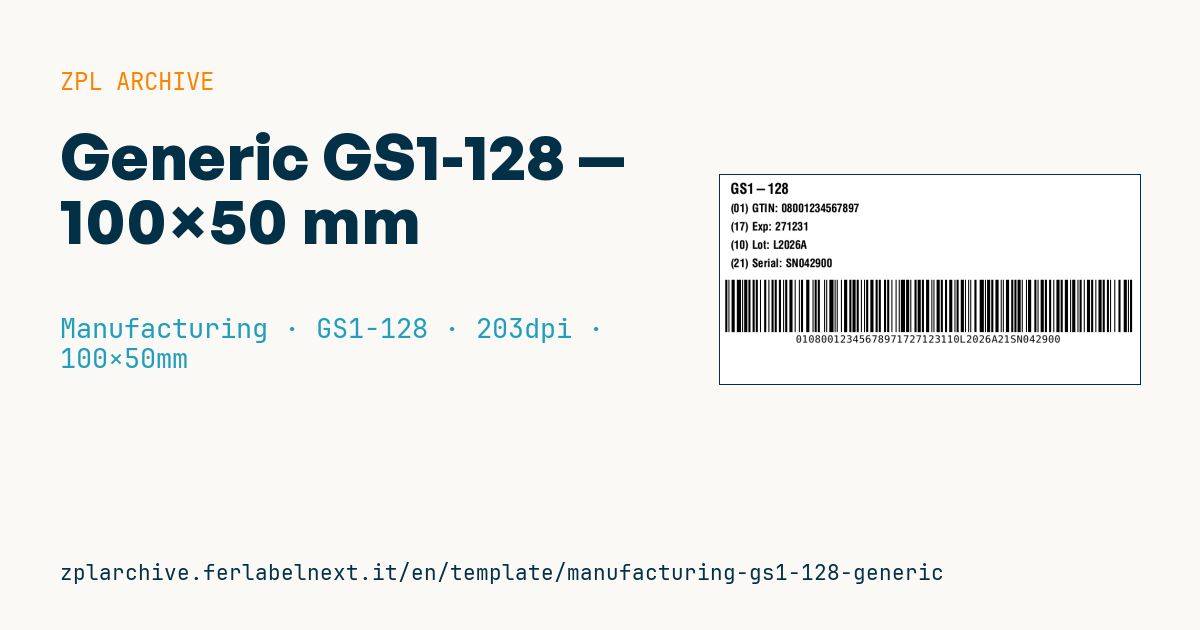
Generic GS1-128
100×50 mm format. Didactic-practical example to learn GS1-128 composition.
Application Identifiers
(01)GTIN-14(17)Expiry in YYMMDD format(10)Lot (max 20 alphanumeric)(21)Serial number
Placeholders
gtin14— 14 digitsexpiry_yymmdd— 6 digits date (YYMMDD)lot,serial
When to use it
It suits anyone marking cases, drums or secondary packaging with traceability data that must be readable across the supply chain: component makers, food, chemicals, suppliers delivering to customers who scan lot and expiry at goods-in. It is also a good starting point for testing your print software before moving to more complex customer layouts. Coated paper is fine on corrugated board in a warehouse; for cold rooms or goods stored for months use thermal transfer on paper or synthetic stock with a freezer-grade adhesive.
Standards and requirements
The structure is defined by the GS1 General Specifications. Practical rules: put fixed-length AIs, (01) and (17), first and variable-length ones after; (10) needs an FNC1 separator if (21) follows, while the last field does not. In (17), day 00 means the last day of the month. A GS1-128 symbol holds at most 48 data characters and must not exceed 165 mm in length. In ZPL start with >;>8, insert >8 between lot and serial and, if the lot is alphanumeric, switch to subset B with >6. Parentheses belong only in the human-readable text, never in the encoded data. For print quality the reference is ISO/IEC 15416.
Common mistakes
- Encoding the AI parentheses as characters: the scanner returns invalid data.
- Forgetting the FNC1 after the lot: the reader treats the serial as part of the lot.
- Using a GTIN-13 without the leading zero needed to reach 14 digits.
- Going over 48 characters with long lots and serials instead of splitting the data across two symbols.
FAQ
GS1-128 or GS1 DataMatrix?
GS1-128 is the standard for cases and logistics; small packs, medical devices and medicines generally use the more compact GS1 DataMatrix.
Can I change the order of the AIs?
Yes, but keeping variable-length fields at the end reduces FNC1 separators and shortens the symbol.
What if the product has no exact expiry day?
Use day 00 to express month and year only, or another date AI if your customer requires it.
ZPL code
^XA
^PW799
^LL400
^CI28
^CF0,28^FO20,15^FDGS1-128^FS
^CF0,22
^FO20,55^FD(01) GTIN: {{gtin14}}^FS
^FO20,90^FD(17) Exp: {{expiry_yymmdd}}^FS
^FO20,125^FD(10) Lot: {{lot}}^FS
^FO20,160^FD(21) Serial: {{serial}}^FS
^BY2,2,100
^FO10,200^BCN,100,Y,N,N^FD>;>801{{gtin14}}17{{expiry_yymmdd}}10>6{{lot}}>821{{serial}}^FS
^XZ- Industry: Manufacturing
- Category: GS1-128
- DPI: 203
- Size: 100×50 mm
- Tags: Compliance 2024, GS1-128
What this label contains
Barcodes
- GS1-128
- Code 128 with FNC1 and GS1 Application Identifiers: the logistics barcode, used for SSCC, batch, expiry and weight on pallets and cartons.
Elements
- 5 text fields
- 4 variable fields to fill in
Variable fields
| Field | Description | Example |
|---|---|---|
gtin14 | GTIN-14 | 08001234567897 |
expiry_yymmdd | Expiry (YYMMDD) | 271231 |
lot | Lot | L2026A |
serial | Serial | SN042900 |
Format and printing
100×50 mm (3.94×1.97″) at 203 dpi: 799×400 dots. Landscape.
Compatible Zebra printers
You need a printer with a 4″ printhead at 203 dpi, for example:
- Zebra ZD421 (desktop)
- Zebra ZD621 (desktop)
- Zebra GK420 (desktop)
- Zebra ZT231 (industrial)
- Zebra ZT411 (industrial)
- Zebra ZT610 (industrial)
- Zebra ZQ521 (mobile)
- Zebra ZQ630 (mobile)
Any Zebra printer with a wider printhead and the same resolution works too.
The code is written for 203 dpi: on a printer with a different resolution the label prints larger or smaller and needs rescaling.
How to use it
- Open “Customize placeholders” and enter your data in the variable fields listed above.
- Check the preview: it is rendered from the same ZPL code you will send to the printer.
- Download the .zpl file or copy the code and send it to the printer: with “Print” through Zebra Browser Print, or as a raw file to port 9100 if the printer is on the network.
- Load 100×50 mm labels and make sure the printer is set to 203 dpi. For a different size use “Duplicate & edit” and adapt the layout in the builder.
Edit it in the editor
To change the layout, use “Duplicate & edit”: the template opens in the online ZPL editor, where you modify it and save it to your account for free.
Related templates
- Company asset tag with QR — 50×50 mm 203 dpi · Manufacturing · Asset
- Kanban card — 100×70 mm 203 dpi · Manufacturing · Commercial label
- Document control label — 60×40 mm 203 dpi · Manufacturing · Documents
- Fixed asset with QR — 50×30 mm 203 dpi · Manufacturing · Asset
- Preventive maintenance — 60×40 mm 203 dpi · Manufacturing · Asset
- Machine asset DataMatrix — 40×25 mm 300 dpi · Manufacturing · Asset
- Daily visitor pass — 100×70 mm 203 dpi · Manufacturing · Badge
- Calibration due label — 50×30 mm 203 dpi · Manufacturing · Asset