Daily visitor pass — 100×70 mm
Visitor pass with name, company, internal host, date and times. Black VISITOR banner for immediate visibility.
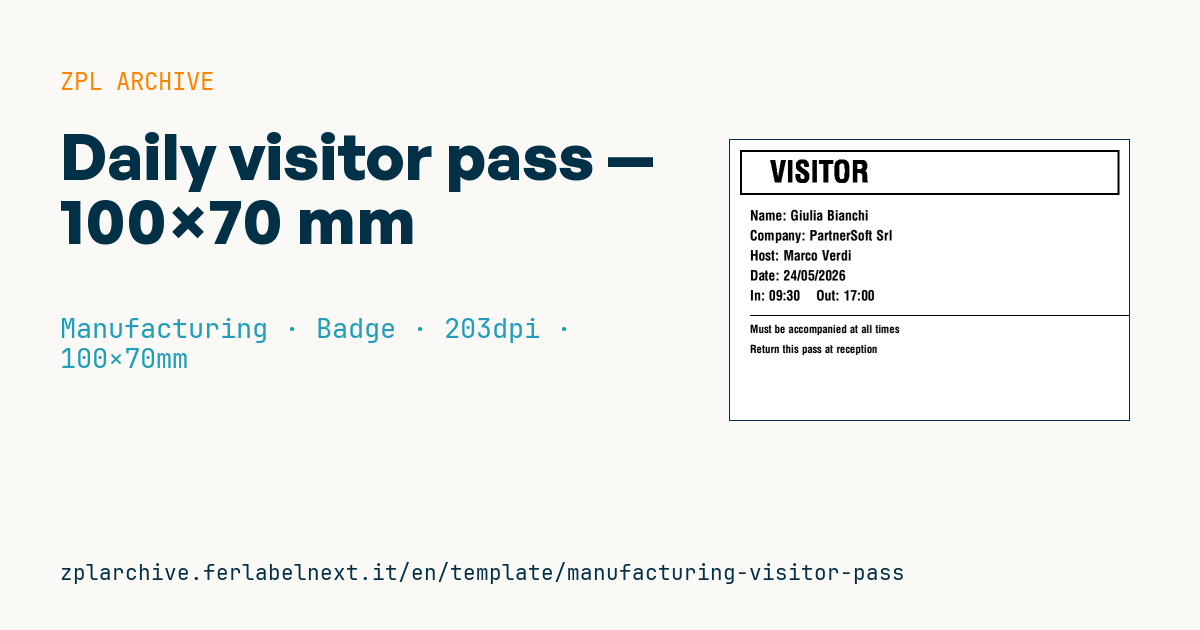
Visitor pass
100×70 mm format. Printed at reception on visitor check-in. The reversed VISITOR banner makes it immediately distinguishable from employee badges.
Placeholders
visitor_name,visitor_companyhost_name— employee hostingvisit_datecheckin_time,expected_checkout—HH:MMtimes
When to use it
Reception prints it at check-in for suppliers, consultants, auditors or candidates entering a plant. It is worn visibly throughout the visit, so supervisors and security staff can see at once who is not an employee and who the responsible internal host is. At the end of the day it is collected or destroyed.
The pass lasts one day, so direct thermal paper works well and is cheap. If you use a holder with a clip or lanyard, check that the format fits it; in areas with oil or dust prefer a closed holder.
Standards and requirements
There is no specific standard for visitor pass layout. Name, company and times are personal data, so processing falls under Regulation (EU) 2016/679 (GDPR): print only what is needed and keep the visitor log in line with your privacy notice. The log also tells you who is on site during an evacuation.
Foreign names often contain accented or special characters: use ^CI28 and send the data in UTF-8. On a reversed banner the text must be large and bold, otherwise thin strokes fill in at 203 dpi.
Common mistakes
- Printing unnecessary data, such as the visitor's phone number or ID document.
- Leaving out the expected check-out time, which is the field that shows a pass has expired.
- Reusing the same pass for several days or people.
- Handing over the pass without the safety briefing or the PPE required in the areas visited.
FAQ
Does a visitor pass need a photo?
Not for a daily pass. A photo makes sense where access control is strict, but it requires more careful handling of personal data.
How do you stop a visitor pass from being reused?
Visible date and times, collection at the exit and a visitor log closed at check-out. For stricter needs there are time-expiring badges that change colour after some hours, but they are a dedicated material, not standard thermal paper.
ZPL code
^XA
^PW799
^LL559
^CI28
^FO20,20^GB760,90,4,B^FS
^CF0,60^FO80,40^FR^FDVISITOR^FS
^CF0,28
^FO40,140^FDName: {{visitor_name}}^FS
^FO40,180^FDCompany: {{visitor_company}}^FS
^FO40,220^FDHost: {{host_name}}^FS
^FO40,260^FDDate: {{visit_date}}^FS
^FO40,300^FDIn: {{checkin_time}}    Out: {{expected_checkout}}^FS
^FO40,350^GB760,2,2^FS
^CF0,22^FO40,370^FDMust be accompanied at all times^FS
^FO40,410^FDReturn this pass at reception^FS
^XZ- Industry: Manufacturing
- Category: Badge
- DPI: 203
- Size: 100×70 mm
What this label contains
Barcodes
This label contains no barcodes: it is made of text and graphics.
Elements
- 8 text fields
- 6 variable fields to fill in
- boxes and separator lines
Variable fields
| Field | Description | Example |
|---|---|---|
visitor_name | Visitor | Giulia Bianchi |
visitor_company | Company | PartnerSoft Srl |
host_name | Host | Marco Verdi |
visit_date | Visit date | 24/05/2026 |
checkin_time | Check-in | 09:30 |
expected_checkout | Expected out | 17:00 |
Format and printing
100×70 mm (3.94×2.76″) at 203 dpi: 799×559 dots. Landscape.
Compatible Zebra printers
You need a printer with a 4″ printhead at 203 dpi, for example:
- Zebra ZD421 (desktop)
- Zebra ZD621 (desktop)
- Zebra GK420 (desktop)
- Zebra ZT231 (industrial)
- Zebra ZT411 (industrial)
- Zebra ZT610 (industrial)
- Zebra ZQ521 (mobile)
- Zebra ZQ630 (mobile)
Any Zebra printer with a wider printhead and the same resolution works too.
The code is written for 203 dpi: on a printer with a different resolution the label prints larger or smaller and needs rescaling.
How to use it
- Open “Customize placeholders” and enter your data in the variable fields listed above.
- Check the preview: it is rendered from the same ZPL code you will send to the printer.
- Download the .zpl file or copy the code and send it to the printer: with “Print” through Zebra Browser Print, or as a raw file to port 9100 if the printer is on the network.
- Load 100×70 mm labels and make sure the printer is set to 203 dpi. For a different size use “Duplicate & edit” and adapt the layout in the builder.
Edit it in the editor
To change the layout, use “Duplicate & edit”: the template opens in the online ZPL editor, where you modify it and save it to your account for free.
Related templates
- Company asset tag with QR — 50×50 mm 203 dpi · Manufacturing · Asset
- Generic GS1-128 — 100×50 mm 203 dpi · Manufacturing · GS1-128
- Document control label — 60×40 mm 203 dpi · Manufacturing · Documents
- Kanban card — 100×70 mm 203 dpi · Manufacturing · Commercial label
- Fixed asset with QR — 50×30 mm 203 dpi · Manufacturing · Asset
- Preventive maintenance — 60×40 mm 203 dpi · Manufacturing · Asset
- Machine asset DataMatrix — 40×25 mm 300 dpi · Manufacturing · Asset
- Mandatory PPE area — 100×150 mm 203 dpi · Manufacturing · Safety