Mandatory PPE area — 100×150 mm
Sign for production area with mandatory PPE list, hazards, emergency number and safety officer.
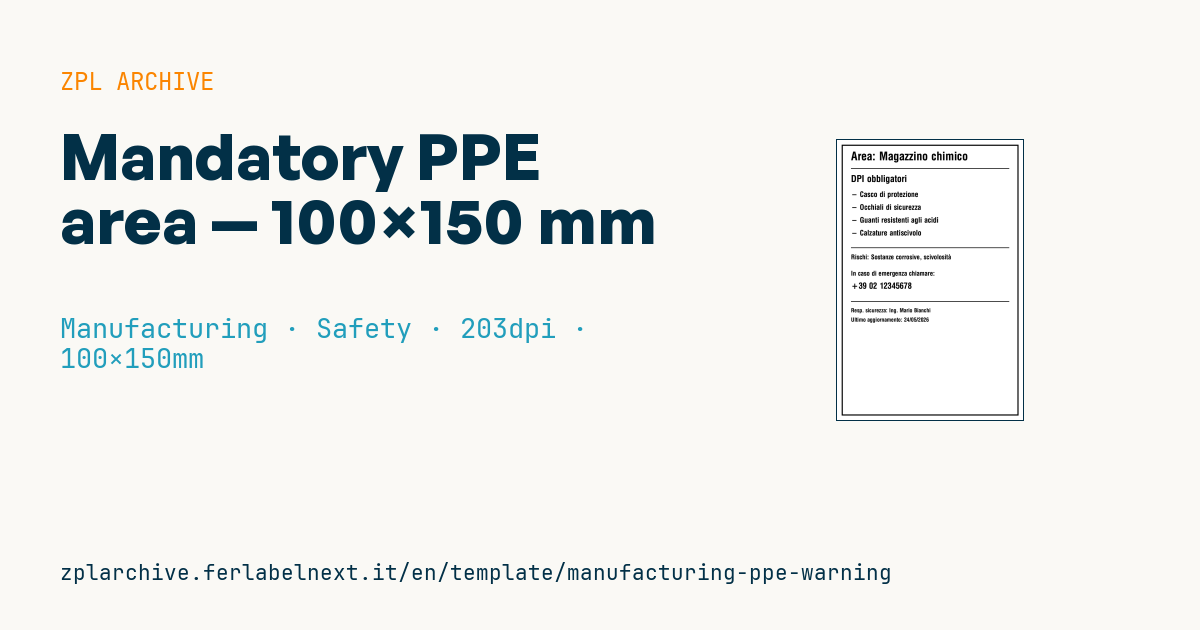
Mandatory PPE
100×150 mm format. Designed to be printed large and posted at the entrance of a hazardous area.
Placeholders
area_name— area name (e.g.Chemical warehouse)ppe_1..4— required PPE (max 4 items)hazards— short hazard summaryemergency_phone— emergency numbersafety_officer— safety officerlast_update— last update date
When to use it
This is an information sign posted at the entrance of an area with specific hazards: chemical store, welding bay, compressor room, forklift zone. Health and safety officers and area managers use it to summarise in one place the required PPE, the main hazards and who to call in an emergency, and to update it in minutes when the risk assessment or the responsible person changes.
The sign stays up for months, often near doors, showers or in damp areas: print it on polyester or polypropylene by thermal transfer and, if possible, protect it with a clear sleeve. Direct thermal paper yellows and fades in light.
Standards and requirements
In the EU, safety signs follow Directive 92/58/EEC and the registered graphical symbols of ISO 7010; mandatory action signs are blue circles with a white pictogram. A thermal printer prints in monochrome, so this sign supplements colour safety signage but does not replace it. The PPE itself must comply with Regulation (EU) 2016/425.
At 203 dpi the format needs ^PW800 and ^LL1200. If area or names contain accented characters, use ^CI28 and a font that supports them.
Common mistakes
- Using the monochrome sign instead of the colour ISO 7010 mandatory signs.
- Listing generic PPE ("gloves") instead of the type required by the risk assessment.
- Leaving an outdated emergency number or safety officer: the update date exists to catch this.
- Printing small text, when the sign must be read from a few metres away.
FAQ
Can I print ISO 7010 pictograms on a Zebra printer?
You can print their shape in black and white as a graphic, but a compliant mandatory sign needs the specified colours. Use pre-printed signs for the symbol and post this information sheet next to them.
How often should a PPE sign be updated?
Whenever the risk assessment, procedures, contacts or responsible person change. Periodically checking the printed date keeps obsolete signs off the walls.
ZPL code
^XA
^PW799
^LL1199
^CI28
^FO20,20^GB760,1160,5,B^FS
^CF0,50^FO60,50^FDArea: {{area_name}}^FS
^FO60,120^GB680,3,3^FS
^CF0,40^FO60,150^FDDPI obbligatori^FS
^CF0,32
^FO60,220^FD- {{ppe_1}}^FS
^FO60,275^FD- {{ppe_2}}^FS
^FO60,330^FD- {{ppe_3}}^FS
^FO60,385^FD- {{ppe_4}}^FS
^FO60,460^GB680,3,3^FS
^CF0,28
^FO60,490^FDRischi: {{hazards}}^FS
^FO60,560^FDIn caso di emergenza chiamare:^FS
^CF0,36
^FO60,610^FD{{emergency_phone}}^FS
^FO60,690^GB680,3,3^FS
^CF0,24
^FO60,720^FDResp. sicurezza: {{safety_officer}}^FS
^FO60,760^FDUltimo aggiornamento: {{last_update}}^FS
^XZ- Industry: Manufacturing
- Category: Safety
- DPI: 203
- Size: 100×150 mm
What this label contains
Barcodes
This label contains no barcodes: it is made of text and graphics.
Elements
- 11 text fields
- 9 variable fields to fill in
- boxes and separator lines
Variable fields
| Field | Description | Example |
|---|---|---|
area_name | Area | Magazzino chimico |
ppe_1 | PPE 1 | Casco di protezione |
ppe_2 | PPE 2 | Occhiali di sicurezza |
ppe_3 | PPE 3 | Guanti resistenti agli acidi |
ppe_4 | PPE 4 | Calzature antiscivolo |
hazards | Hazards | Sostanze corrosive, scivolosità |
emergency_phone | Emergency | +39 02 12345678 |
safety_officer | Safety officer | Ing. Mario Bianchi |
last_update | Updated | 24/05/2026 |
Format and printing
100×150 mm (3.94×5.91″) at 203 dpi: 799×1199 dots. Portrait.
Compatible Zebra printers
You need a printer with a 4″ printhead at 203 dpi, for example:
- Zebra ZD421 (desktop)
- Zebra ZD621 (desktop)
- Zebra GK420 (desktop)
- Zebra ZT231 (industrial)
- Zebra ZT411 (industrial)
- Zebra ZT610 (industrial)
- Zebra ZQ521 (mobile)
- Zebra ZQ630 (mobile)
Any Zebra printer with a wider printhead and the same resolution works too.
The code is written for 203 dpi: on a printer with a different resolution the label prints larger or smaller and needs rescaling.
How to use it
- Open “Customize placeholders” and enter your data in the variable fields listed above.
- Check the preview: it is rendered from the same ZPL code you will send to the printer.
- Download the .zpl file or copy the code and send it to the printer: with “Print” through Zebra Browser Print, or as a raw file to port 9100 if the printer is on the network.
- Load 100×150 mm labels and make sure the printer is set to 203 dpi. For a different size use “Duplicate & edit” and adapt the layout in the builder.
Edit it in the editor
To change the layout, use “Duplicate & edit”: the template opens in the online ZPL editor, where you modify it and save it to your account for free.
Related templates
- Company asset tag with QR — 50×50 mm 203 dpi · Manufacturing · Asset
- Generic GS1-128 — 100×50 mm 203 dpi · Manufacturing · GS1-128
- Kanban card — 100×70 mm 203 dpi · Manufacturing · Commercial label
- Document control label — 60×40 mm 203 dpi · Manufacturing · Documents
- Fixed asset with QR — 50×30 mm 203 dpi · Manufacturing · Asset
- Preventive maintenance — 60×40 mm 203 dpi · Manufacturing · Asset
- Machine asset DataMatrix — 40×25 mm 300 dpi · Manufacturing · Asset
- Daily visitor pass — 100×70 mm 203 dpi · Manufacturing · Badge