Candle label with logo — 60×40 mm
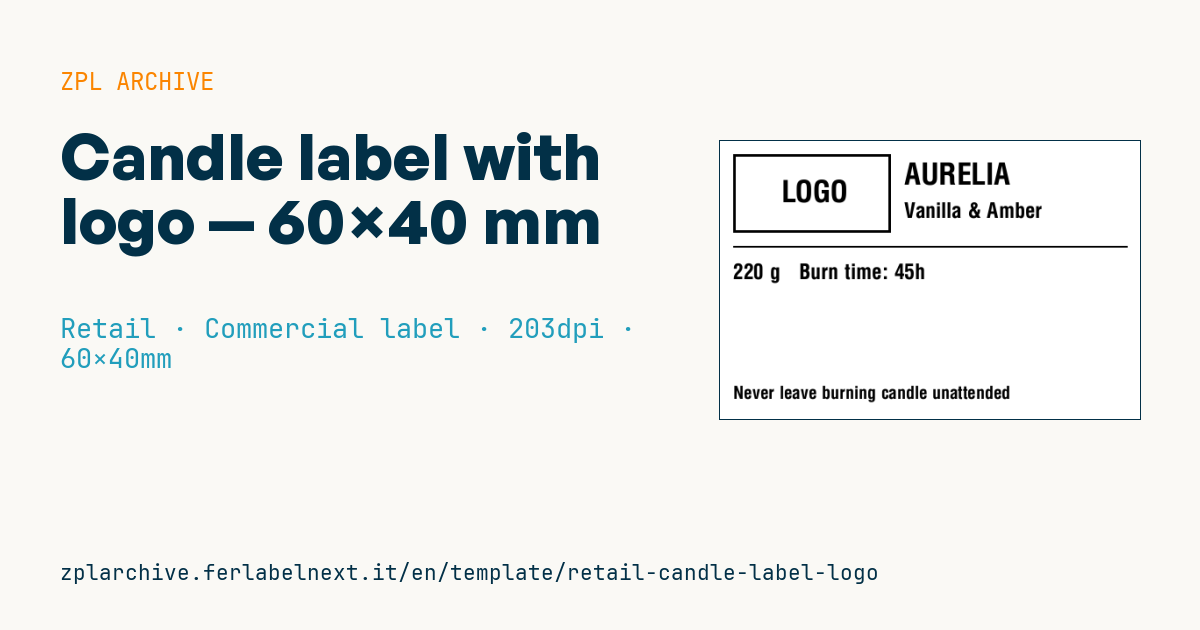
Handmade candle label with logo area, brand, fragrance, weight, burn time and safety warning.
Candle label with logo
60×40 mm @ 203 dpi. Label applied to the handmade candle jar. On the left the logo area: a placeholder frame with "LOGO" text, to be replaced with the real brand logo (^GF image).
Placeholders
brandfragranceweight_g— weight in gramsburn_time— burn duration (e.g.40h)warning_short— short warning (e.g.Never leave burning candle unattended)
The "LOGO" frame is a placeholder: replace it with your logo as a graphic (
^GF).
When to use it
Small workshops and indie brands making candles in glass jars, tins or ceramic vessels use this label for shop, market or online sales. It goes on the side or bottom of the container, which heats up while the candle burns and may pick up drops of fragrance oil. That rules out direct thermal paper, which darkens with heat. Choose polypropylene or coated paper printed by thermal transfer with a wax-resin or resin ribbon.
Standards and requirements
EN 15494 defines safety labels for candles: standard warnings and pictograms such as never leaving a burning candle unattended or keeping it away from flammable materials. Scented candles may need CLP labelling under Regulation (EC) 1272/2008 if the fragrance contains classified substances, for example skin sensitisers: check your fragrance supplier's safety data sheet. Regulation (EU) 2023/988 (GPSR) requires the manufacturer's name, postal and electronic address and a product identifier such as a batch number. This layout does not include them, so add them here or on a second label.
The logo must be converted to a monochrome bitmap for ^GF; at 203 dpi lines thinner than 2 dots disappear, so simplify the artwork.
Common mistakes
- Printing only a short warning when the fragrance requires CLP hazard statements and pictograms.
- Claiming a burn time that has not been verified with real tests on the same wax and wick.
- Placing the label near the top rim of the jar, where it gets hottest.
- Converting a colour logo without controlled dithering: it turns into a black blob.
FAQ
Do I have to list fragrance allergens on the candle?
If the blend exceeds CLP classification thresholds, yes: you need the hazard statements and the name of the sensitising substance. Your fragrance supplier can give you the maximum percentages and the correct wording.
Which material holds up best on a glass jar?
White or clear polypropylene printed by thermal transfer with a resin ribbon withstands moderate heat and oil. Paper is only suitable for candles sold mainly as gifts and rarely burned.
ZPL code
^XA
^LL320
^CI28
^PW480
^FO15,15^GB180,90,3^FS
^CF0,34^FO60,45^FD LOGO ^FS
^CF0,34^FO210,25^FD{{brand}}^FS
^CF0,24^FO210,70^FD{{fragrance}}^FS
^FO15,120^GB450,2,2^FS
^CF0,24^FO15,140^FD{{weight_g}} g   Burn time: {{burn_time}}^FS
^CF0,20^FO15,280^FD{{warning_short}}^FS
^XZ- Industry: Retail
- Category: Commercial label
- DPI: 203
- Size: 60×40 mm
- Tags: Candle, Handmade, Logo, Premium
What this label contains
Barcodes
This label contains no barcodes: it is made of text and graphics.
Elements
- 5 text fields
- 5 variable fields to fill in
- boxes and separator lines
Variable fields
| Field | Description | Example |
|---|---|---|
brand | Brand | AURELIA |
fragrance | Fragrance | Vanilla & Amber |
weight_g | Weight (g) | 220 |
burn_time | Burn time | 45h |
warning_short | Warning | Never leave burning candle unattended |
Format and printing
60×40 mm (2.36×1.57″) at 203 dpi: 480×320 dots. Landscape.
Compatible Zebra printers
You need a printer with a 4″ printhead at 203 dpi, for example:
- Zebra ZD421 (desktop)
- Zebra ZD621 (desktop)
- Zebra GK420 (desktop)
- Zebra ZT231 (industrial)
- Zebra ZT411 (industrial)
- Zebra ZT610 (industrial)
- Zebra ZQ521 (mobile)
- Zebra ZQ630 (mobile)
Any Zebra printer with a wider printhead and the same resolution works too.
The code is written for 203 dpi: on a printer with a different resolution the label prints larger or smaller and needs rescaling.
How to use it
- Open “Customize placeholders” and enter your data in the variable fields listed above.
- Check the preview: it is rendered from the same ZPL code you will send to the printer.
- Download the .zpl file or copy the code and send it to the printer: with “Print” through Zebra Browser Print, or as a raw file to port 9100 if the printer is on the network.
- Load 60×40 mm labels and make sure the printer is set to 203 dpi. For a different size use “Duplicate & edit” and adapt the layout in the builder.
Edit it in the editor
To change the layout, use “Duplicate & edit”: the template opens in the online ZPL editor, where you modify it and save it to your account for free.
Related templates
- Black Friday with offer QR — 50×40 mm 300 dpi · Retail · Commercial label
- EAN13 + bilingual IT/EN description — 60×40 mm 203 dpi · Retail · Commercial label
- Handmade soap label with logo — 50×40 mm 203 dpi · Retail · Commercial label
- Basic EAN13 product — 50×30 mm 203 dpi · Retail · Commercial label
- Summer sale with EAN-13 — 60×40 mm 203 dpi · Retail · Commercial label
- Clearance window poster — 70×50 mm 203 dpi · Retail · Commercial label
- Price + product name — 70×40 mm 203 dpi · Retail · Commercial label
- -50% off sticker — 40×40 mm 203 dpi · Retail · Commercial label