Price + product name — 70×40 mm
Shelf price label: product name, subtitle, main price and unit price.
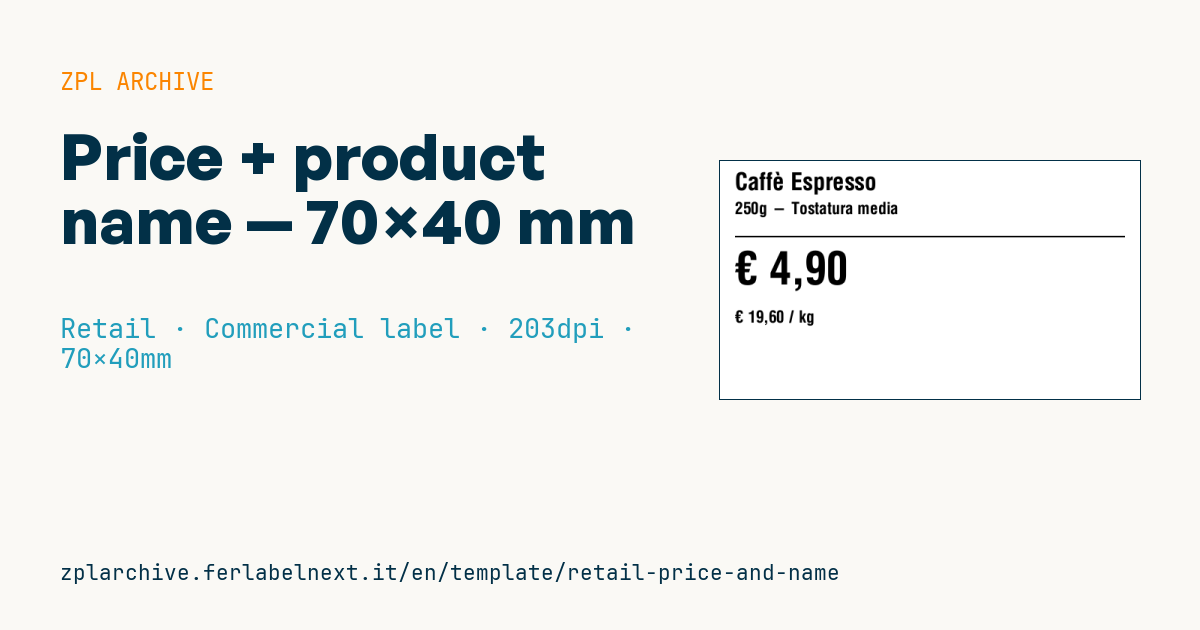
Shelf price label
70×40 mm format. Clean layout with large price and small unit price for compliance.
Placeholders
product_name— main nameproduct_subtitle— variant or description (e.g.Medium roast)currency—€,$,£, …price— final price (local format)price_per_unit—€ X.XX / kgor/lt
When to use it
This is the shelf or counter tag for grocery stores, coffee roasters, delicatessens and bulk-food shops: it goes into the shelf price channel or on a stand next to the product and is reprinted at every price change. The large price catches the eye; the price per kg or litre lets the customer compare packs of different sizes.
Since tags change often, direct thermal paper is the usual choice; in chilled cabinets use a material that copes with humidity and condensation.
Standards and requirements
In the EU Directive 98/6/EC requires, besides the selling price, the unit price (per kg, per litre, per metre…) for products sold by quantity, shown unambiguously, easily identifiable and clearly legible. Each member state implements it nationally; some allow 100 g or 100 ml as the reference for small quantities. Consumer prices include VAT. For foods in a packing medium the unit price usually refers to the drained net weight: check your national rule.
In ZPL right-align the price with ^FB (e.g. ^FB400,1,0,R) and use ^CI28 for €, £ and the correct decimal separator.
Common mistakes
- Calculating the price per kg on gross weight instead of net weight.
- Mixing prices per kg and per 100 g on the same shelf, making comparison impossible.
- Printing the unit price so small that it is unreadable.
- Forgetting to reprint the tag when the pack size changes.
FAQ
Is the price per kg mandatory on the shelf tag?
Yes, in the EU for products sold by weight or volume, except for the exemptions set by national law.
What material should I use for shelf price tags?
Direct thermal paper, cheap and quick to replace. In chilled cabinets choose materials suited to cold, damp conditions.
ZPL code
^XA
^PW559
^LL320
^CI28
^CF0,32^FO20,15^FD{{product_name}}^FS
^CF0,22^FO20,55^FD{{product_subtitle}}^FS
^FO20,100^GB520,2,2^FS
^CF0,60^FO20,120^FD{{currency}} {{price}}^FS
^CF0,22^FO20,200^FD{{price_per_unit}}^FS
^XZ- Industry: Retail
- Category: Commercial label
- DPI: 203
- Size: 70×40 mm
- Tags: Price per kg
What this label contains
Barcodes
This label contains no barcodes: it is made of text and graphics.
Elements
- 4 text fields
- 5 variable fields to fill in
- boxes and separator lines
Variable fields
| Field | Description | Example |
|---|---|---|
product_name | Product | Caffè Espresso |
product_subtitle | Subtitle | 250g - Tostatura media |
currency | Currency | € |
price | Price | 4,90 |
price_per_unit | Unit price | € 19,60 / kg |
Format and printing
70×40 mm (2.76×1.57″) at 203 dpi: 559×320 dots. Landscape.
Compatible Zebra printers
You need a printer with a 4″ printhead at 203 dpi, for example:
- Zebra ZD421 (desktop)
- Zebra ZD621 (desktop)
- Zebra GK420 (desktop)
- Zebra ZT231 (industrial)
- Zebra ZT411 (industrial)
- Zebra ZT610 (industrial)
- Zebra ZQ521 (mobile)
- Zebra ZQ630 (mobile)
Any Zebra printer with a wider printhead and the same resolution works too.
The code is written for 203 dpi: on a printer with a different resolution the label prints larger or smaller and needs rescaling.
How to use it
- Open “Customize placeholders” and enter your data in the variable fields listed above.
- Check the preview: it is rendered from the same ZPL code you will send to the printer.
- Download the .zpl file or copy the code and send it to the printer: with “Print” through Zebra Browser Print, or as a raw file to port 9100 if the printer is on the network.
- Load 70×40 mm labels and make sure the printer is set to 203 dpi. For a different size use “Duplicate & edit” and adapt the layout in the builder.
Edit it in the editor
To change the layout, use “Duplicate & edit”: the template opens in the online ZPL editor, where you modify it and save it to your account for free.
Related templates
- Black Friday with offer QR — 50×40 mm 300 dpi · Retail · Commercial label
- Handmade soap label with logo — 50×40 mm 203 dpi · Retail · Commercial label
- EAN13 + bilingual IT/EN description — 60×40 mm 203 dpi · Retail · Commercial label
- Basic EAN13 product — 50×30 mm 203 dpi · Retail · Commercial label
- -50% off sticker — 40×40 mm 203 dpi · Retail · Commercial label
- Summer sale with EAN-13 — 60×40 mm 203 dpi · Retail · Commercial label
- Clearance window poster — 70×50 mm 203 dpi · Retail · Commercial label
- Candle label with logo — 60×40 mm 203 dpi · Retail · Commercial label