EAN13 + bilingual IT/EN description — 60×40 mm
Retail label with product name in two languages, EAN13 and net content. Useful for export.
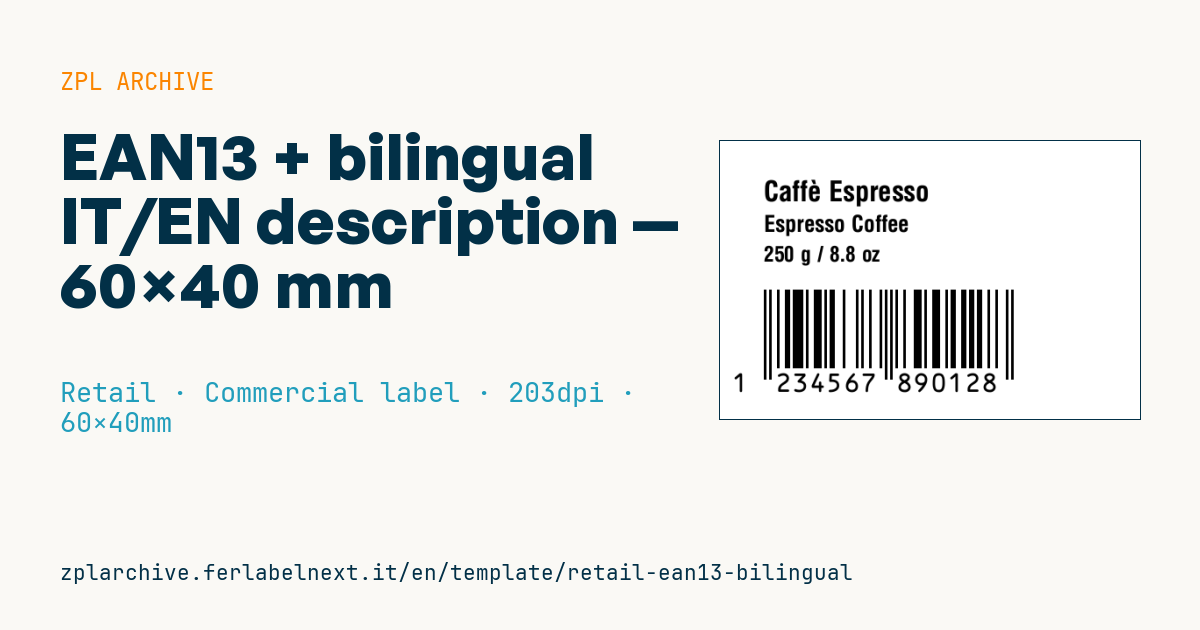
Bilingual EAN13
60×40 mm format. Designed for items shipped to IT + EN-speaking markets.
Placeholders
-
name_it,name_en— product name in both languages -
ean13— 13 digits -
net_content— net content (e.g.250 g,500 ml)
When to use it
It is for businesses exporting packaged goods, often food, cosmetics or household products, to English-speaking markets such as Ireland or Malta, or selling online across several countries. The label is applied as a secondary label over the original pack or directly on the packing line. On jars, pouches and boxes that pass through fridges or damp warehouses, use a synthetic thermal transfer material, since paper and direct thermal stock deteriorate with condensation.
Standards and requirements
For food, Article 15 of Regulation (EU) 1169/2011 requires mandatory information in a language easily understood by consumers in the Member State where the product is sold: English is not enough in Germany or France. If the product is food, name and net quantity are not enough either: you also need ingredients, allergens, best-before or use-by date and the responsible food business operator. The nominal quantity of ℮-marked prepackages follows Directive 76/211/EEC, with minimum figure heights of 2 mm up to 50 g, 3 mm up to 200 g, 4 mm up to 1000 g and 6 mm above.
For Italian accented letters use ^CI28 and send data in UTF-8; the EAN-13 follows the GS1 rules on module size and quiet zones. For the UK, check the separate UK rules.
Common mistakes
- Writing
grorlt: the correct units areg,kg,mlormL,lorL, with a space after the number. - Shrinking the font to fit two languages: for food the minimum x-height is 1.2 mm (0.9 mm on the smallest packs).
- Translating the name with machine translation without checking the legal name in the country of sale.
- Reusing the same GTIN for a pack with a different net quantity.
FAQ
Is English enough to sell across the EU?
No. Each Member State may require its own language for mandatory information; English only covers countries where it is an official or accepted language.
Does the new format need a new EAN?
Yes, if the net quantity changes you need a new GTIN. Adding a language to the label usually does not require one.
ZPL code
^XA
^PW480
^LL320
^CI28
^CF0,32^FO50,45^FD{{name_it}}^FS
^CF0,26^FO50,85^FD{{name_en}}^FS
^CF0,24^FO50,120^FD{{net_content}}^FS
^BY3,3,90
^FO50,170^BEN,90,Y,N^FD{{ean13}}^FS
^XZ- Industry: Retail
- Category: Commercial label
- DPI: 203
- Size: 60×40 mm
- Tags: EAN-13, Multi-language
What this label contains
Barcodes
- EAN-13
- 13-digit product code (GTIN-13) scanned at retail checkouts.
Elements
- 3 text fields
- 4 variable fields to fill in
Variable fields
| Field | Description | Example |
|---|---|---|
name_it | Name IT | Caffè Espresso |
name_en | Name EN | Espresso Coffee |
net_content | Net content | 250 g / 8.8 oz |
ean13 | ean13 | 123456789012 |
Format and printing
60×40 mm (2.36×1.57″) at 203 dpi: 480×320 dots. Landscape.
Compatible Zebra printers
You need a printer with a 4″ printhead at 203 dpi, for example:
- Zebra ZD421 (desktop)
- Zebra ZD621 (desktop)
- Zebra GK420 (desktop)
- Zebra ZT231 (industrial)
- Zebra ZT411 (industrial)
- Zebra ZT610 (industrial)
- Zebra ZQ521 (mobile)
- Zebra ZQ630 (mobile)
Any Zebra printer with a wider printhead and the same resolution works too.
The code is written for 203 dpi: on a printer with a different resolution the label prints larger or smaller and needs rescaling.
How to use it
- Open “Customize placeholders” and enter your data in the variable fields listed above.
- Check the preview: it is rendered from the same ZPL code you will send to the printer.
- Download the .zpl file or copy the code and send it to the printer: with “Print” through Zebra Browser Print, or as a raw file to port 9100 if the printer is on the network.
- Load 60×40 mm labels and make sure the printer is set to 203 dpi. For a different size use “Duplicate & edit” and adapt the layout in the builder.
Edit it in the editor
To change the layout, use “Duplicate & edit”: the template opens in the online ZPL editor, where you modify it and save it to your account for free.
Related templates
- Black Friday with offer QR — 50×40 mm 300 dpi · Retail · Commercial label
- Handmade soap label with logo — 50×40 mm 203 dpi · Retail · Commercial label
- Price + product name — 70×40 mm 203 dpi · Retail · Commercial label
- Summer sale with EAN-13 — 60×40 mm 203 dpi · Retail · Commercial label
- Clearance window poster — 70×50 mm 203 dpi · Retail · Commercial label
- Candle label with logo — 60×40 mm 203 dpi · Retail · Commercial label
- Basic EAN13 product — 50×30 mm 203 dpi · Retail · Commercial label
- -50% off sticker — 40×40 mm 203 dpi · Retail · Commercial label