Black Friday with offer QR — 50×40 mm
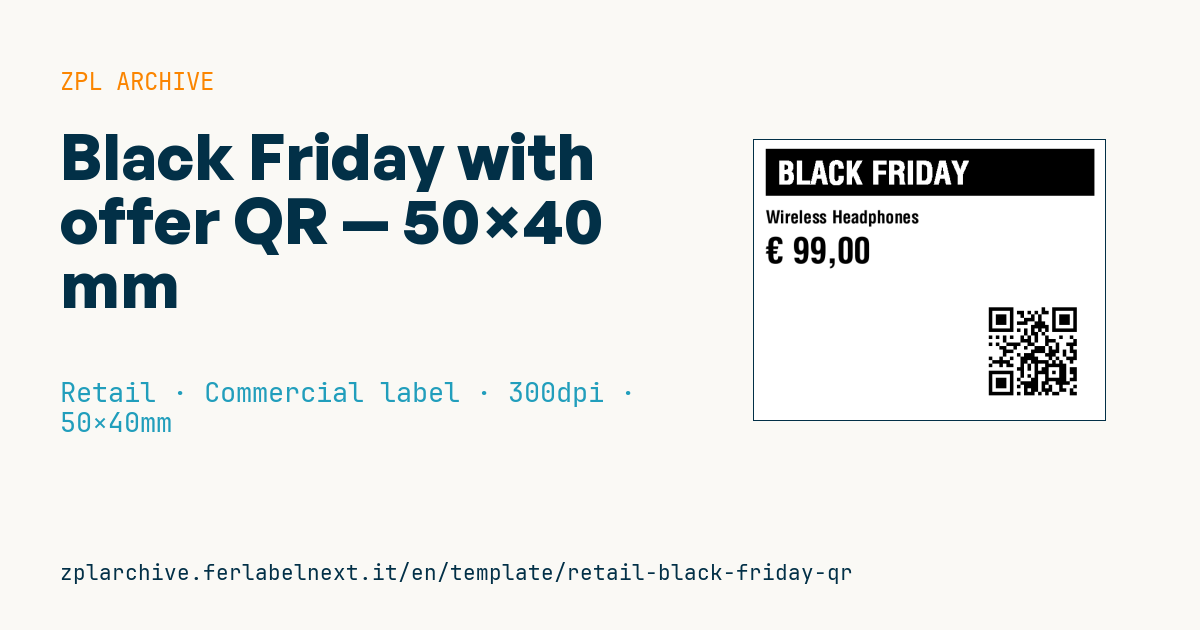
Black Friday label with a reversed dark box on top, a highlighted price and a QR code linking to the offer landing page. Bridges shelf and digital.
Black Friday with offer QR
50×40 mm @ 300 dpi. Dark box (^GB) with a reversed claim (^FR) on top, name and price on the left, QR code (^BQ) bottom-right pointing to the offer landing page.
Placeholders
promo_label— claim (e.g.BLACK FRIDAY)product_namecurrency— currency symbolprice— price (EU format)offer_url— offer landing URL
When to use it
This label lets stores link the physical product to an offer page: terms, available variants, reviews, or the option to buy online when a size is out of stock. It goes on the shelf or the item for the length of the Black Friday or Cyber Monday campaign, so a few days: direct thermal is fine. The QR must scan with a customer's smartphone at 20-30 cm, even under less than ideal store lighting.
Standards and requirements
The QR code is defined by ISO/IEC 18004, which requires a quiet zone of 4 modules around the symbol. In ^BQ the data field starts with the error correction level and input mode, for example ^FDMA, followed by the URL; at 300 dpi a magnification of 4 gives modules of about 0.34 mm. Shorter URLs produce less dense QR codes that scan more easily.
For pricing, Directive 98/6/EC as amended by Directive (EU) 2019/2161 applies: if the label or page announces a discount, the prior price to show is the lowest of the 30 days before the reduction. Black Friday has no exemption from this rule.
Common mistakes
- Pointing the QR at a page that returns an error once the campaign ends: set up a redirect.
- Using long URLs packed with tracking parameters that make the QR too dense for 50×40 mm.
- Printing a label price that differs from the one on the landing page.
- Not testing the scan with several smartphones before printing the full run.
FAQ
Which error correction level should I use?
For clean, flat labels, level M is a good balance between robustness and density. Level H only makes sense if the QR risks scratches or creases, and it makes the symbol larger.
Can I use a shortened URL?
Yes, it reduces QR density. Use a domain you control, though: if the shortening service shuts down, your labels stop working.
ZPL code
^XA
^PW591
^LL472
^CI28
^FO20,15^GB560,80,80^FS
^FR^CF0,54^FO40,36^FD{{promo_label}}^FS
^CF0,30^FO20,120^FD{{product_name}}^FS
^CF0,60^FO20,165^FD{{currency}} {{price}}^FS
^FO400,275^BQN,2,6^FDLA,{{offer_url}}^FS
^XZ- Industry: Retail
- Category: Commercial label
- DPI: 300
- Size: 50×40 mm
- Tags: Black Friday, Promotion, QR Code
What this label contains
Barcodes
- QR Code
- 2D code for links, text and structured data, readable by any smartphone.
Elements
- 3 text fields
- 5 variable fields to fill in
- boxes and separator lines
Variable fields
| Field | Description | Example |
|---|---|---|
promo_label | Promo text | BLACK FRIDAY |
product_name | Product | Wireless Headphones |
currency | Currency | € |
price | Price | 99,00 |
offer_url | Offer URL | https://shop.example/bf |
Format and printing
50×40 mm (1.97×1.57″) at 300 dpi: 591×472 dots. Landscape.
Compatible Zebra printers
You need a printer with a 2″ printhead at 300 dpi, for example:
- Zebra ZD411 (desktop)
- Zebra ZD611 (desktop)
Any Zebra printer with a wider printhead and the same resolution works too.
The code is written for 300 dpi: on a printer with a different resolution the label prints larger or smaller and needs rescaling.
How to use it
- Open “Customize placeholders” and enter your data in the variable fields listed above.
- Check the preview: it is rendered from the same ZPL code you will send to the printer.
- Download the .zpl file or copy the code and send it to the printer: with “Print” through Zebra Browser Print, or as a raw file to port 9100 if the printer is on the network.
- Load 50×40 mm labels and make sure the printer is set to 300 dpi. For a different size use “Duplicate & edit” and adapt the layout in the builder.
Edit it in the editor
To change the layout, use “Duplicate & edit”: the template opens in the online ZPL editor, where you modify it and save it to your account for free.
Related templates
- EAN13 + bilingual IT/EN description — 60×40 mm 203 dpi · Retail · Commercial label
- Handmade soap label with logo — 50×40 mm 203 dpi · Retail · Commercial label
- Candle label with logo — 60×40 mm 203 dpi · Retail · Commercial label
- Basic EAN13 product — 50×30 mm 203 dpi · Retail · Commercial label
- Summer sale with EAN-13 — 60×40 mm 203 dpi · Retail · Commercial label
- Clearance window poster — 70×50 mm 203 dpi · Retail · Commercial label
- Price + product name — 70×40 mm 203 dpi · Retail · Commercial label
- -50% off sticker — 40×40 mm 203 dpi · Retail · Commercial label