-50% off sticker — 40×40 mm
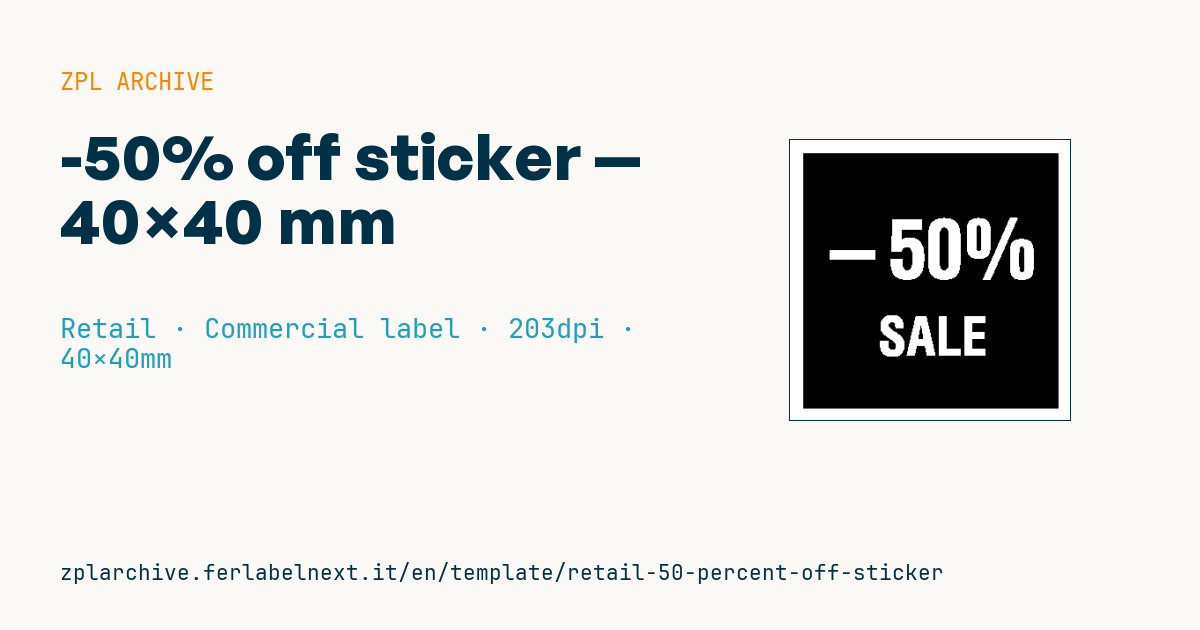
High-impact square sticker with a giant reversed discount percentage on a solid black field. Catches the eye from a distance.
-50% off sticker
40×40 mm @ 203 dpi. Solid black fill (^GB) with reversed text (^FR) printing white on black. The percentage is central and dominant, above a short promo claim.
Placeholders
discount_pct— discount percentage (number only)promo_label— short claim (e.g.SALE)
When to use it
This is the sticker staff apply by hand to the pack or over the existing tag during sales, end-of-season clear-outs or flash promotions. It goes on the goods, not the shelf, so a removable adhesive makes sense: it should peel off without tearing the carton or leaving residue on glass and plastic. It is printed in batches just before the promotion and needs to last weeks, not years: direct thermal is fine as long as the store is not exposed to direct sunlight.
Standards and requirements
The sticker alone does not show a price, but announcing a price reduction is regulated. Directive 98/6/EC, as amended by Directive (EU) 2019/2161 (Omnibus), requires every price reduction announcement to show the prior price, meaning the lowest price applied in the 30 days before the reduction; the -50% must be calculated from that price. Exemptions and rules on sales periods and notifications depend on national and regional law: check them before the campaign.
On the print side, a solid black field with ^FR draws a lot of printhead energy: lower the speed with ^PR and tune darkness with ~SD or ^MD to avoid streaky black or blurred edges.
Common mistakes
- Applying the sticker without the 30-day reference price being shown on the product or shelf.
- Using a permanent adhesive on packs that customers want to give as gifts.
- Running the black fill to the very edge: a slight media shift leaves a white line or smears the platen roller.
- Overlapping two
^FRfields: where they cross, the reversal cancels out and the text disappears.
FAQ
Can I advertise -50% on a price I just raised?
No. Under the Omnibus Directive the discount must be calculated from the lowest price of the previous 30 days, so a price increase shortly before the promotion is not a valid base.
Direct thermal or thermal transfer for discount stickers?
For an indoor promotion lasting a few weeks, direct thermal is enough and cheaper. If products sit in a sunny window, thermal transfer keeps the black from fading.
ZPL code
^XA
^PW320
^LL320
^CI28
^FO15,15^GB290,290,290^FS
^FR^CF0,90^FO30,90^FD-{{discount_pct}}%^FS
^FR^CF0,60^FO100,200^FD{{promo_label}}^FS
^XZ- Industry: Retail
- Category: Commercial label
- DPI: 203
- Size: 40×40 mm
- Tags: Discount, Promotion, Sale
What this label contains
Barcodes
This label contains no barcodes: it is made of text and graphics.
Elements
- 2 text fields
- 2 variable fields to fill in
- boxes and separator lines
Variable fields
| Field | Description | Example |
|---|---|---|
discount_pct | Discount % | 50 |
promo_label | Promo text | SALE |
Format and printing
40×40 mm (1.57×1.57″) at 203 dpi: 320×320 dots. Square.
Compatible Zebra printers
You need a printer with a 2″ printhead at 203 dpi, for example:
- Zebra ZD411 (desktop)
- Zebra ZD611 (desktop)
- Zebra ZQ220 (mobile)
- Zebra ZQ310 (mobile)
Any Zebra printer with a wider printhead and the same resolution works too.
The code is written for 203 dpi: on a printer with a different resolution the label prints larger or smaller and needs rescaling.
How to use it
- Open “Customize placeholders” and enter your data in the variable fields listed above.
- Check the preview: it is rendered from the same ZPL code you will send to the printer.
- Download the .zpl file or copy the code and send it to the printer: with “Print” through Zebra Browser Print, or as a raw file to port 9100 if the printer is on the network.
- Load 40×40 mm labels and make sure the printer is set to 203 dpi. For a different size use “Duplicate & edit” and adapt the layout in the builder.
Edit it in the editor
To change the layout, use “Duplicate & edit”: the template opens in the online ZPL editor, where you modify it and save it to your account for free.
Related templates
- Black Friday with offer QR — 50×40 mm 300 dpi · Retail · Commercial label
- Handmade soap label with logo — 50×40 mm 203 dpi · Retail · Commercial label
- EAN13 + bilingual IT/EN description — 60×40 mm 203 dpi · Retail · Commercial label
- Price + product name — 70×40 mm 203 dpi · Retail · Commercial label
- Summer sale with EAN-13 — 60×40 mm 203 dpi · Retail · Commercial label
- Clearance window poster — 70×50 mm 203 dpi · Retail · Commercial label
- Candle label with logo — 60×40 mm 203 dpi · Retail · Commercial label
- Basic EAN13 product — 50×30 mm 203 dpi · Retail · Commercial label