Handmade soap label with logo — 50×40 mm
Handmade soap label with logo area, brand, product name, ingredients and weight.
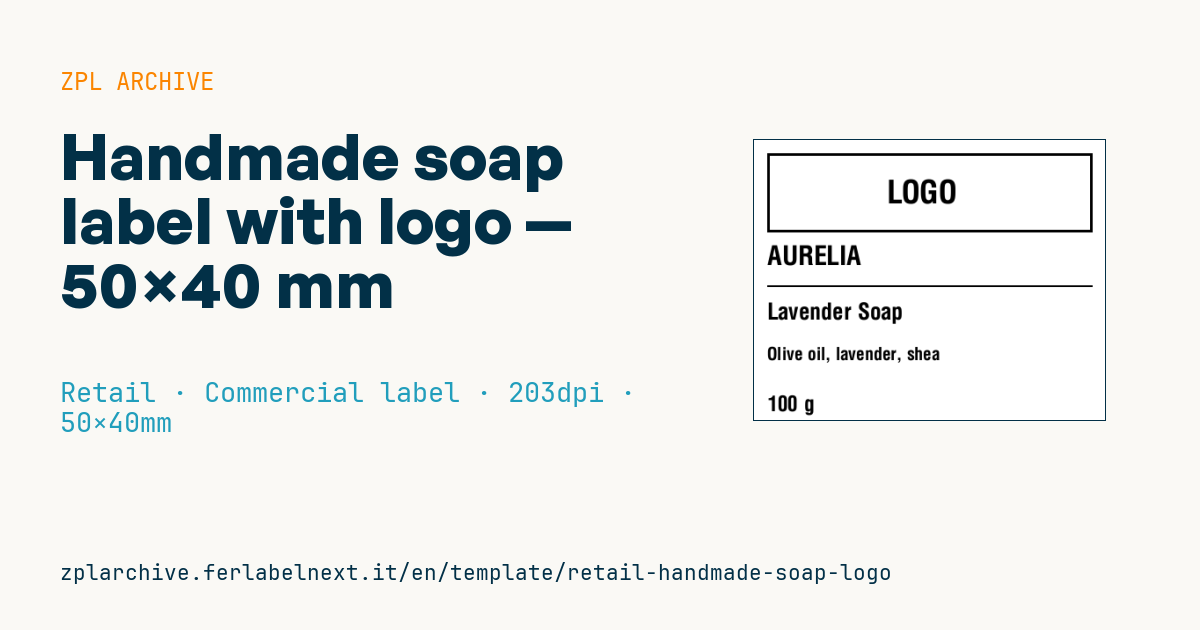
Handmade soap label with logo
50×40 mm @ 203 dpi. Label to wrap around the handmade soap bar. At the top the logo area: a placeholder frame with "LOGO" text, to be replaced with the real brand logo (^GF image).
Placeholders
brandproduct_nameingredients_short— main ingredientsweight_g— weight in grams
The "LOGO" frame is a placeholder: replace it with your logo as a graphic (
^GF).
When to use it
Craft soap makers, herbalists and cosmetic workshops selling solid soap bars use this label: the band wraps around the bar, closes at the back and shows brand, product name and key ingredients. It is printed in small runs, often tied to a single batch, and ends up on market stalls, organic shops or shipped parcels.
Soap oils and glycerine stain paper and direct thermal stock: prefer coated paper or a polypropylene label printed by thermal transfer with a wax-resin or resin ribbon, which also copes with bathroom humidity.
Standards and requirements
In the EU soap is a cosmetic product covered by Regulation (EC) 1223/2009. The label must include, among other things: name and address of the responsible person, nominal content by weight, date of minimum durability or the PAO symbol when durability exceeds 30 months, batch number, any precautions for use and the full ingredient list with INCI names in descending order. The short ingredients field in this template is not enough on its own: the full INCI list must appear on the product or the outer packaging. Before sale you also need the safety assessment and the CPNP notification.
In ZPL use ^CI28 for special characters and ^FB to fit the list on several lines.
Common mistakes
- Printing only the "highlight" ingredients instead of the full INCI list.
- Forgetting the batch number, which you need to trace a specific batch.
- Stating the weight before curing, when the bar still loses water and weight.
- Using paper that soaks up oil and becomes unreadable.
FAQ
Is handmade soap a cosmetic?
Yes, in the EU soap for cleansing the skin is a cosmetic and follows Regulation (EC) 1223/2009.
Can I sell soap without an ingredient list?
No. The full INCI list is mandatory on the product or its outer packaging.
ZPL code
^XA
^LL320
^CI28
^PW400
^FO15,15^GB370,90,3^FS
^CF0,36^FO140,45^FD LOGO ^FS
^CF0,30^FO15,120^FD{{brand}}^FS
^FO15,165^GB370,2,2^FS
^CF0,26^FO15,185^FD{{product_name}}^FS
^CF0,20^FO15,235^FD{{ingredients_short}}^FS
^CF0,24^FO15,290^FD{{weight_g}} g^FS
^XZ- Industry: Retail
- Category: Commercial label
- DPI: 203
- Size: 50×40 mm
- Tags: Handmade, Logo, Premium
What this label contains
Barcodes
This label contains no barcodes: it is made of text and graphics.
Elements
- 5 text fields
- 4 variable fields to fill in
- boxes and separator lines
Variable fields
| Field | Description | Example |
|---|---|---|
brand | Brand | AURELIA |
product_name | Product | Lavender Soap |
ingredients_short | Ingredients | Olive oil, lavender, shea |
weight_g | Weight (g) | 100 |
Format and printing
50×40 mm (1.97×1.57″) at 203 dpi: 400×320 dots. Landscape.
Compatible Zebra printers
You need a printer with a 2″ printhead at 203 dpi, for example:
- Zebra ZD411 (desktop)
- Zebra ZD611 (desktop)
- Zebra ZQ220 (mobile)
- Zebra ZQ310 (mobile)
Any Zebra printer with a wider printhead and the same resolution works too.
The code is written for 203 dpi: on a printer with a different resolution the label prints larger or smaller and needs rescaling.
How to use it
- Open “Customize placeholders” and enter your data in the variable fields listed above.
- Check the preview: it is rendered from the same ZPL code you will send to the printer.
- Download the .zpl file or copy the code and send it to the printer: with “Print” through Zebra Browser Print, or as a raw file to port 9100 if the printer is on the network.
- Load 50×40 mm labels and make sure the printer is set to 203 dpi. For a different size use “Duplicate & edit” and adapt the layout in the builder.
Edit it in the editor
To change the layout, use “Duplicate & edit”: the template opens in the online ZPL editor, where you modify it and save it to your account for free.
Related templates
- Black Friday with offer QR — 50×40 mm 300 dpi · Retail · Commercial label
- EAN13 + bilingual IT/EN description — 60×40 mm 203 dpi · Retail · Commercial label
- -50% off sticker — 40×40 mm 203 dpi · Retail · Commercial label
- Basic EAN13 product — 50×30 mm 203 dpi · Retail · Commercial label
- Summer sale with EAN-13 — 60×40 mm 203 dpi · Retail · Commercial label
- Clearance window poster — 70×50 mm 203 dpi · Retail · Commercial label
- Candle label with logo — 60×40 mm 203 dpi · Retail · Commercial label
- Price + product name — 70×40 mm 203 dpi · Retail · Commercial label