Basic EAN13 product — 50×30 mm
Minimal retail product label with name and standard EAN13 barcode.
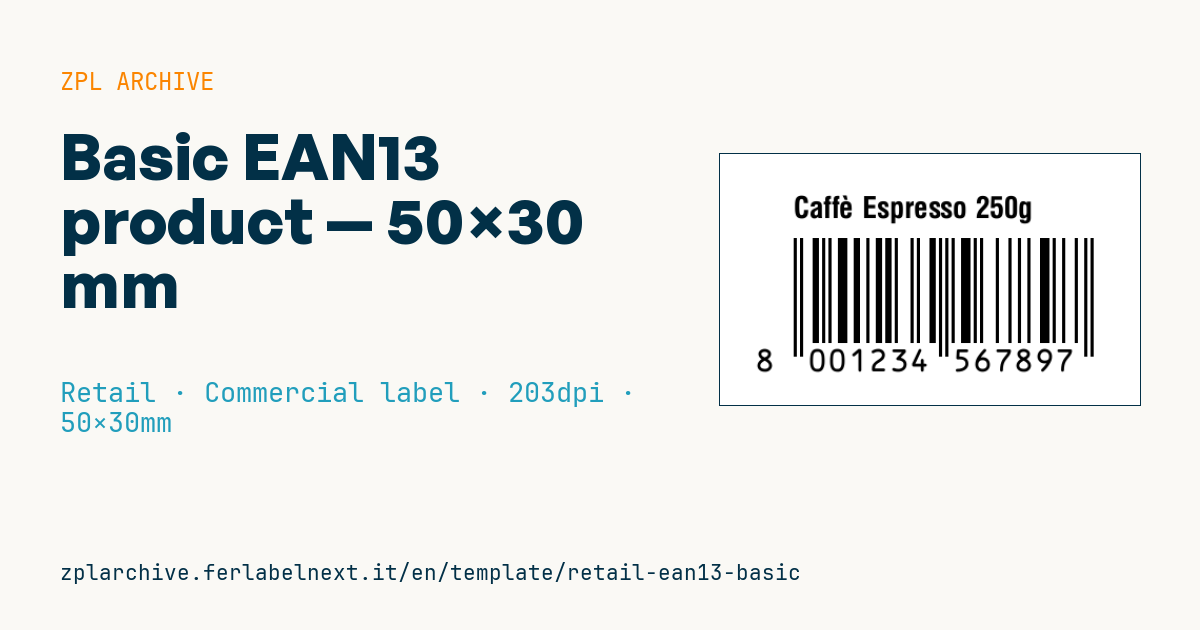
Basic EAN13 product
50×30 mm format. Most common label for retail items.
Placeholders
product_name— short name (max 30 visible chars)ean13— 13 numeric digits EAN13. First 2-3 are country prefix (80-83for Italy), then company code + item code + check digit (auto-calculated by Labelary).
When to use it
Manufacturers, wholesalers and small brands use this label on items that must go through a store checkout: cosmetics, accessories, spare parts, craft products sold through resellers. Place it on a flat, visible area of the pack, away from folds and edges. If the item sits in a warehouse for a long time or under bright light, direct thermal paper can grey out and make the code unreadable: for long shelf life, prefer thermal transfer.
Standards and requirements
EAN-13 encodes a GTIN-13 according to the GS1 General Specifications. You obtain GTINs from your national GS1 organisation: the prefix shows which GS1 office issued the company prefix, not the product's country of origin. For point-of-sale scanning GS1 sets a nominal module of 0.33 mm, with magnifications from 80% to 200%. At 203 dpi a dot is 0.125 mm: with ^BY2 the module is 0.25 mm, below the minimum; with ^BY3 it is about 0.375 mm, which is correct. The symbol with quiet zones then exceeds 42 mm, so it only just fits in 50 mm.
Always send 12 digits: ^BE calculates the check digit itself, so check in your management system that it matches the one in the GTIN.
Common mistakes
- Using
^BY2at 203 dpi to make the code fit: the module is below the GS1 threshold. - Cutting bar height a lot: GS1 discourages truncation on items scanned at checkout.
- Removing white space at the sides: you need at least 11 modules on the left and 7 on the right.
- Inventing GTINs or buying second-hand ones: retailers check them against GS1 databases.
FAQ
Can I create an EAN-13 code myself?
Technically yes, but retail sales require a GTIN that GS1 has issued to your company; otherwise you risk duplicates and rejection by retailers.
Does an 80 prefix mean the product is Italian?
No. Prefixes 800-839 mean the company prefix was assigned by GS1 Italy; the product can be made anywhere.
ZPL code
^XA
^PW400
^LL240
^CI28
^CF0,28^FO70,40^FD{{product_name}}^FS
^BY3,2,100
^FO70,80^BEN,100,Y,N^FD{{ean13}}^FS
^XZ- Industry: Retail
- Category: Commercial label
- DPI: 203
- Size: 50×30 mm
- Tags: EAN-13
What this label contains
Barcodes
- EAN-13
- 13-digit product code (GTIN-13) scanned at retail checkouts.
Elements
- 1 text field
- 2 variable fields to fill in
Variable fields
| Field | Description | Example |
|---|---|---|
product_name | Product | Caffè Espresso 250g |
ean13 | EAN13 | 8001234567897 |
Format and printing
50×30 mm (1.97×1.18″) at 203 dpi: 400×240 dots. Landscape.
Compatible Zebra printers
You need a printer with a 2″ printhead at 203 dpi, for example:
- Zebra ZD411 (desktop)
- Zebra ZD611 (desktop)
- Zebra ZQ220 (mobile)
- Zebra ZQ310 (mobile)
Any Zebra printer with a wider printhead and the same resolution works too.
The code is written for 203 dpi: on a printer with a different resolution the label prints larger or smaller and needs rescaling.
How to use it
- Open “Customize placeholders” and enter your data in the variable fields listed above.
- Check the preview: it is rendered from the same ZPL code you will send to the printer.
- Download the .zpl file or copy the code and send it to the printer: with “Print” through Zebra Browser Print, or as a raw file to port 9100 if the printer is on the network.
- Load 50×30 mm labels and make sure the printer is set to 203 dpi. For a different size use “Duplicate & edit” and adapt the layout in the builder.
Edit it in the editor
To change the layout, use “Duplicate & edit”: the template opens in the online ZPL editor, where you modify it and save it to your account for free.
Related templates
- Black Friday with offer QR — 50×40 mm 300 dpi · Retail · Commercial label
- Handmade soap label with logo — 50×40 mm 203 dpi · Retail · Commercial label
- EAN13 + bilingual IT/EN description — 60×40 mm 203 dpi · Retail · Commercial label
- Summer sale with EAN-13 — 60×40 mm 203 dpi · Retail · Commercial label
- Clearance window poster — 70×50 mm 203 dpi · Retail · Commercial label
- Candle label with logo — 60×40 mm 203 dpi · Retail · Commercial label
- Price + product name — 70×40 mm 203 dpi · Retail · Commercial label
- -50% off sticker — 40×40 mm 203 dpi · Retail · Commercial label