Handmade craft tag with logo — 40×40 mm
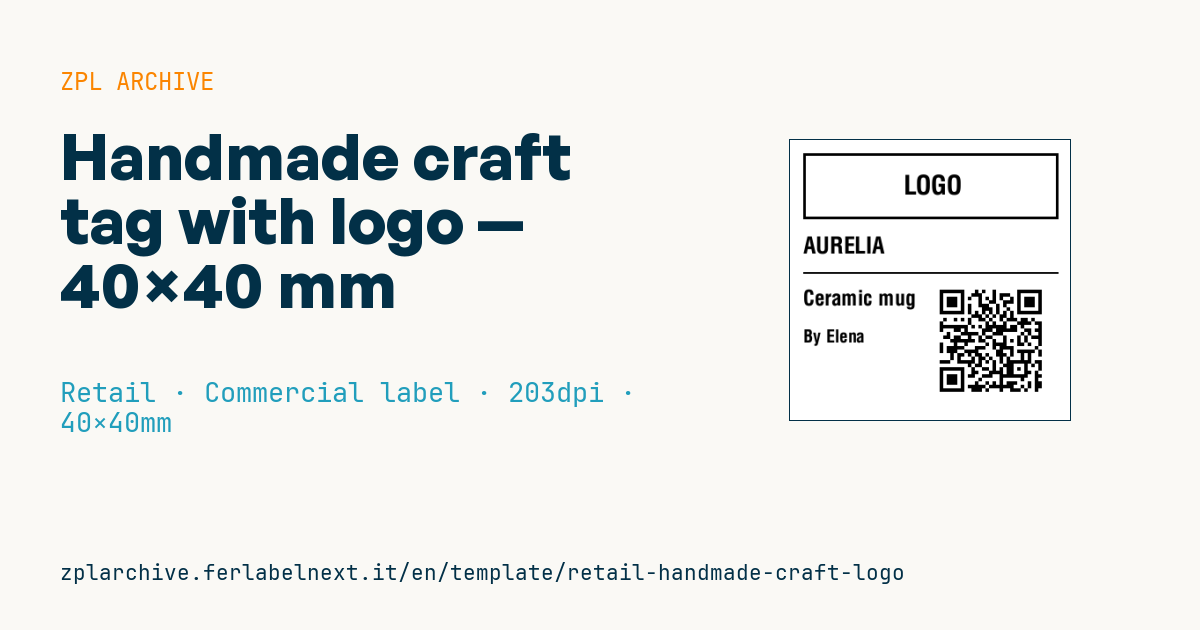
Handmade craft item tag with logo area, brand, item name, maker and product-story QR.
Handmade craft tag with logo
40×40 mm @ 203 dpi. Small square tag for handmade craft items. At the top the logo area: a placeholder frame with "LOGO" text, to be replaced with the real brand logo (^GF image). The QR tells the product story.
Placeholders
branditem_namemakerstory_url— URL in the QR (product story)
The "LOGO" frame is a placeholder: replace it with your logo as a graphic (
^GF).
When to use it
Makers, workshops and small brands selling ceramics, jewellery, wooden or leather goods at markets, concept stores and online use this tag. The square tag hangs on a string or sticks under the item and signs the piece: who made it and, through the QR, the story of the material and the craft. It also helps tell one-off pieces apart from small runs.
At 40×40 mm space is tight: choose tag stock or a synthetic label printed by thermal transfer, which survives handling in the shop and does not fade in a window display.
Standards and requirements
There is no standard for the tag itself, but items sold to consumers in the EU fall under the General Product Safety Regulation (EU) 2023/988 (GPSR): the product, its packaging or an accompanying document must show the manufacturer's name and postal address, an electronic contact and an element that identifies the product (type, batch or serial number). Toys, textiles and food-contact items have their own rules: check them.
For the QR at 203 dpi use at least ^BQN,2,3 (modules of about 0.375 mm) with a short URL; at lower magnification the code becomes hard to read.
Common mistakes
- Encoding a long URL with parameters: on 40 mm the QR gets too dense.
- Relying on the tag as the only carrier of manufacturer details, when it can come off and get lost.
- Placing the QR flush with the edge, without a white margin.
- Using direct thermal paper for items displayed for months in a window.
FAQ
Does a handmade item need a mandatory label?
In the EU the GPSR requires at least the manufacturer's details and a product identifier; some categories have specific rules.
What should the QR page contain?
The story of the piece, materials, care instructions and your contact details, so the customer can find them after the purchase.
ZPL code
^XA
^LL320
^CI28
^PW320
^FO15,15^GB290,75,3^FS
^CF0,30^FO120,40^FD LOGO ^FS
^CF0,26^FO15,110^FD{{brand}}^FS
^FO15,150^GB290,2,2^FS
^CF0,24^FO15,170^FD{{item_name}}^FS
^CF0,20^FO15,215^FDBy {{maker}}^FS
^FO170,160^BQN,4,4^FDQA,{{story_url}}^FS
^XZ- Industry: Retail
- Category: Commercial label
- DPI: 203
- Size: 40×40 mm
- Tags: Handmade, Logo, QR Code
What this label contains
Barcodes
- QR Code
- 2D code for links, text and structured data, readable by any smartphone.
Elements
- 4 text fields
- 4 variable fields to fill in
- boxes and separator lines
Variable fields
| Field | Description | Example |
|---|---|---|
brand | Brand | AURELIA |
item_name | Item | Ceramic mug |
maker | Maker | Elena |
story_url | Story URL | https://aurelia.example/s/mug01 |
Format and printing
40×40 mm (1.57×1.57″) at 203 dpi: 320×320 dots. Square.
Compatible Zebra printers
You need a printer with a 2″ printhead at 203 dpi, for example:
- Zebra ZD411 (desktop)
- Zebra ZD611 (desktop)
- Zebra ZQ220 (mobile)
- Zebra ZQ310 (mobile)
Any Zebra printer with a wider printhead and the same resolution works too.
The code is written for 203 dpi: on a printer with a different resolution the label prints larger or smaller and needs rescaling.
How to use it
- Open “Customize placeholders” and enter your data in the variable fields listed above.
- Check the preview: it is rendered from the same ZPL code you will send to the printer.
- Download the .zpl file or copy the code and send it to the printer: with “Print” through Zebra Browser Print, or as a raw file to port 9100 if the printer is on the network.
- Load 40×40 mm labels and make sure the printer is set to 203 dpi. For a different size use “Duplicate & edit” and adapt the layout in the builder.
Edit it in the editor
To change the layout, use “Duplicate & edit”: the template opens in the online ZPL editor, where you modify it and save it to your account for free.
Related templates
- Black Friday with offer QR — 50×40 mm 300 dpi · Retail · Commercial label
- Handmade soap label with logo — 50×40 mm 203 dpi · Retail · Commercial label
- EAN13 + bilingual IT/EN description — 60×40 mm 203 dpi · Retail · Commercial label
- Candle label with logo — 60×40 mm 203 dpi · Retail · Commercial label
- Price + product name — 70×40 mm 203 dpi · Retail · Commercial label
- -50% off sticker — 40×40 mm 203 dpi · Retail · Commercial label
- Basic EAN13 product — 50×30 mm 203 dpi · Retail · Commercial label
- Summer sale with EAN-13 — 60×40 mm 203 dpi · Retail · Commercial label