GS1 SSCC pallet label — 100×60 mm
Pallet logistics label with the SSCC in GS1-128 (AI 00), ship-to, content and quantity. The standard for unique logistic unit identification.
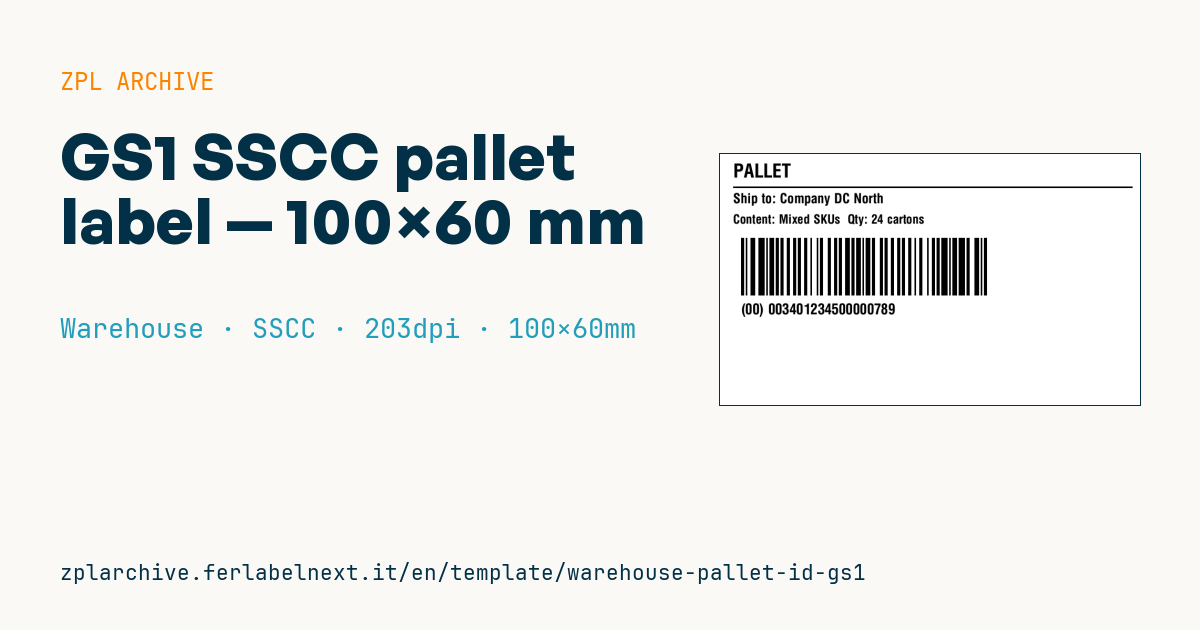
GS1 SSCC pallet label
100×60 mm @ 203 dpi. Title, separator, ship-to, content+quantity, GS1-128 barcode with AI (00) SSCC and the readable SSCC.
Placeholders
title_label— title (e.g.PALLET)ship_to— ship-tocontent/quantity— content and quantitysscc— SSCC code (18 digits)
The barcode uses
>;>8for FNC1 + Code 128 numeric mode (correct GS1-128 encoding of the SSCC).
When to use it
This label identifies the pallet as a logistic unit through the SSCC, the serial code the consignee scans at receiving to link the pallet to the despatch advice. Manufacturers and distributors shipping to retail distribution centres, 3PLs and industrial customers working with GS1 standards use it, as do warehouses that want a unique pallet ID for internal flows too.
The pallet travels by truck, waits on docks and sometimes in cold stores: direct thermal is fine for short shipments, but if the pallet is stored for long periods or outdoors, use thermal transfer, which does not fade with heat and light.
Standards and requirements
The SSCC is defined by the GS1 General Specifications: 18 digits made of an extension digit, GS1 Company Prefix, serial reference and a modulo 10 check digit, encoded in GS1-128 with AI (00). ZPL calculates the internal Code 128 check character but not the SSCC check digit: you must pass all 18 correct digits. For the full logistic label, GS1 indicates formats such as A6 or A5, a minimum X-dimension of 0.495 mm (^BY4 at 203 dpi) and a bar height of about 32 mm: this compact format may not be enough, so check your customer's requirements.
Common mistakes
- Putting the brackets of "(00)" in the barcode data: they belong only in the human-readable text.
- Miscalculating or omitting the SSCC check digit.
- Reusing an SSCC already assigned to another shipped pallet.
- Applying a single label: for pallets, GS1 recommends two labels on adjacent sides, with the barcode 400-800 mm from the base.
FAQ
How do I generate a valid SSCC?
You need a GS1 Company Prefix from the GS1 member organisation in your country. You manage the serial reference and increment it without repeats.
Why can't the consignee read my GS1-128?
Usually the leading FNC1 is missing or the module is too small. Check that the field starts with >;>8 and verify the print with an ISO/IEC 15416 verifier.
ZPL code
^XA
^PW799
^LL480
^CI28
^CF0,36^FO25,18^FD{{title_label}}^FS
^FO25,62^GB760,3,3^FS
^CF0,26^FO25,75^FDShip to: {{ship_to}}^FS
^CF0,24^FO25,115^FDContent: {{content}}  Qty: {{quantity}}^FS
^BY3,2,110
^FO40,160^BCN,110,N,N,N^FD>;>800{{sscc}}^FS
^CF0,28^FO40,285^FD(00) {{sscc}}^FS
^XZWhat this label contains
Barcodes
- GS1-128
- Code 128 with FNC1 and GS1 Application Identifiers: the logistics barcode, used for SSCC, batch, expiry and weight on pallets and cartons.
Elements
- 4 text fields
- 5 variable fields to fill in
- boxes and separator lines
Variable fields
| Field | Description | Example |
|---|---|---|
title_label | Title | PALLET |
ship_to | Ship to | Company DC North |
content | Content | Mixed SKUs |
quantity | Quantity | 24 cartons |
sscc | SSCC | 003401234500000789 |
Format and printing
100×60 mm (3.94×2.36″) at 203 dpi: 799×480 dots. Landscape.
Compatible Zebra printers
You need a printer with a 4″ printhead at 203 dpi, for example:
- Zebra ZD421 (desktop)
- Zebra ZD621 (desktop)
- Zebra GK420 (desktop)
- Zebra ZT231 (industrial)
- Zebra ZT411 (industrial)
- Zebra ZT610 (industrial)
- Zebra ZQ521 (mobile)
- Zebra ZQ630 (mobile)
Any Zebra printer with a wider printhead and the same resolution works too.
The code is written for 203 dpi: on a printer with a different resolution the label prints larger or smaller and needs rescaling.
How to use it
- Open “Customize placeholders” and enter your data in the variable fields listed above.
- Check the preview: it is rendered from the same ZPL code you will send to the printer.
- Download the .zpl file or copy the code and send it to the printer: with “Print” through Zebra Browser Print, or as a raw file to port 9100 if the printer is on the network.
- Load 100×60 mm labels and make sure the printer is set to 203 dpi. For a different size use “Duplicate & edit” and adapt the layout in the builder.
Edit it in the editor
To change the layout, use “Duplicate & edit”: the template opens in the online ZPL editor, where you modify it and save it to your account for free.
Related templates
- Multi-level bay location — 100×50 mm 203 dpi · Warehouse · Location
- Single rack location — 50×30 mm 203 dpi · Warehouse · Location
- Shelf-edge / bin label — 40×20 mm 300 dpi · Warehouse · Location
- GS1 SSCC pallet — 100×150 mm 203 dpi · Warehouse · SSCC
- Pick face label with QR — 60×40 mm 203 dpi · Warehouse · Picking
- Cross-dock receiving — 100×70 mm 203 dpi · Warehouse · Cross-docking
- Zone / aisle sign — 100×50 mm 203 dpi · Warehouse · Location
- Quality hold label — 70×50 mm 203 dpi · Warehouse · Inventory