Shelf-edge / bin label — 40×20 mm
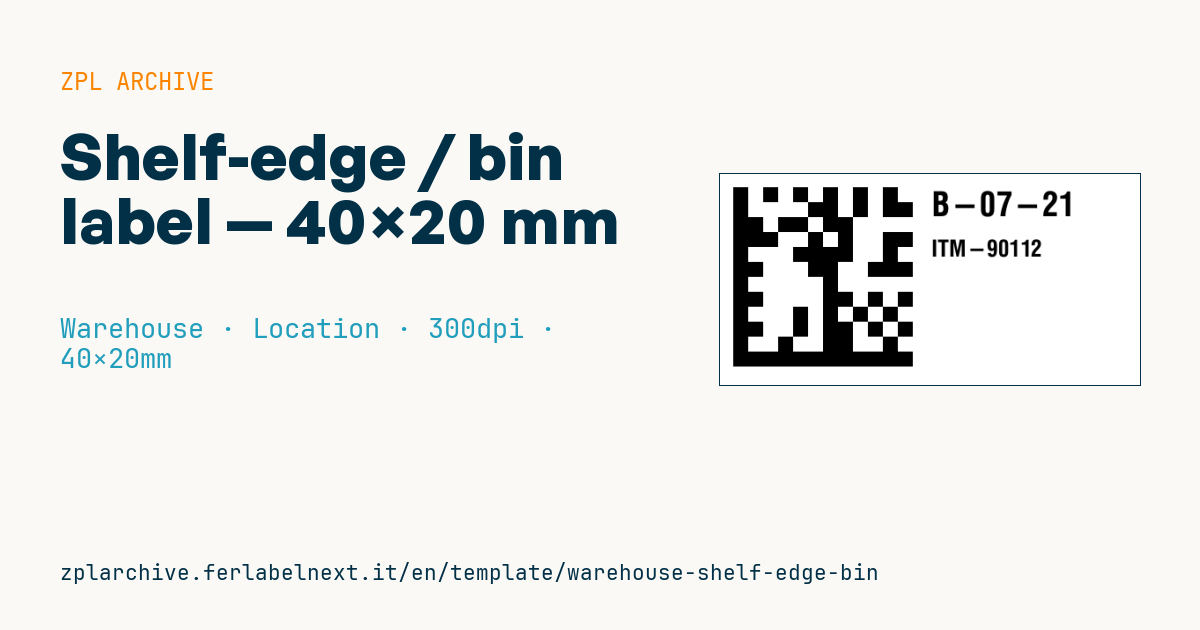
Shelf-edge micro label for drawers/bins: DataMatrix of the bin code, readable code and item. Compact, for dense shelving.
Shelf-edge / bin label
40×20 mm @ 300 dpi. DataMatrix with the bin code, readable code and item. Designed for dense shelving.
Placeholders
bin_code— bin/drawer codeitem_code— item
When to use it
This is the typical label for spare-parts, small-parts and e-commerce warehouses with drawer cabinets or small bins, where the shelf edge leaves very little room. The picker scans the Data Matrix with a handheld or ring scanner and the WMS checks the pick comes from the right bin; the human-readable item code supports visual checks and replenishment.
For long-term use choose polypropylene or polyester printed by thermal transfer; direct thermal paper is acceptable only if item-to-bin assignments change often and the label is reprinted anyway.
Standards and requirements
The symbol is a Data Matrix ECC 200 as defined in ISO/IEC 16022; 2D print quality is graded according to ISO/IEC 15415. Since this is an internal code, you do not need the GS1 DataMatrix format with FNC1: use it only when you encode GS1 data such as a GTIN. In ZPL the module size is the first parameter of ^BX (in dots): at 300 dpi a module of 3-4 dots is about 0.25-0.34 mm. Data Matrix requires a quiet zone of at least one module on every side.
Common mistakes
- Shrinking the module to make the code fit: older imagers, or scanners used at a distance, will not read it.
- Sending the template to a 203 dpi printer: ZPL coordinates are in dots, so everything comes out about 1.5 times larger and runs off the label.
- Leaving the old item code on a bin after re-slotting, so the visual check contradicts the scanner.
FAQ
Why Data Matrix instead of Code 128 on a 40 mm label?
A Code 128 carrying an 8-10 character bin code needs a lot of width; Data Matrix fits the same data into a square of a few millimetres and copes better with partial scratches.
Can I read the Data Matrix with a smartphone?
Yes, almost every scanning app and camera-based Android terminal reads it, but for high-volume picking a dedicated imager is much faster.
ZPL code
^XA
^PW472
^LL236
^CI28
^FO15,15^BXN,17,200^FD{{bin_code}}^FS
^CF0,38^FO240,20^FD{{bin_code}}^FS
^CF0,26^FO240,75^FD{{item_code}}^FS
^XZWhat this label contains
Barcodes
- Data Matrix
- Very compact 2D code, readable even at a few millimetres: component marking, PCBs and asset tags.
Elements
- 2 text fields
- 2 variable fields to fill in
Variable fields
| Field | Description | Example |
|---|---|---|
bin_code | Bin code | B-07-21 |
item_code | Item | ITM-90112 |
Format and printing
40×20 mm (1.57×0.79″) at 300 dpi: 472×236 dots. Landscape.
Compatible Zebra printers
You need a printer with a 2″ printhead at 300 dpi, for example:
- Zebra ZD411 (desktop)
- Zebra ZD611 (desktop)
Any Zebra printer with a wider printhead and the same resolution works too.
The code is written for 300 dpi: on a printer with a different resolution the label prints larger or smaller and needs rescaling.
How to use it
- Open “Customize placeholders” and enter your data in the variable fields listed above.
- Check the preview: it is rendered from the same ZPL code you will send to the printer.
- Download the .zpl file or copy the code and send it to the printer: with “Print” through Zebra Browser Print, or as a raw file to port 9100 if the printer is on the network.
- Load 40×20 mm labels and make sure the printer is set to 300 dpi. For a different size use “Duplicate & edit” and adapt the layout in the builder.
Edit it in the editor
To change the layout, use “Duplicate & edit”: the template opens in the online ZPL editor, where you modify it and save it to your account for free.
Related templates
- Multi-level bay location — 100×50 mm 203 dpi · Warehouse · Location
- Single rack location — 50×30 mm 203 dpi · Warehouse · Location
- GS1 SSCC pallet — 100×150 mm 203 dpi · Warehouse · SSCC
- Pick face label with QR — 60×40 mm 203 dpi · Warehouse · Picking
- Cross-dock receiving — 100×70 mm 203 dpi · Warehouse · Cross-docking
- Annual inventory serial — 60×40 mm 203 dpi · Warehouse · Inventory
- Putaway / location label — 60×40 mm 203 dpi · Warehouse · Location
- Cycle count label — 50×30 mm 203 dpi · Warehouse · Inventory