Cycle count label — 50×30 mm
Label for inventory cycle counting: location, count ID and a Code 128 barcode. For periodic warehouse counts without halting operations.
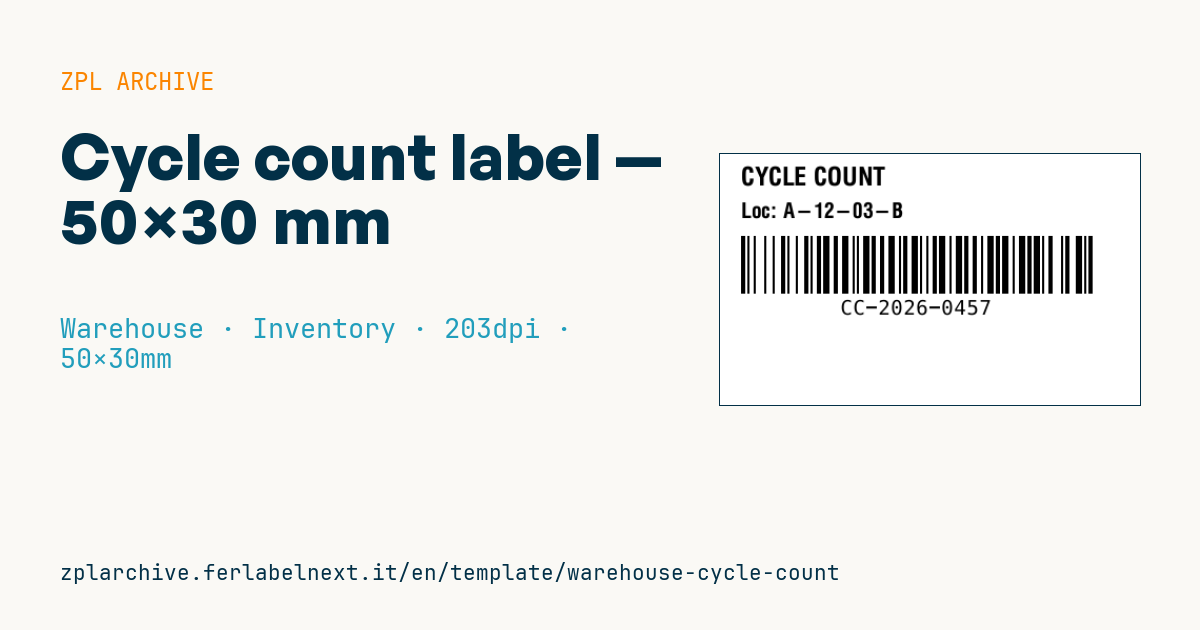
Cycle count label
50×30 mm @ 203 dpi. Title, location, Code 128 barcode with the count ID.
Placeholders
title_label— title (e.g.CYCLE COUNT)location_code— locationcount_id— count ID
When to use it
Cycle counting replaces or complements the annual physical inventory: a few locations are counted every day, usually picked with ABC logic (fast movers more often). This label is printed when the WMS creates the count task and goes on the location or container: it tells colleagues the location is under count and links the result to the right task through the ID.
It is a temporary label, removed once the count is closed, so use direct thermal paper with a removable adhesive that leaves no residue on shelves or beam labels. In cold rooms, choose a low-temperature adhesive.
Standards and requirements
There is no specific standard for cycle count labels. The requirements are process ones: the count ID must be unique and never reused, the printed location must match the WMS master data, and the count should be "blind", meaning the operator does not see the system quantity. If cycle counting is meant to replace the annual physical inventory for financial reporting, check the requirements with your auditor or tax adviser. For a small Code 128 on 50 mm, keep the ID short and respect the 10-module quiet zone.
Common mistakes
- Leaving labels on the racks after closing: at the next count nobody knows which ones are still valid.
- Using permanent adhesive on beam labels or fixed location labels, damaging them on removal.
- Allowing picks and putaways on the location while the count is open.
- Reusing a count ID, mixing results from different days.
FAQ
How often should cycle counts be done?
It depends on the item class and your warehouse policy: A items are often counted several times a year and C items once. No standard sets the frequency.
Why not print the system quantity on the label?
Because the operator would tend to confirm it rather than actually count. A blind count exposes the real differences.
ZPL code
^XA
^PW400
^LL240
^CI28
^CF0,24^FO20,12^FD{{title_label}}^FS
^CF0,20^FO20,46^FDLoc: {{location_code}}^FS
^BY2,2,55
^FO20,78^BCN,55,Y,N,N^FD{{count_id}}^FS
^XZ- Industry: Warehouse
- Category: Inventory
- DPI: 203
- Size: 50×30 mm
- Tags: Code 128, Cycle count, Inventory, Warehouse
What this label contains
Barcodes
- Code 128
- High-density linear barcode that encodes the full ASCII set: ideal for tracking numbers, internal codes and alphanumeric IDs.
Elements
- 2 text fields
- 3 variable fields to fill in
Variable fields
| Field | Description | Example |
|---|---|---|
title_label | Title | CYCLE COUNT |
location_code | Location | A-12-03-B |
count_id | Count ID | CC-2026-0457 |
Format and printing
50×30 mm (1.97×1.18″) at 203 dpi: 400×240 dots. Landscape.
Compatible Zebra printers
You need a printer with a 2″ printhead at 203 dpi, for example:
- Zebra ZD411 (desktop)
- Zebra ZD611 (desktop)
- Zebra ZQ220 (mobile)
- Zebra ZQ310 (mobile)
Any Zebra printer with a wider printhead and the same resolution works too.
The code is written for 203 dpi: on a printer with a different resolution the label prints larger or smaller and needs rescaling.
How to use it
- Open “Customize placeholders” and enter your data in the variable fields listed above.
- Check the preview: it is rendered from the same ZPL code you will send to the printer.
- Download the .zpl file or copy the code and send it to the printer: with “Print” through Zebra Browser Print, or as a raw file to port 9100 if the printer is on the network.
- Load 50×30 mm labels and make sure the printer is set to 203 dpi. For a different size use “Duplicate & edit” and adapt the layout in the builder.
Edit it in the editor
To change the layout, use “Duplicate & edit”: the template opens in the online ZPL editor, where you modify it and save it to your account for free.
Related templates
- Multi-level bay location — 100×50 mm 203 dpi · Warehouse · Location
- Single rack location — 50×30 mm 203 dpi · Warehouse · Location
- Shelf-edge / bin label — 40×20 mm 300 dpi · Warehouse · Location
- Pick face label with QR — 60×40 mm 203 dpi · Warehouse · Picking
- GS1 SSCC pallet — 100×150 mm 203 dpi · Warehouse · SSCC
- Cross-dock receiving — 100×70 mm 203 dpi · Warehouse · Cross-docking
- Annual inventory serial — 60×40 mm 203 dpi · Warehouse · Inventory
- Putaway / location label — 60×40 mm 203 dpi · Warehouse · Location