Serial + IMEI label — 50×30 mm
Traceability label for electronic devices: model, serial number and IMEI with a scannable Code 128 barcode. Ideal for smartphones, modems and network gear.
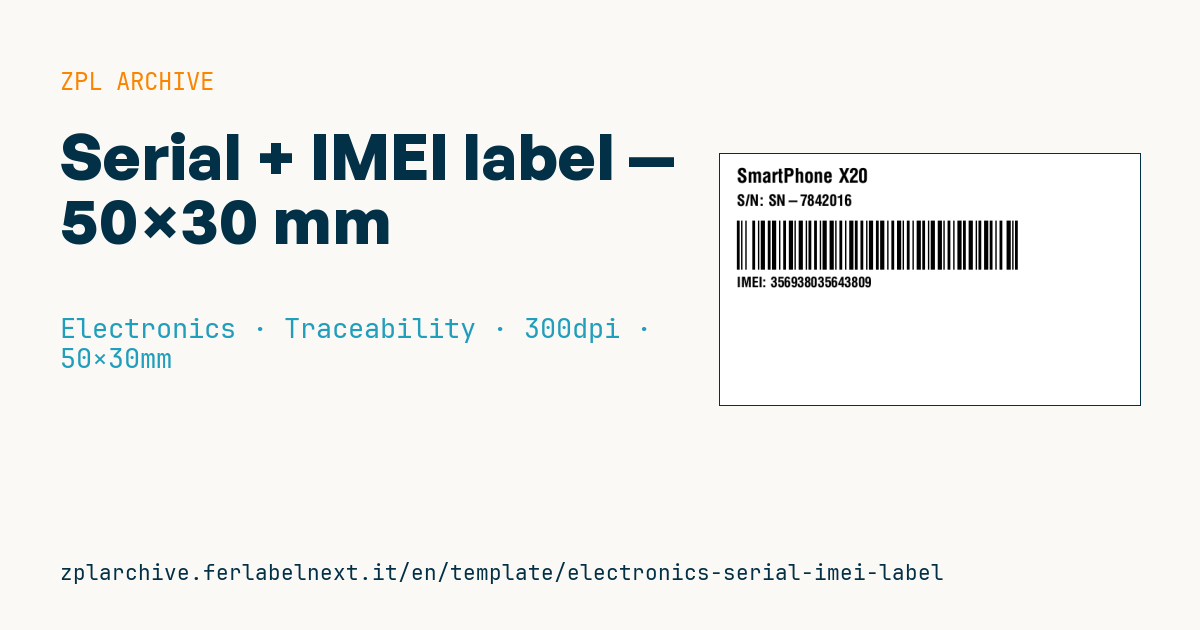
Serial + IMEI label
50×30 mm @ 300 dpi. Model on top, serial number, a Code 128 barcode carrying the IMEI, and the human-readable IMEI below the code.
Placeholders
model_name— device name/modelserial— serial number (S/N)imei— IMEI code (15 digits)
When to use it
Manufacturers, refurbishers and distributors of smartphones, modems, 4G/5G routers and IoT modules use it to identify each unit on the box, on the inner tray or under the battery cover. In warehouses and at mobile operators the IMEI is scanned for activation, warranty, blocking of stolen devices and returns.
On the box, coated paper in thermal transfer is fine; on the device itself use polyester with a resin ribbon. Direct thermal is acceptable only for transit labels that will be replaced.
Standards and requirements
The IMEI structure is defined in 3GPP TS 23.003: 15 digits made of an 8-digit TAC allocated through the GSMA, a 6-digit serial number and a check digit calculated with the Luhn algorithm. The IMEISV has 16 digits and no check digit. The box label layout (position, any additional codes) is often set by the operator or distributor: check their specifications.
For a numeric IMEI in Code 128, automatic mode ^BCN,h,N,N,N,A uses subset C where it helps and keeps the code compact. At 300 dpi, check that the total width including quiet zones fits within 50 mm.
Common mistakes
- Generating IMEIs yourself: the TAC must be allocated to your model, or networks may block the device.
- Dropping the check digit or printing the IMEISV where the IMEI is required.
- Showing only one IMEI on a dual-SIM device, which has two.
- Taking the serial and the IMEI from two separate data sources that are not kept in sync.
FAQ
How do I check an IMEI check digit?
Apply the Luhn algorithm to the first 14 digits: double every second digit starting from the right, add everything up, and the check digit brings the total to the next multiple of 10.
Are the serial number and the IMEI the same thing?
No. The serial is assigned by the manufacturer under its own scheme; the IMEI identifies the device on mobile networks and follows a standard structure.
ZPL code
^XA
^PW591
^LL354
^CI28
^CF0,28^FO24,20^FD{{model_name}}^FS
^CF0,22^FO24,58^FDS/N: {{serial}}^FS
^BY2,2,70
^FO24,95^BCN,70,N,N,N^FD{{imei}}^FS
^CF0,20^FO24,175^FDIMEI: {{imei}}^FS
^XZ- Industry: Electronics
- Category: Traceability
- DPI: 300
- Size: 50×30 mm
- Tags: Code 128, Electronics, IMEI, Serial number
What this label contains
Barcodes
- Code 128
- High-density linear barcode that encodes the full ASCII set: ideal for tracking numbers, internal codes and alphanumeric IDs.
Elements
- 3 text fields
- 3 variable fields to fill in
Variable fields
| Field | Description | Example |
|---|---|---|
model_name | Model | SmartPhone X20 |
serial | Serial | SN-7842016 |
imei | IMEI | 356938035643809 |
Format and printing
50×30 mm (1.97×1.18″) at 300 dpi: 591×354 dots. Landscape.
Compatible Zebra printers
You need a printer with a 2″ printhead at 300 dpi, for example:
- Zebra ZD411 (desktop)
- Zebra ZD611 (desktop)
Any Zebra printer with a wider printhead and the same resolution works too.
The code is written for 300 dpi: on a printer with a different resolution the label prints larger or smaller and needs rescaling.
How to use it
- Open “Customize placeholders” and enter your data in the variable fields listed above.
- Check the preview: it is rendered from the same ZPL code you will send to the printer.
- Download the .zpl file or copy the code and send it to the printer: with “Print” through Zebra Browser Print, or as a raw file to port 9100 if the printer is on the network.
- Load 50×30 mm labels and make sure the printer is set to 300 dpi. For a different size use “Duplicate & edit” and adapt the layout in the builder.
Edit it in the editor
To change the layout, use “Duplicate & edit”: the template opens in the online ZPL editor, where you modify it and save it to your account for free.
Related templates
- Instrument calibration tag (QR) — 40×30 mm 600 dpi · Electronics · Asset
- Cable/connector label (flag wrap) — 50×25 mm 300 dpi · Electronics · Commercial label
- ESD / voltage warning label — 50×30 mm 203 dpi · Electronics · Commercial label
- Battery rating label — 50×30 mm 203 dpi · Electronics · Commercial label
- DataMatrix PCB label — 25×25 mm 300 dpi · Electronics · Traceability
- Device manual/support QR — 40×40 mm 300 dpi · Electronics · Commercial label
- RMA return tag — 70×50 mm 203 dpi · Electronics · Return
- IT asset tag with QR — 50×25 mm 300 dpi · Electronics · Asset