Variable weight traceability — 70×40 mm
GS1-128 label for variable-weight items (deli, fish counter): GTIN, net weight, lot in a single barcode.
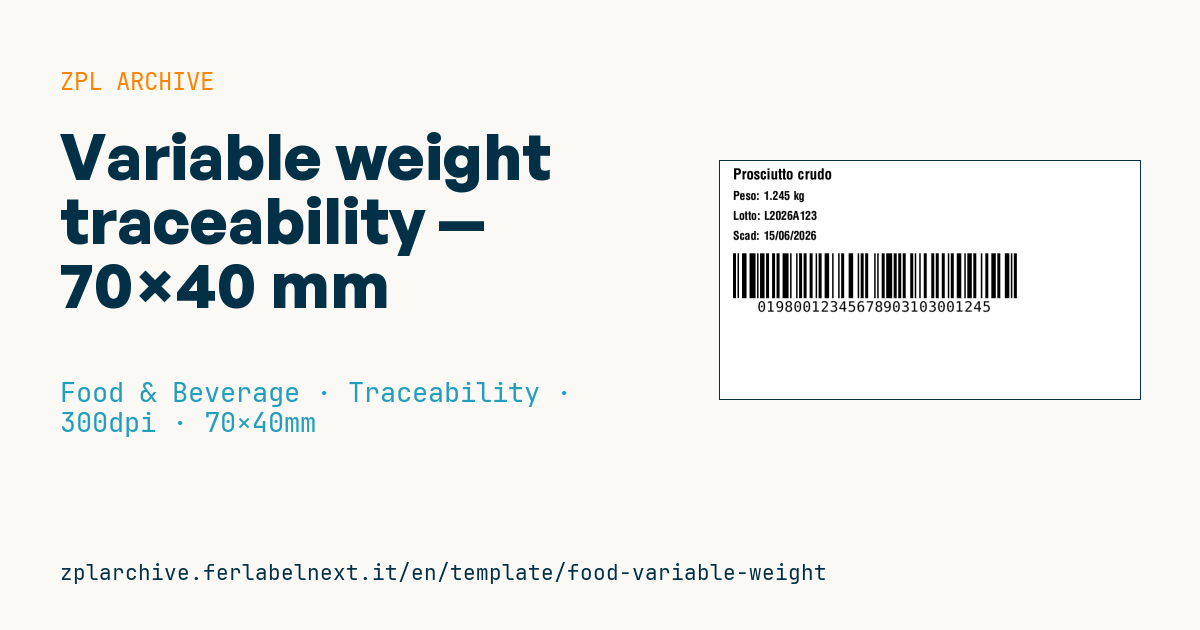
Variable weight traceability
70×40 mm @ 300 dpi. Standard for deli counter, fish counter, loose produce.
Placeholders
product_namenet_weight— weight in kg (3 decimals) for human readabilityweight_padded— weight as 6 digits with 3 implicit decimals for the barcode (e.g.001245= 1.245 kg). AI310xwherex= decimal count (here3).lotexpirygtin14— 14-digit GTIN-14
When to use it
Cured meat producers, dairies, seafood companies and meat processing plants use it to ship random-weight pieces (hams, cheese wheels, fillets, steaks) to wholesalers, distribution centres and retail chains. It goes on the piece or the pack at in-line weighing and is scanned at goods-in to capture weight, lot and expiry without keying.
The product is often in cold, damp conditions: use thermal transfer on coated paper or PP with an adhesive for cold surfaces, so the code stays readable through the whole chain.
Standards and requirements
The structure follows the GS1 General Specifications: (01) GTIN-14 of a variable measure item, starting with indicator digit 9; (3103) net weight in kg with three decimals as six digits; (17) expiry YYMMDD; (10) lot. Fixed-length AIs go first and the variable-length lot last, so no FNC1 separator is needed. A GS1-128 symbol holds at most 48 data characters.
In ZPL the barcode starts with >;>8 (subset C plus FNC1); to switch to an alphanumeric lot insert >6 for subset B. The minimum X-dimension depends on the scanning environment in the GS1 tables: confirm it with your customer and check quality to ISO/IEC 15416.
Common mistakes
- Encoding the weight with a decimal separator instead of six digits with implied decimals.
- Using a 310x AI whose decimal count does not match the value.
- Using a GTIN that does not start with 9 for a random-weight item.
- Expecting GS1-128 to scan at the checkout: it is meant for logistics, not point of sale.
FAQ
What does AI 3103 mean?
It is the net weight in kilograms; the last digit gives the number of decimals, so 3103 means three decimals and 001245 equals 1.245 kg.
Can I put several lots or dates in the same barcode?
No, each AI appears only once per symbol; mixed contents need separate labels or packaging levels.
ZPL code
^XA
^PW827
^LL472
^CI28
^CF0,30^FO20,15^FD{{product_name}}^FS
^CF0,24
^FO20,60^FDPeso: {{net_weight}} kg^FS
^FO20,100^FDLotto: {{lot}}^FS
^FO20,140^FDScad: {{expiry}}^FS
^BY3,2,90
^FO20,185^BCN,90,Y,N,N^FD>;>801{{gtin14}}3103{{weight_padded}}^FS
^XZ- Industry: Food & Beverage
- Category: Traceability
- DPI: 300
- Size: 70×40 mm
- Tags: GS1-128, Lot, Weight
What this label contains
Barcodes
- GS1-128
- Code 128 with FNC1 and GS1 Application Identifiers: the logistics barcode, used for SSCC, batch, expiry and weight on pallets and cartons.
Elements
- 4 text fields
- 6 variable fields to fill in
Variable fields
| Field | Description | Example |
|---|---|---|
product_name | Product | Prosciutto crudo |
net_weight | Net weight (kg) | 1.245 |
weight_padded | Weight (6 digits) | 001245 |
lot | Lot | L2026A123 |
expiry | Expiry | 15/06/2026 |
gtin14 | GTIN-14 | 98001234567890 |
Format and printing
70×40 mm (2.76×1.57″) at 300 dpi: 827×472 dots. Landscape.
Compatible Zebra printers
You need a printer with a 4″ printhead at 300 dpi, for example:
- Zebra ZD421 (desktop)
- Zebra ZD621 (desktop)
- Zebra ZT231 (industrial)
- Zebra ZT411 (industrial)
- Zebra ZT610 (industrial)
Any Zebra printer with a wider printhead and the same resolution works too.
The code is written for 300 dpi: on a printer with a different resolution the label prints larger or smaller and needs rescaling.
How to use it
- Open “Customize placeholders” and enter your data in the variable fields listed above.
- Check the preview: it is rendered from the same ZPL code you will send to the printer.
- Download the .zpl file or copy the code and send it to the printer: with “Print” through Zebra Browser Print, or as a raw file to port 9100 if the printer is on the network.
- Load 70×40 mm labels and make sure the printer is set to 300 dpi. For a different size use “Duplicate & edit” and adapt the layout in the builder.
Edit it in the editor
To change the layout, use “Duplicate & edit”: the template opens in the online ZPL editor, where you modify it and save it to your account for free.
Related templates
- Wine gift label with logo — 50×90 mm 300 dpi · Food & Beverage · Commercial label
- Beverage bottle label — 40×80 mm 300 dpi · Food & Beverage · Commercial label
- Food label with allergens — 70×100 mm 300 dpi · Food & Beverage · Commercial label
- Price per kg label — 50×40 mm 203 dpi · Food & Beverage · Commercial label
- GS1 DataMatrix traceability — 30×30 mm 300 dpi · Food & Beverage · GS1 DataMatrix
- Cooking instructions label — 70×50 mm 203 dpi · Food & Beverage · Commercial label
- Best-before date label — 50×30 mm 203 dpi · Food & Beverage · Traceability
- Artisan jam label with logo — 50×60 mm 203 dpi · Food & Beverage · Commercial label