Controlled substance label — 50×40 mm
Label for controlled-substance drugs: reverse-contrast classification band, drug, strength, lot, expiry and a legal warning.
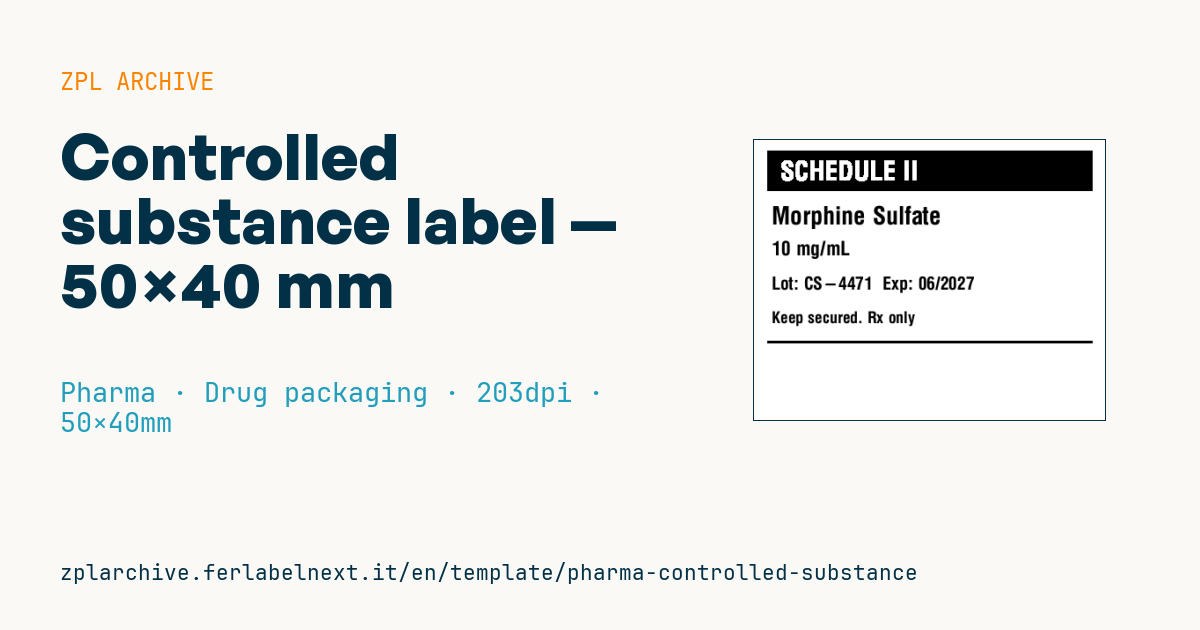
Controlled substance label
50×40 mm @ 203 dpi. Reverse-contrast classification band (^FR over a filled box), then drug, strength, lot/expiry, warning and a closing line.
Placeholders
schedule_label— class (e.g.SCHEDULE II)drug_name— drug namestrength— strengthlot/expiry— lot and expirywarning— legal warning
When to use it
Hospital pharmacies, warehouses and laboratories handling controlled drugs (narcotics and psychotropics) use this label to identify packs, repackaging containers or vault compartments, with the reverse-contrast band making the class obvious at a glance. The small size fits bottles, ampoule boxes and return containers.
Packs sit in the vault for a long time and get counted at every inventory, so pick a thermal transfer stock that will not fade and that resists alcohol-based disinfectants.
Standards and requirements
Classification depends on the country. In the United States, schedules I to V are set by the DEA, and labelling of commercial containers is covered by 21 CFR Part 1302 (the symbol with a letter C and the schedule numeral). In Italy the reference is DPR 309/1990, which sorts substances into tables, and other European countries have their own national laws, so a "SCHEDULE II" wording has no legal meaning there. Take the warning text from the applicable law or your facility's procedures; do not make it up.
The reverse band uses a filled ^GB with ^FR on the text: with ^MD set too high, the white characters close up.
Common mistakes
- Using US terminology on products for the European market.
- Overdarkness that fills in the white text inside the black band at 203 dpi.
- Unreadable lot and expiry, the very data checked during inventories and returns.
- A warning too long for its line, silently truncated.
FAQ
What does "Schedule II" mean?
In the US system it identifies substances with accepted medical use but high abuse potential. Other countries use different classifications.
Does this label replace the controlled drugs register?
No. It identifies the pack; receipts and issues must be recorded according to national rules.
ZPL code
^XA
^PW400
^LL320
^CI28
^FO15,12^GB370,46,46^FS
^FR^CF0,30^FO30,24^FD{{schedule_label}}^FS
^CF0,28^FO20,75^FD{{drug_name}}^FS
^CF0,22^FO20,115^FD{{strength}}^FS
^CF0,20^FO20,155^FDLot: {{lot}}  Exp: {{expiry}}^FS
^CF0,18^FO20,195^FD{{warning}}^FS
^FO15,228^GB370,3,3^FS
^XZ- Industry: Pharma
- Category: Drug packaging
- DPI: 203
- Size: 50×40 mm
- Tags: Compliance 2024, Controlled substance, Dosage, Pharma
What this label contains
Barcodes
This label contains no barcodes: it is made of text and graphics.
Elements
- 5 text fields
- 6 variable fields to fill in
- boxes and separator lines
Variable fields
| Field | Description | Example |
|---|---|---|
schedule_label | Schedule | SCHEDULE II |
drug_name | Drug | Morphine Sulfate |
strength | Strength | 10 mg/mL |
lot | Lot | CS-4471 |
expiry | Expiry | 06/2027 |
warning | Warning | Keep secured. Rx only |
Format and printing
50×40 mm (1.97×1.57″) at 203 dpi: 400×320 dots. Landscape.
Compatible Zebra printers
You need a printer with a 2″ printhead at 203 dpi, for example:
- Zebra ZD411 (desktop)
- Zebra ZD611 (desktop)
- Zebra ZQ220 (mobile)
- Zebra ZQ310 (mobile)
Any Zebra printer with a wider printhead and the same resolution works too.
The code is written for 203 dpi: on a printer with a different resolution the label prints larger or smaller and needs rescaling.
How to use it
- Open “Customize placeholders” and enter your data in the variable fields listed above.
- Check the preview: it is rendered from the same ZPL code you will send to the printer.
- Download the .zpl file or copy the code and send it to the printer: with “Print” through Zebra Browser Print, or as a raw file to port 9100 if the printer is on the network.
- Load 50×40 mm labels and make sure the printer is set to 203 dpi. For a different size use “Duplicate & edit” and adapt the layout in the builder.
Edit it in the editor
To change the layout, use “Duplicate & edit”: the template opens in the online ZPL editor, where you modify it and save it to your account for free.
Related templates
- GS1 DataMatrix pharma — 25×10 mm (600 dpi) 600 dpi · Pharma · GS1 DataMatrix
- Patient check-in & appointment ticket — 80×150 mm 203 dpi · Pharma · Patient check-in & flow
- GS1 serialization DataMatrix — 40×25 mm 300 dpi · Pharma · GS1 DataMatrix
- UDI medical device — 50×30 mm 300 dpi · Pharma · Drug packaging
- Sample tube Aztec — 25×25 mm 300 dpi · Pharma · Lab samples
- Lab sample — 70×40 mm 300 dpi · Pharma · Lab samples
- Sterile medical lot — 60×40 mm 300 dpi · Pharma · Drug packaging
- Patient wristband — 200×25 mm 300 dpi · Pharma · Patient wristband