GS1 DataMatrix pharma — 25×10 mm (600 dpi)
High-resolution 600 dpi GS1 DataMatrix, compliant with European FMD (falsified medicines directive).
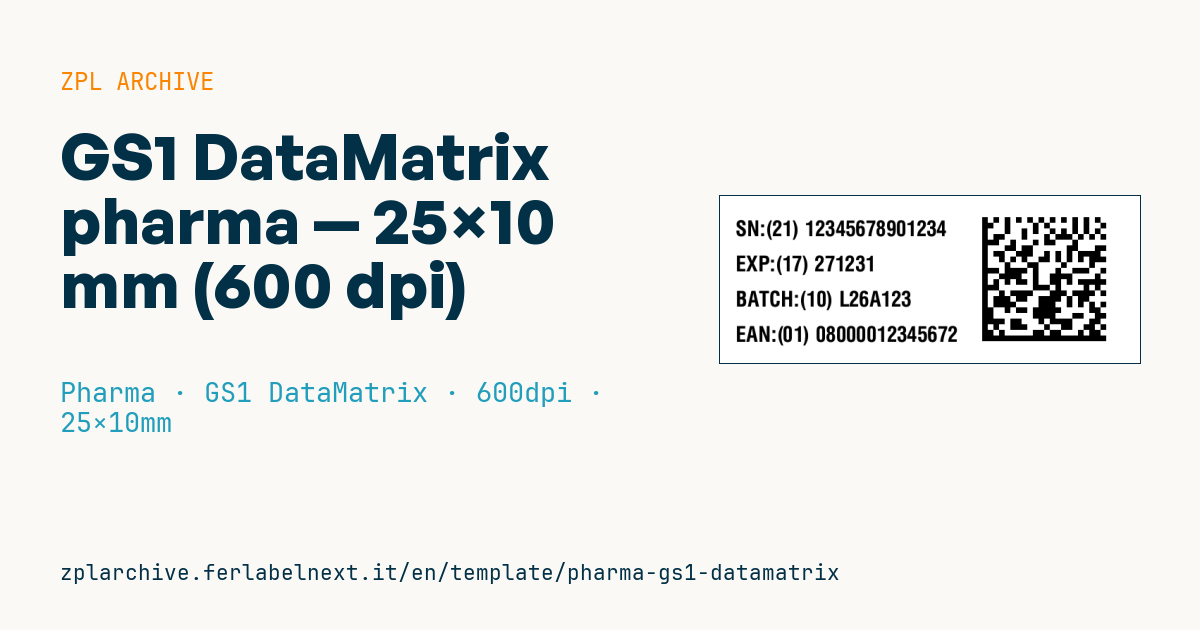
Pharma GS1 DataMatrix
25×10 mm @ 600 dpi (high res needed for reliable pharmacy scanning).
Compliant with EU directive FMD 2011/62/EU on European drug traceability. Contains the same AIs as GS1-128 but in a more compact 2D matrix.
Placeholders
-
gtin14 -
expiry_yymmdd -
lot -
serial— unique package serial (anti-counterfeit)
When to use it
This code is used when the unique identifier has to fit into a minimal area: small cartons, narrow sides of eye-drop or ampoule packs, repackaging labels. Manufacturers' packaging departments and contract packagers print it, often on 600 dpi printers in line or on labels later applied to the carton, and it is scanned in pharmacies and distribution for verification.
The typical stock is a white coated or synthetic label printed thermal transfer with a wax-resin or resin ribbon: at this density direct thermal paper gives poorly defined module edges.
Standards and requirements
Delegated Regulation (EU) 2016/161 requires the unique identifier to be carried by a Data Matrix ECC 200 with a print quality of 1.5 or higher under ISO/IEC 15415, holding product code, serial number, batch, expiry date and, where required, a national reimbursement number. Data structure follows the GS1 General Specifications: AI (01) GTIN, (17) expiry YYMMDD, (10) batch, (21) serial of up to 20 alphanumeric characters.
In ZPL use ^BXN with quality 200: set an escape character in the ^BX parameter and start the data with the matching FNC1 sequence. At 600 dpi pick a module of several whole dots, not 1-2 dots.
Common mistakes
- Putting (10) or (21) before (17) without an FNC1 separator: variable-length fields must end with FNC1 unless they are last.
- Using a module so small that pharmacy scanners fail even on a perfect print.
- Checking the code by eye instead of with an ISO/IEC 15415 verifier.
- Printing a human-readable serial that differs from the encoded one.
FAQ
Why 600 dpi rather than 300?
On a very small symbol, 300 dpi modules have few dots and quality drops; 600 dpi gives more precise modules in the same space.
Are the AI parentheses encoded?
No. Parentheses only appear in the human-readable text; inside the symbol, AIs are separated by FNC1.
ZPL code
^XA
^PW591
^LL236
^CI28
^CF0,30^FO20,35^FDSN:(21) {{serial}}^FS
^CF0,30^FO20,85^FDEXP:(17) {{expiry_yymmdd}}^FS
^CF0,30^FO20,135^FDBATCH:(10) {{lot}}^FS
^CF0,30^FO20,185^FDEAN:(01) {{gtin14}}^FS
^FO370,30^BXN,8,200,,,,_^FD_101{{gtin14}}17{{expiry_yymmdd}}10{{lot}}_121{{serial}}^FS
^XZ- Industry: Pharma
- Category: GS1 DataMatrix
- DPI: 600
- Size: 25×10 mm
- Tags: Compliance 2024, DataMatrix, High resolution
What this label contains
Barcodes
- GS1 DataMatrix
- 2D code with GS1 Application Identifiers: used for pharmaceutical serialisation (GTIN, batch, expiry, serial number) and for medical device UDI.
Elements
- 4 text fields
- 4 variable fields to fill in
Variable fields
| Field | Description | Example |
|---|---|---|
serial | Serial | 12345678901234 |
expiry_yymmdd | Expiry (YYMMDD) | 271231 |
lot | Lot | L26A123 |
gtin14 | GTIN-14 | 08000012345672 |
Format and printing
25×10 mm (0.98×0.39″) at 600 dpi: 591×236 dots. Landscape.
The code is written for 600 dpi: on a printer with a different resolution the label prints larger or smaller and needs rescaling.
How to use it
- Open “Customize placeholders” and enter your data in the variable fields listed above.
- Check the preview: it is rendered from the same ZPL code you will send to the printer.
- Download the .zpl file or copy the code and send it to the printer: with “Print” through Zebra Browser Print, or as a raw file to port 9100 if the printer is on the network.
- Load 25×10 mm labels and make sure the printer is set to 600 dpi. For a different size use “Duplicate & edit” and adapt the layout in the builder.
Edit it in the editor
To change the layout, use “Duplicate & edit”: the template opens in the online ZPL editor, where you modify it and save it to your account for free.
Related templates
- Patient check-in & appointment ticket — 80×150 mm 203 dpi · Pharma · Patient check-in & flow
- GS1 serialization DataMatrix — 40×25 mm 300 dpi · Pharma · GS1 DataMatrix
- Sample tube Aztec — 25×25 mm 300 dpi · Pharma · Lab samples
- UDI medical device — 50×30 mm 300 dpi · Pharma · Drug packaging
- Lab sample — 70×40 mm 300 dpi · Pharma · Lab samples
- Prescription label — 70×40 mm 203 dpi · Pharma · Drug packaging
- Patient wristband — 200×25 mm 300 dpi · Pharma · Patient wristband
- Sterile medical lot — 60×40 mm 300 dpi · Pharma · Drug packaging