Prescription label — 70×40 mm
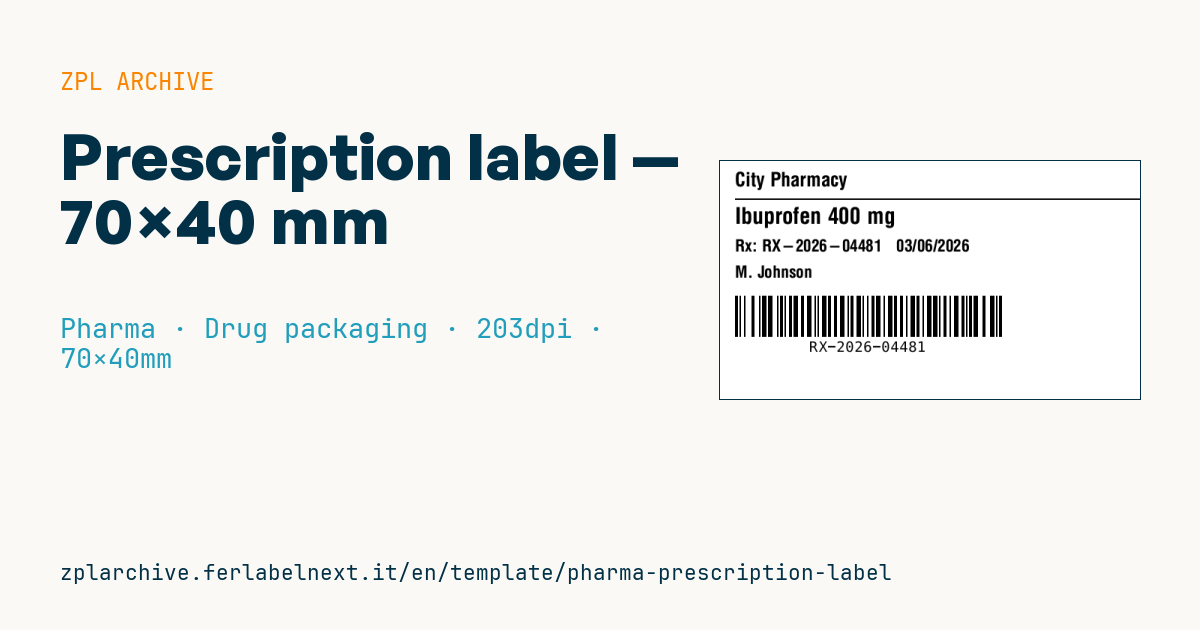
Pharmacy prescription label: pharmacy, drug, prescription number, date, patient and a Code 128 barcode. For dispensing traceability.
Prescription label
70×40 mm @ 203 dpi. Pharmacy name, separator, prominent drug, prescription number + date, patient and a Code 128 barcode with the prescription number.
Placeholders
pharmacy_name— pharmacy namedrug_name— prescribed drugrx_number— prescription numberdate— datepatient— patient
When to use it
The prescription label is printed in a community or hospital pharmacy when an order is filled: it physically ties the dispensed pack to the prescription number and the patient. The barcode lets counter staff recall the record in the pharmacy system, check collection and, where robots or automated cabinets are used, run a final check before hand-over.
It is typical of workflows where packs are prepared in advance and collected later, or of compounded preparations. For same-day collection direct thermal paper is enough; if the pack stays in the patient's home for months, use thermal transfer.
Standards and requirements
Mandatory content of a dispensing label depends on national law and pharmacy professional rules, so check the ones for your country. The prescription number format is set by the health system or the pharmacy software, so the barcode must encode it exactly, with no added spaces. Patient name and drug are health data: GDPR applies to printing and to disposal of spoiled labels.
At 203 dpi a Code 128 with module ^BY2 is a good compromise; if the number is all digits with even length, subset C (>;) makes it shorter.
Common mistakes
- Throwing misprinted labels with a readable patient name into the bin.
- Encoding the prescription number with prefixes or hyphens the pharmacy system does not expect.
- Covering the code on the original pack, which is needed for traceability.
- Truncating the drug name when it includes a long form and strength.
FAQ
Can the barcode also carry the patient's name?
Better not: the barcode should only hold the prescription reference, while personal data stay in the pharmacy system.
Which scanner do I need?
Any 1D or 2D counter scanner reads Code 128; make sure it is configured without unwanted prefixes or suffixes.
ZPL code
^XA
^PW559
^LL320
^CI28
^CF0,26^FO20,15^FD{{pharmacy_name}}^FS
^FO20,50^GB540,2,2^FS
^CF0,30^FO20,62^FD{{drug_name}}^FS
^CF0,22^FO20,105^FDRx: {{rx_number}}   {{date}}^FS
^CF0,22^FO20,140^FD{{patient}}^FS
^BY2,2,55
^FO20,180^BCN,55,Y,N,N^FD{{rx_number}}^FS
^XZ- Industry: Pharma
- Category: Drug packaging
- DPI: 203
- Size: 70×40 mm
- Tags: Code 128, Patient, Pharma, Prescription
What this label contains
Barcodes
- Code 128
- High-density linear barcode that encodes the full ASCII set: ideal for tracking numbers, internal codes and alphanumeric IDs.
Elements
- 4 text fields
- 5 variable fields to fill in
- boxes and separator lines
Variable fields
| Field | Description | Example |
|---|---|---|
pharmacy_name | Pharmacy | City Pharmacy |
drug_name | Drug | Ibuprofen 400 mg |
rx_number | Rx number | RX-2026-04481 |
date | Date | 03/06/2026 |
patient | Patient | M. Johnson |
Format and printing
70×40 mm (2.76×1.57″) at 203 dpi: 559×320 dots. Landscape.
Compatible Zebra printers
You need a printer with a 4″ printhead at 203 dpi, for example:
- Zebra ZD421 (desktop)
- Zebra ZD621 (desktop)
- Zebra GK420 (desktop)
- Zebra ZT231 (industrial)
- Zebra ZT411 (industrial)
- Zebra ZT610 (industrial)
- Zebra ZQ521 (mobile)
- Zebra ZQ630 (mobile)
Any Zebra printer with a wider printhead and the same resolution works too.
The code is written for 203 dpi: on a printer with a different resolution the label prints larger or smaller and needs rescaling.
How to use it
- Open “Customize placeholders” and enter your data in the variable fields listed above.
- Check the preview: it is rendered from the same ZPL code you will send to the printer.
- Download the .zpl file or copy the code and send it to the printer: with “Print” through Zebra Browser Print, or as a raw file to port 9100 if the printer is on the network.
- Load 70×40 mm labels and make sure the printer is set to 203 dpi. For a different size use “Duplicate & edit” and adapt the layout in the builder.
Edit it in the editor
To change the layout, use “Duplicate & edit”: the template opens in the online ZPL editor, where you modify it and save it to your account for free.
Related templates
- GS1 DataMatrix pharma — 25×10 mm (600 dpi) 600 dpi · Pharma · GS1 DataMatrix
- Patient check-in & appointment ticket — 80×150 mm 203 dpi · Pharma · Patient check-in & flow
- UDI medical device — 50×30 mm 300 dpi · Pharma · Drug packaging
- Sample tube Aztec — 25×25 mm 300 dpi · Pharma · Lab samples
- GS1 serialization DataMatrix — 40×25 mm 300 dpi · Pharma · GS1 DataMatrix
- Lab sample — 70×40 mm 300 dpi · Pharma · Lab samples
- Patient wristband — 200×25 mm 300 dpi · Pharma · Patient wristband
- Sterile medical lot — 60×40 mm 300 dpi · Pharma · Drug packaging