Frozen storage label — 50×40 mm
Label for frozen products with a snowflake symbol drawn in ZPL, storage temperature, instructions, lot and expiry.
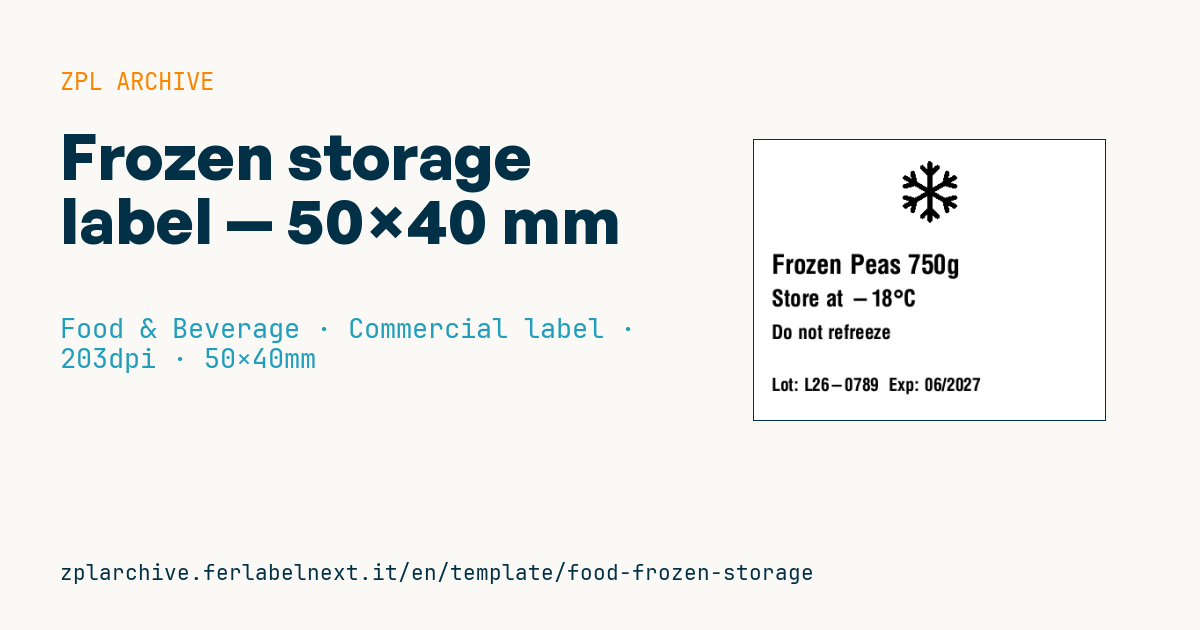
Frozen storage label
50×40 mm @ 203 dpi. Snowflake drawn with ZPL primitives (^GB/^GD), then product, temperature, instructions, lot and expiry.
Placeholders
product_name— product nametemperature— temperature (e.g.-18°C)instruction— instruction (e.g.Do not refreeze)lot/expiry— lot and expiry
When to use it
Ice-cream and pastry workshops, fishmongers, butchers, frozen ready-meal producers and kitchens that freeze preparations for later use rely on it. It goes on bags, trays or cartons before blast chilling or freezing and must remain legible for months at -18 °C or colder.
The critical part is the adhesive: it must be a freezer-grade adhesive, applied before frost forms on the pack. A standard adhesive placed on an already frozen or wet surface will fall off. For long storage use thermal transfer with a wax-resin or resin ribbon on coated paper or PP; direct thermal can work, but only in a top-coated grade suitable for the cold.
Standards and requirements
Prepacked products fall under Regulation (EU) 1169/2011: for frozen meat, frozen meat preparations and frozen unprocessed fishery products, Annex III also requires the date of freezing or first freezing. Quick-frozen foods in the strict sense are covered by Directive 89/108/EEC, implemented nationally, which among other things requires the "quick-frozen" designation and a warning not to refreeze after thawing.
If you print at room temperature and apply inside the cold room, keep the roll out of the cold until use. For the snowflake and other graphics avoid lines thinner than 2 dots at 203 dpi.
Common mistakes
- Confusing "frozen" and "quick-frozen": the latter implies rapid freezing and a controlled cold chain.
- Leaving out the freezing date on frozen meat or fish.
- Applying the label to packs that are already frosted or wet.
- Printing the temperature without the minus sign, or with a dash that reads as another character.
FAQ
What is the difference between frozen and quick-frozen on a label?
"Quick-frozen" is reserved for products that have undergone rapid freezing and are kept at -18 °C or colder throughout the chain; otherwise "frozen" is used.
Which adhesive do freezer labels need?
A low-temperature adhesive rated for both the application temperature and the service temperature: ask your label supplier for the technical data sheet.
ZPL code
^XA
^PW400
^LL320
^CI28
^FO165,24^GFA,630,630,9,00000000700000000000000000780000000000000000fc0000000000000000fc0000000000000020fc10000000000000f0fc7c000000000000f8fcfc000000000000fcfdfc000000000000fefffc0000000000007ffff80000000000003ffff00000000003801fffe00700000007c00fffc00f80000007c007ff800f80000007c003ff000f80000007e001fe001f80000307e000fc001f870007c7e000fc001f0f800ff3e000fc001f3fc00ffbf000fc003fffc007fff000fc003fff8003fff000fc003fff0000fff000fc003ffc00003ff800fc007ff000001ffc00fc00ffe00000ffff00fc03fffc0007ffffc0fc0fffff800fffffe0fc1fffffc00fffbff8fc7ff7ffc00ffc0ffefdffc0ffc007c003ffffff000f80000001fffffc0000000000007ffff80000000000001fffe000000000000007ff8000000000000007ff800000000000001fffe00000000000007ffff8000000000000fffffc00000007c003ffffff000f800ffc0ffefdffc0ffc00fffbff8fc7ff7ffc00fffffe0fc3fffffc007ffffc0fc0fffff8000ffff00fc03fffc00001ffc00fc00ffe000003ff800fc007ff00000fff000fc003ffc0003fff000fc003fff0007fff000fc003fff800ffff000fc003fffc00ff3e000fc001f3fc007c3e000fc001f0f800387e000fc001f87000007e001fe001f80000007c003ff000f80000007c007ff800f80000007c00fffc00f80000003801fffe00700000000003ffff00000000000007ffff8000000000000fefffc000000000000fcfdfc000000000000f8fcfc000000000000f8fc7c00000000000020fc1000000000000000fc0000000000000000fc00000000000000007800000000000000003000000000^FS0000000003f00000000000000000000001e000000000000^FS
^CF0,30^FO20,130^FD{{product_name}}^FS
^CF0,26^FO20,170^FDStore at {{temperature}}^FS
^CF0,22^FO20,210^FD{{instruction}}^FS
^CF0,20^FO20,270^FDLot: {{lot}}  Exp: {{expiry}}^FS
^XZ- Industry: Food & Beverage
- Category: Commercial label
- DPI: 203
- Size: 50×40 mm
- Tags: Food, Frozen, Refrigerated, Temperature
What this label contains
Barcodes
This label contains no barcodes: it is made of text and graphics.
Elements
- 4 text fields
- 5 variable fields to fill in
- embedded logo or graphic
Variable fields
| Field | Description | Example |
|---|---|---|
product_name | Product | Frozen Peas 750g |
temperature | Temperature | -18°C |
instruction | Instruction | Do not refreeze |
lot | Lot | L26-0789 |
expiry | Expiry | 06/2027 |
Format and printing
50×40 mm (1.97×1.57″) at 203 dpi: 400×320 dots. Landscape.
Compatible Zebra printers
You need a printer with a 2″ printhead at 203 dpi, for example:
- Zebra ZD411 (desktop)
- Zebra ZD611 (desktop)
- Zebra ZQ220 (mobile)
- Zebra ZQ310 (mobile)
Any Zebra printer with a wider printhead and the same resolution works too.
The code is written for 203 dpi: on a printer with a different resolution the label prints larger or smaller and needs rescaling.
How to use it
- Open “Customize placeholders” and enter your data in the variable fields listed above.
- Check the preview: it is rendered from the same ZPL code you will send to the printer.
- Download the .zpl file or copy the code and send it to the printer: with “Print” through Zebra Browser Print, or as a raw file to port 9100 if the printer is on the network.
- Load 50×40 mm labels and make sure the printer is set to 203 dpi. For a different size use “Duplicate & edit” and adapt the layout in the builder.
Edit it in the editor
To change the layout, use “Duplicate & edit”: the template opens in the online ZPL editor, where you modify it and save it to your account for free.
Related templates
- Wine gift label with logo — 50×90 mm 300 dpi · Food & Beverage · Commercial label
- Beverage bottle label — 40×80 mm 300 dpi · Food & Beverage · Commercial label
- Food label with allergens — 70×100 mm 300 dpi · Food & Beverage · Commercial label
- Price per kg label — 50×40 mm 203 dpi · Food & Beverage · Commercial label
- GS1 DataMatrix traceability — 30×30 mm 300 dpi · Food & Beverage · GS1 DataMatrix
- Cooking instructions label — 70×50 mm 203 dpi · Food & Beverage · Commercial label
- Artisan jam label with logo — 50×60 mm 203 dpi · Food & Beverage · Commercial label
- Food nutrition label — 70×100 mm 300 dpi · Food & Beverage · Nutritional label