Parcel routing label — 100×50 mm
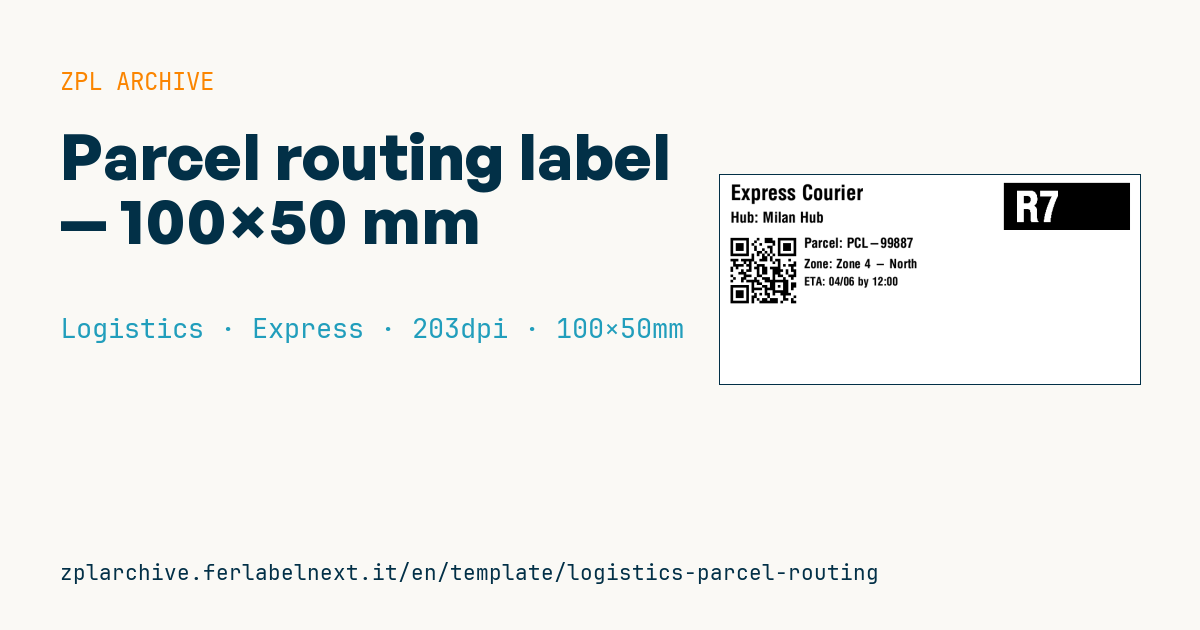
Parcel routing/sorting label: contrast route code, carrier, hub, QR to the tracking, parcel ID, delivery zone and ETA. For hub sorting.
Parcel routing label
100×50 mm @ 203 dpi. Reverse-contrast route code (^FR), carrier, hub, QR to the tracking, parcel ID, delivery zone and ETA.
Placeholders
-
route_code— route code (large) -
carrier/hub— carrier and hub -
parcel_url/parcel_id— parcel URL and ID -
delivery_zone/eta— delivery zone and ETA
When to use it
This is the internal label a local courier, last-mile operator or e-commerce business with its own fleet sticks on parcels for hub sorting. The person at the belt reads the reverse-print route code at a glance and pushes the parcel to the right bay; the QR is for later, when the driver or customer opens the tracking page. The parcel only lives a few hours or days, so direct thermal is fine, but the face stock must survive belt friction and some moisture during delivery.
Standards and requirements
There is no specific standard for internal sorting labels: what matters is the practical requirements of your process. The route code must be readable from a couple of metres away, and the QR must comply with ISO/IEC 18004 and scan on phones and handhelds. If the parcel is handed over to a third-party carrier, that carrier applies its own label: check its specifications. In ZPL use ^BQN,2, with QA, or MA, data (error correction Q or M) and keep a 4-module quiet zone around the QR. For the reversed box, use a filled ^GB and ^FR on the text.
Common mistakes
- Encoding a long URL full of parameters: the symbol grows and becomes hard to read at 203 dpi.
- Choosing route codes that look alike for neighbouring zones (e.g.
B12andB21), which causes missorts. - Covering or replacing the third-party carrier's label with this one.
- Putting recipient personal data in clear text in the URL.
FAQ
Which QR error correction level should I use?
For parcels rubbing along belts, level Q is a good balance; H makes the symbol larger with little benefit at this size.
Is direct thermal paper OK?
Yes, for a cycle of a few days out of direct sunlight. For long storage or outdoor use, switch to thermal transfer.
Can the route code be numeric only?
Yes, but a short letter-plus-number combination is easier for operators to remember.
ZPL code
^XA
^PW799
^LL400
^CI28
^FO540,15^GB240,90,90^FS
^FR^CF0,80^FO560,30^FD{{route_code}}^FS
^CF0,40^FO20,18^FD{{carrier}}^FS
^CF0,28^FO20,70^FDHub: {{hub}}^FS
^FO20,110^BQN,2,5^FDLA,{{parcel_url}}^FS
^CF0,26^FO160,120^FDParcel: {{parcel_id}}^FS
^CF0,24^FO160,160^FDZone: {{delivery_zone}}^FS
^CF0,22^FO160,195^FDETA: {{eta}}^FS
^XZ- Industry: Logistics
- Category: Express
- DPI: 203
- Size: 100×50 mm
- Tags: Dispatch, Logistics, QR Code, Tracking
What this label contains
Barcodes
- QR Code
- 2D code for links, text and structured data, readable by any smartphone.
Elements
- 6 text fields
- 7 variable fields to fill in
- boxes and separator lines
Variable fields
| Field | Description | Example |
|---|---|---|
route_code | Route code | R7 |
carrier | Carrier | Express Courier |
hub | Hub | Milan Hub |
parcel_url | Parcel URL | https://track.example/p/99887 |
parcel_id | Parcel ID | PCL-99887 |
delivery_zone | Delivery zone | Zone 4 - North |
eta | ETA | 04/06 by 12:00 |
Format and printing
100×50 mm (3.94×1.97″) at 203 dpi: 799×400 dots. Landscape.
Compatible Zebra printers
You need a printer with a 4″ printhead at 203 dpi, for example:
- Zebra ZD421 (desktop)
- Zebra ZD621 (desktop)
- Zebra GK420 (desktop)
- Zebra ZT231 (industrial)
- Zebra ZT411 (industrial)
- Zebra ZT610 (industrial)
- Zebra ZQ521 (mobile)
- Zebra ZQ630 (mobile)
Any Zebra printer with a wider printhead and the same resolution works too.
The code is written for 203 dpi: on a printer with a different resolution the label prints larger or smaller and needs rescaling.
How to use it
- Open “Customize placeholders” and enter your data in the variable fields listed above.
- Check the preview: it is rendered from the same ZPL code you will send to the printer.
- Download the .zpl file or copy the code and send it to the printer: with “Print” through Zebra Browser Print, or as a raw file to port 9100 if the printer is on the network.
- Load 100×50 mm labels and make sure the printer is set to 203 dpi. For a different size use “Duplicate & edit” and adapt the layout in the builder.
Edit it in the editor
To change the layout, use “Duplicate & edit”: the template opens in the online ZPL editor, where you modify it and save it to your account for free.
Related templates
- IATA air baggage tag — 50×220 mm 203 dpi · Logistics · Luggage
- Fragile / Handle with care — 100×70 mm 203 dpi · Logistics · Express
- DHL Express Worldwide AWB — 100×150 mm 203 dpi · Logistics · Express
- Pallet Label GS1 SSCC — 148×210 mm (A5) 203 dpi · Logistics · Pallet
- ISO 6346 sea container label — 100×70 mm 203 dpi · Logistics · Express
- Generic Return Label — 100×150 mm 203 dpi · Logistics · Return
- Cross-dock routing label (QR) — 100×50 mm 203 dpi · Logistics · Express
- Basic Sender/Recipient — 100×70 mm 203 dpi · Logistics · Express