Cold chain +2/+8 °C — 70×40 mm
Cold-chain warning label for drugs/vaccines: temperature range, product, lot, expiry, QA contact.
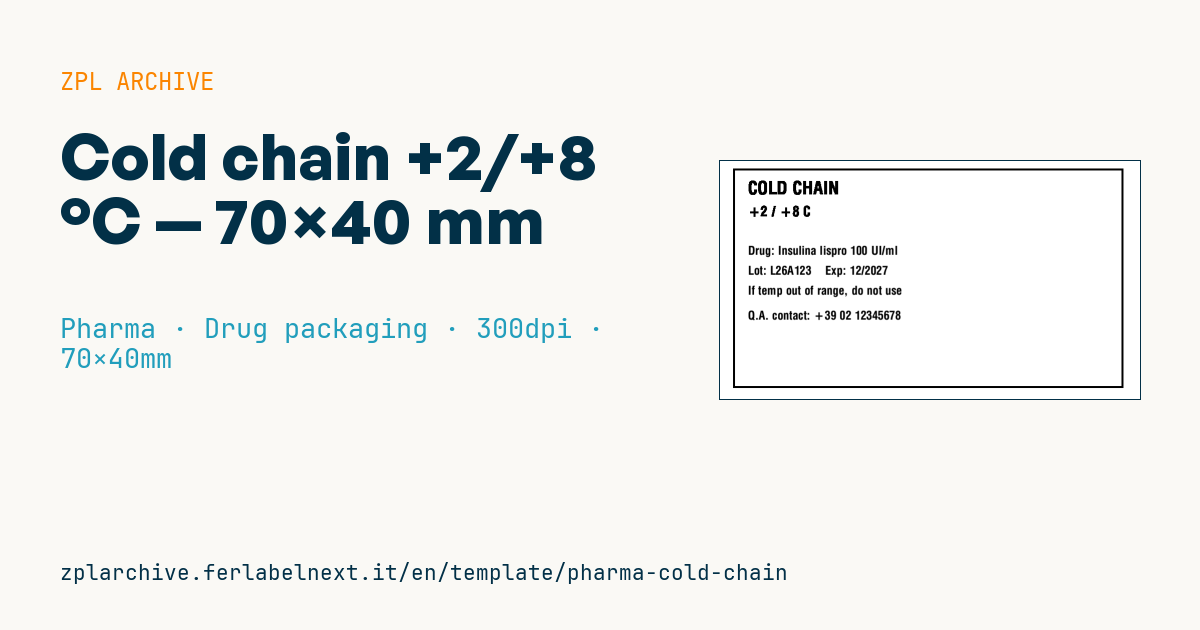
Cold-chain warning
70×40 mm @ 300 dpi. Used on refrigerated product packages (vaccines, biologics). The thick black border makes the warning stand out; no international standard prescribes its design.
Placeholders
drug_namelot,expiryqa_phone— company QA number to report broken cold-chain
When to use it
The +2/+8 °C warning label goes on secondary packs or shipping cases of vaccines, insulins, biologics and other refrigerated products. Manufacturers, wholesalers, 3PLs and hospital pharmacies use it to tell the receiver that the goods must go straight into the fridge and that any cold-chain break must be reported to the QA number shown.
The label lives in harsh conditions: moves between ambient warehouse and cold room, condensation, insulated shippers. Use a synthetic or coated paper stock with an adhesive rated for cold, damp surfaces, printed thermal transfer. Direct thermal paper copes badly with summer heat in transit and can darken.
Standards and requirements
The EU Guidelines on Good Distribution Practice (GDP, 2013/C 343/01) require storage conditions to be maintained and communicated along the supply chain; the temperature you print must match the one approved in the marketing authorisation. No single standard prescribes the graphic of this warning, so follow the procedures of the marketing authorisation holder or your customer.
In ZPL the degree sign needs ^CI28 (UTF-8) or ^FH with the correct hex value for the code page you use.
Common mistakes
- Printing a range that differs from the authorised one, for example +2/+25 °C copied from another product.
- Applying the label to a carton that is already cold and wet, so the adhesive never grabs.
- Showing a generic QA number nobody answers out of hours.
- Getting a box instead of "°" because of the wrong code page.
FAQ
Does this label replace a data logger?
No. It states the required conditions but records nothing: temperature monitoring needs validated loggers or indicators.
Should it also go on the shipping case?
Usually yes, because the receiver must see it without opening the parcel; check your customer's or carrier's instructions.
ZPL code
^XA
^PW827
^LL472
^CI28
^FO20,15^GB780,440,4,B^FS
^CF0,36^FO50,40^FR^FDCOLD CHAIN^FS
^CF0,28^FO50,90^FR^FD+2 / +8 C^FS
^CF0,24
^FO50,170^FDDrug: {{drug_name}}^FS
^FO50,210^FDLot: {{lot}}    Exp: {{expiry}}^FS
^FO50,250^FDIf temp out of range, do not use^FS
^FO50,300^FDQ.A. contact: {{qa_phone}}^FS
^XZ- Industry: Pharma
- Category: Drug packaging
- DPI: 300
- Size: 70×40 mm
- Tags: Refrigerated, Temperature
What this label contains
Barcodes
This label contains no barcodes: it is made of text and graphics.
Elements
- 6 text fields
- 4 variable fields to fill in
- boxes and separator lines
Variable fields
| Field | Description | Example |
|---|---|---|
drug_name | Drug | Insulina lispro 100 UI/ml |
lot | Lot | L26A123 |
expiry | Expiry | 12/2027 |
qa_phone | QA contact | +39 02 12345678 |
Format and printing
70×40 mm (2.76×1.57″) at 300 dpi: 827×472 dots. Landscape.
Compatible Zebra printers
You need a printer with a 4″ printhead at 300 dpi, for example:
- Zebra ZD421 (desktop)
- Zebra ZD621 (desktop)
- Zebra ZT231 (industrial)
- Zebra ZT411 (industrial)
- Zebra ZT610 (industrial)
Any Zebra printer with a wider printhead and the same resolution works too.
The code is written for 300 dpi: on a printer with a different resolution the label prints larger or smaller and needs rescaling.
How to use it
- Open “Customize placeholders” and enter your data in the variable fields listed above.
- Check the preview: it is rendered from the same ZPL code you will send to the printer.
- Download the .zpl file or copy the code and send it to the printer: with “Print” through Zebra Browser Print, or as a raw file to port 9100 if the printer is on the network.
- Load 70×40 mm labels and make sure the printer is set to 300 dpi. For a different size use “Duplicate & edit” and adapt the layout in the builder.
Edit it in the editor
To change the layout, use “Duplicate & edit”: the template opens in the online ZPL editor, where you modify it and save it to your account for free.
Related templates
- GS1 DataMatrix pharma — 25×10 mm (600 dpi) 600 dpi · Pharma · GS1 DataMatrix
- Patient check-in & appointment ticket — 80×150 mm 203 dpi · Pharma · Patient check-in & flow
- GS1 serialization DataMatrix — 40×25 mm 300 dpi · Pharma · GS1 DataMatrix
- Sample tube Aztec — 25×25 mm 300 dpi · Pharma · Lab samples
- UDI medical device — 50×30 mm 300 dpi · Pharma · Drug packaging
- Lab sample — 70×40 mm 300 dpi · Pharma · Lab samples
- Prescription label — 70×40 mm 203 dpi · Pharma · Drug packaging
- Patient wristband — 200×25 mm 300 dpi · Pharma · Patient wristband