Basic price tag — 50×30 mm
Essential, clean price tag: product name, code and a highly readable price. The starting point for any retail label.
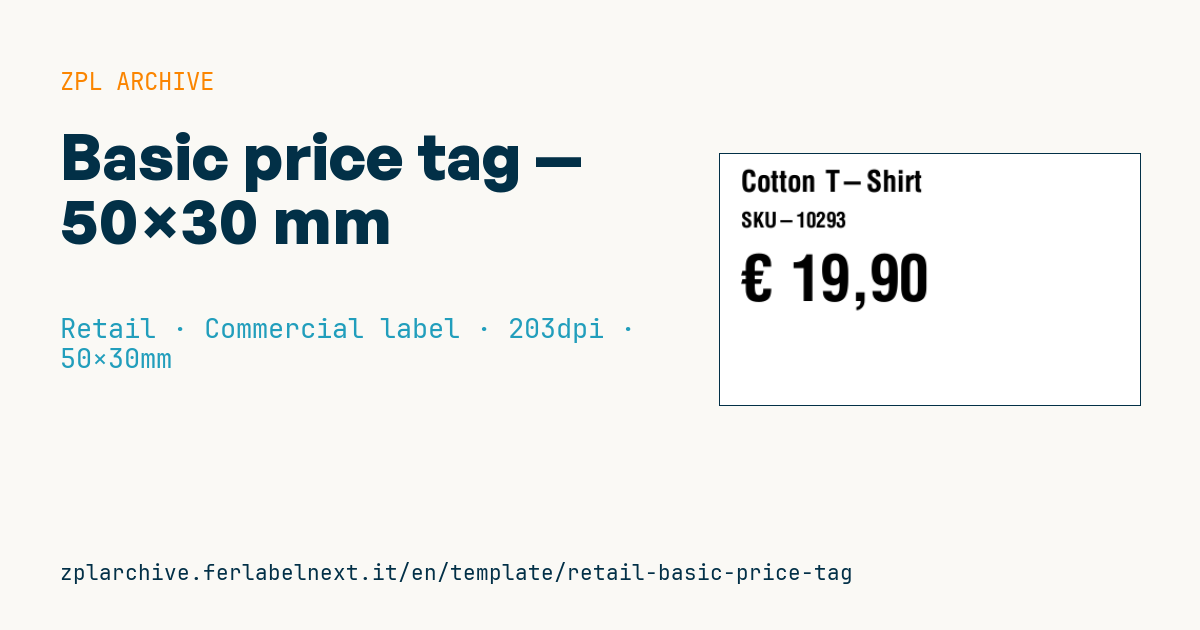
Basic price tag
50×30 mm @ 203 dpi. Vertical three-line layout: name, code, price. The price is set in a large font for maximum shelf readability.
Placeholders
product_nameproduct_code— code/SKUcurrency— currency symbol (e.g.€)price— price (EU format, e.g.19,90)
When to use it
This is the tag that shops, hardware stores, stationers and small retailers print from their back-office software for shelf edges or for hanging on the item. With no barcode, it fits stores where the till looks up an internal code, or where the product already carries an EAN on its pack. On direct thermal stock it lasts a few months on the shelf; for frequent price changes it is handy to reprint in batches whenever the price list changes.
Standards and requirements
Directive 98/6/EC on price indication requires the selling price to be unambiguous, easily identifiable and clearly legible, and products sold by weight or volume must also show the unit price (per kg, per litre). This layout shows only the final price: if you sell loose food, detergents or variable-weight packs, add the unit price. The price shown to consumers must be the final price including VAT.
For the € sign use ^CI28 with a font that contains it: with ^CI28 active you can type € directly or, with ^FH, write it as _E2_82_AC. Alternatively, use ^CI27 (code page 1252) with ^FH and _80. With ^FB you can right-align the price so the digits line up along the shelf.
Common mistakes
- Leaving out the price per kg or per litre on products that require it.
- Sending the euro sign without
^CI28: the printer outputs the wrong character. - Using a point as the decimal separator on a European price list, creating ambiguous prices such as
1.990. - Leaving old tags on the shelf after a price change: the till and the label must match.
FAQ
Must the price include VAT?
Yes. For sales to consumers the price shown must be the total price, including VAT and other taxes.
How large should the price be on the tag?
The directive sets no minimum height; it requires legibility. In practice, a font that fills about a third of the tag height reads well at shelf distance.
ZPL code
^XA
^PW400
^LL240
^CI28
^CF0,28^FO20,15^FD{{product_name}}^FS
^CF0,20^FO20,55^FD{{product_code}}^FS
^CF0,60^FO20,95^FD{{currency}} {{price}}^FS
^XZ- Industry: Retail
- Category: Commercial label
- DPI: 203
- Size: 50×30 mm
- Tags: Price tag, Promotion
What this label contains
Barcodes
This label contains no barcodes: it is made of text and graphics.
Elements
- 3 text fields
- 4 variable fields to fill in
Variable fields
| Field | Description | Example |
|---|---|---|
product_name | Product | Cotton T-Shirt |
product_code | Code | SKU-10293 |
currency | Currency | € |
price | Price | 19,90 |
Format and printing
50×30 mm (1.97×1.18″) at 203 dpi: 400×240 dots. Landscape.
Compatible Zebra printers
You need a printer with a 2″ printhead at 203 dpi, for example:
- Zebra ZD411 (desktop)
- Zebra ZD611 (desktop)
- Zebra ZQ220 (mobile)
- Zebra ZQ310 (mobile)
Any Zebra printer with a wider printhead and the same resolution works too.
The code is written for 203 dpi: on a printer with a different resolution the label prints larger or smaller and needs rescaling.
How to use it
- Open “Customize placeholders” and enter your data in the variable fields listed above.
- Check the preview: it is rendered from the same ZPL code you will send to the printer.
- Download the .zpl file or copy the code and send it to the printer: with “Print” through Zebra Browser Print, or as a raw file to port 9100 if the printer is on the network.
- Load 50×30 mm labels and make sure the printer is set to 203 dpi. For a different size use “Duplicate & edit” and adapt the layout in the builder.
Edit it in the editor
To change the layout, use “Duplicate & edit”: the template opens in the online ZPL editor, where you modify it and save it to your account for free.
Related templates
- Black Friday with offer QR — 50×40 mm 300 dpi · Retail · Commercial label
- EAN13 + bilingual IT/EN description — 60×40 mm 203 dpi · Retail · Commercial label
- Handmade soap label with logo — 50×40 mm 203 dpi · Retail · Commercial label
- Basic EAN13 product — 50×30 mm 203 dpi · Retail · Commercial label
- -50% off sticker — 40×40 mm 203 dpi · Retail · Commercial label
- Price + product name — 70×40 mm 203 dpi · Retail · Commercial label
- Summer sale with EAN-13 — 60×40 mm 203 dpi · Retail · Commercial label
- Clearance window poster — 70×50 mm 203 dpi · Retail · Commercial label