Left luggage storage tag — 60×40 mm
Tag for luggage storage / left luggage: ticket number, deposit time, number of pieces and claim QR code.
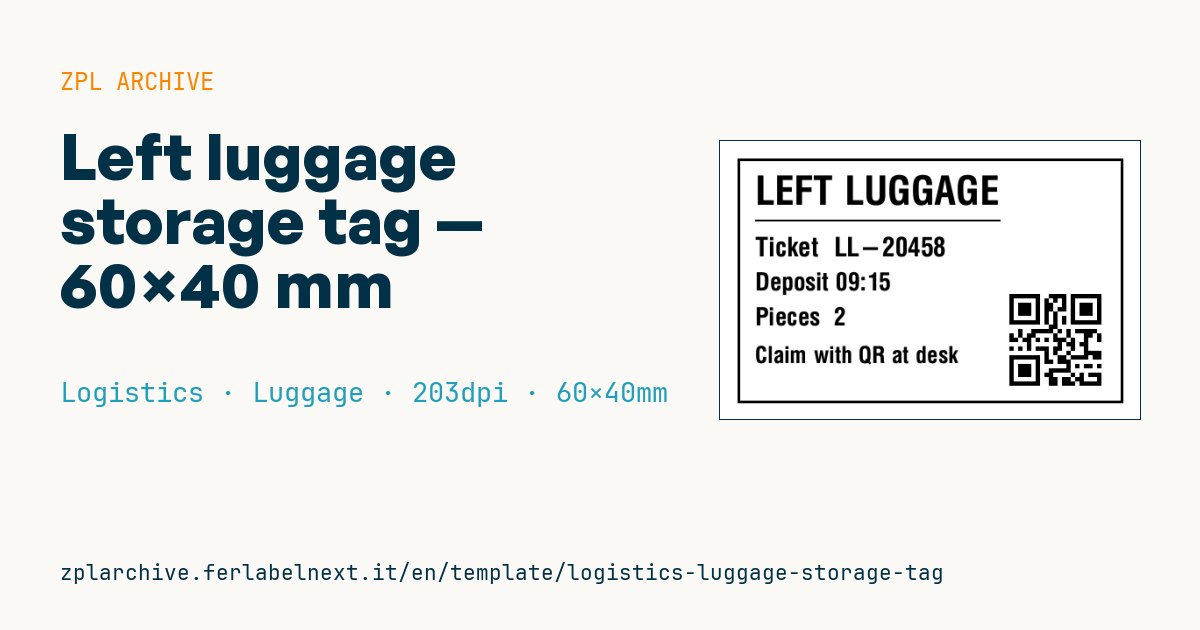
Left luggage storage tag
60×40 mm @ 203 dpi. For luggage storage services (stations, hotels, airports). The QR holds the ticket number and is scanned at the desk to claim the bags.
Placeholders
ticket— ticket number (also encoded in the QR)deposit_time— deposit timepieces— number of pieces
When to use it
The luggage storage tag is used at the desk in hotels, stations, airports, museums, event venues and city left-luggage services. Staff print one tag per bag, fix it to the handle with a loop or elastic and give the customer a receipt with the same number. At collection they scan the QR, the system lists the linked items and staff hand them back without searching the shelves.
Storage lasts from a few hours to a few days, so direct thermal paper is enough. Avoid sticking adhesive labels straight onto leather or fabric bags: they damage the material and fall off.
Standards and requirements
There is no specific standard for storage tags. The QR follows ISO/IEC 18004; the requirements are practical: a number readable by eye, a reliable link between receipt and tag, and content that is hard to guess. Terms of service, liability and excluded items depend on local law and your own rules: print them on the receipt, not the tag. For several items you can print copies with ^PQ, but if each tag must show its item number out of the total, generate one label per item; for running serial numbers there is also ^SN.
Common mistakes
- Using short sequential tickets: anyone holding one can try to claim the next bag.
- Printing a single tag for a group of items that then get separated on the shelves.
- Handing bags back without a scan when the receipt is lost, and without checking ID.
- Leaving the QR on the side of the tag that ends up facing the bag.
FAQ
What if the customer loses the receipt?
That depends on your procedure: usually you check an ID document and log the collection before handing the bags back.
Do I need a dedicated printer?
A desktop thermal printer with 60×40 mm rolls is enough; if you use tags with a hole for the loop, make sure the sensor detects the media.
ZPL code
^XA
^LL320
^CI28
^PW480
^FO20,20^GB440,280,3^FS
^CF0,45^FO40,40^FDLEFT LUGGAGE^FS
^FO40,90^GB280,2,2^FS
^CF0,30^FO40,110^FDTicket  {{ticket}}^FS
^CF0,28^FO40,150^FDDeposit {{deposit_time}}^FS
^FO40,190^FDPieces  {{pieces}}^FS
^CF0,26^FO40,235^FDClaim with QR at desk^FS
^FO330,165^BQN,2,5^FDQA,{{ticket}}^FS
^XZWhat this label contains
Barcodes
- QR Code
- 2D code for links, text and structured data, readable by any smartphone.
Elements
- 5 text fields
- 3 variable fields to fill in
- boxes and separator lines
Variable fields
| Field | Description | Example |
|---|---|---|
ticket | Ticket | LL-20458 |
deposit_time | Deposit | 09:15 |
pieces | Pieces | 2 |
Format and printing
60×40 mm (2.36×1.57″) at 203 dpi: 480×320 dots. Landscape.
Compatible Zebra printers
You need a printer with a 4″ printhead at 203 dpi, for example:
- Zebra ZD421 (desktop)
- Zebra ZD621 (desktop)
- Zebra GK420 (desktop)
- Zebra ZT231 (industrial)
- Zebra ZT411 (industrial)
- Zebra ZT610 (industrial)
- Zebra ZQ521 (mobile)
- Zebra ZQ630 (mobile)
Any Zebra printer with a wider printhead and the same resolution works too.
The code is written for 203 dpi: on a printer with a different resolution the label prints larger or smaller and needs rescaling.
How to use it
- Open “Customize placeholders” and enter your data in the variable fields listed above.
- Check the preview: it is rendered from the same ZPL code you will send to the printer.
- Download the .zpl file or copy the code and send it to the printer: with “Print” through Zebra Browser Print, or as a raw file to port 9100 if the printer is on the network.
- Load 60×40 mm labels and make sure the printer is set to 203 dpi. For a different size use “Duplicate & edit” and adapt the layout in the builder.
Edit it in the editor
To change the layout, use “Duplicate & edit”: the template opens in the online ZPL editor, where you modify it and save it to your account for free.
Related templates
- IATA air baggage tag — 50×220 mm 203 dpi · Logistics · Luggage
- Fragile / Handle with care — 100×70 mm 203 dpi · Logistics · Express
- DHL Express Worldwide AWB — 100×150 mm 203 dpi · Logistics · Express
- Pallet Label GS1 SSCC — 148×210 mm (A5) 203 dpi · Logistics · Pallet
- Cross-dock routing label (QR) — 100×50 mm 203 dpi · Logistics · Express
- Basic Sender/Recipient — 100×70 mm 203 dpi · Logistics · Express
- ISO 6346 sea container label — 100×70 mm 203 dpi · Logistics · Express
- Generic Return Label — 100×150 mm 203 dpi · Logistics · Return