Dosage instructions label — 60×40 mm
Dosage label for pharmacy: drug name, strength, dosage, frequency, patient and warning. For personalized dispensing.
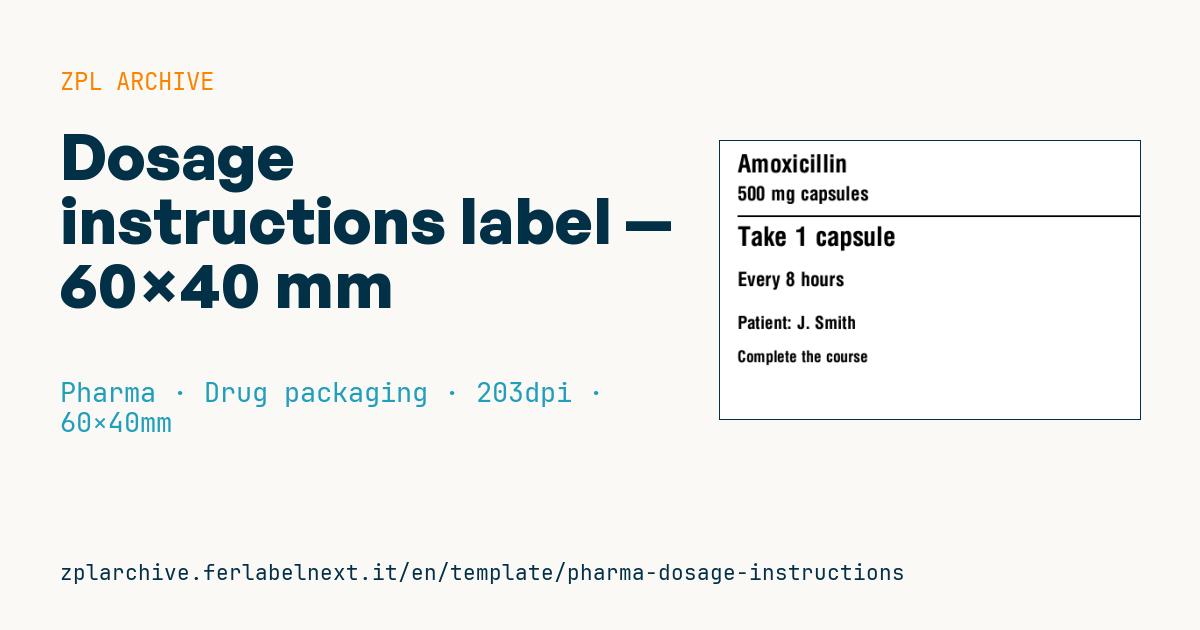
Dosage instructions label
60×40 mm @ 203 dpi. Drug name, strength, separator, prominent dosage, frequency, patient and a warning.
Placeholders
drug_name— drug namestrength— strength (e.g.500 mg)dosage— dosage (e.g.Take 1 tablet)frequency— frequency (e.g.3 times a day)patient_label/patient— patient label and namewarning— warning
When to use it
The dosage label is printed at the pharmacy counter or in the hospital pharmacy at dispensing and applied to the box, bottle or repackaged blister for a named patient. It matters most for people on several medicines, older patients and carers: the dosage is the most prominent line because it is what the patient rereads every day.
The pack ends up in a kitchen or bathroom, exposed to moisture and wet hands. Direct thermal paper is fine for short courses; for packs that last months or sit near heat, prefer thermal transfer on a synthetic stock.
Standards and requirements
There is no single European standard for dispensing labels: mandatory content depends on national law and pharmacy professional rules. The practical requirements are clear: instructions understandable without medical abbreviations, the patient's name, relevant warnings and characters large enough to read. The label must not cover information on the original pack such as lot, expiry date or traceability codes.
At 203 dpi avoid fonts under roughly 20-24 dots high for the dosage line; use ^CI28 for accented letters.
Common mistakes
- Writing abbreviations such as "TID" or "1x3" that patients do not understand.
- Covering the lot, expiry or code of the original pack.
- Truncating the frequency when the text runs past the available line.
- Using direct thermal paper on medicines kept for a long time or in warm places.
FAQ
Can I print the dosage in more than one language?
Yes, it is good practice when the patient does not read the local language; keep the main language prominent and check the available space.
What font size should I use?
Large enough for an older patient to read without glasses: in practice the dosage should be the biggest text on the label.
ZPL code
^XA
^PW480
^LL320
^CI28
^CF0,28^FO20,15^FD{{drug_name}}^FS
^CF0,22^FO20,52^FD{{strength}}^FS
^FO20,85^GB460,2,2^FS
^CF0,30^FO20,98^FD{{dosage}}^FS
^CF0,22^FO20,150^FD{{frequency}}^FS
^CF0,20^FO20,200^FD{{patient_label}}: {{patient}}^FS
^CF0,18^FO20,240^FD{{warning}}^FS
^XZ- Industry: Pharma
- Category: Drug packaging
- DPI: 203
- Size: 60×40 mm
- Tags: Dosage, Patient, Pharma, Prescription
What this label contains
Barcodes
This label contains no barcodes: it is made of text and graphics.
Elements
- 6 text fields
- 7 variable fields to fill in
- boxes and separator lines
Variable fields
| Field | Description | Example |
|---|---|---|
drug_name | Drug | Amoxicillin |
strength | Strength | 500 mg capsules |
dosage | Dosage | Take 1 capsule |
frequency | Frequency | Every 8 hours |
patient_label | Patient | Patient |
patient | Patient name | J. Smith |
warning | Warning | Complete the course |
Format and printing
60×40 mm (2.36×1.57″) at 203 dpi: 480×320 dots. Landscape.
Compatible Zebra printers
You need a printer with a 4″ printhead at 203 dpi, for example:
- Zebra ZD421 (desktop)
- Zebra ZD621 (desktop)
- Zebra GK420 (desktop)
- Zebra ZT231 (industrial)
- Zebra ZT411 (industrial)
- Zebra ZT610 (industrial)
- Zebra ZQ521 (mobile)
- Zebra ZQ630 (mobile)
Any Zebra printer with a wider printhead and the same resolution works too.
The code is written for 203 dpi: on a printer with a different resolution the label prints larger or smaller and needs rescaling.
How to use it
- Open “Customize placeholders” and enter your data in the variable fields listed above.
- Check the preview: it is rendered from the same ZPL code you will send to the printer.
- Download the .zpl file or copy the code and send it to the printer: with “Print” through Zebra Browser Print, or as a raw file to port 9100 if the printer is on the network.
- Load 60×40 mm labels and make sure the printer is set to 203 dpi. For a different size use “Duplicate & edit” and adapt the layout in the builder.
Edit it in the editor
To change the layout, use “Duplicate & edit”: the template opens in the online ZPL editor, where you modify it and save it to your account for free.
Related templates
- GS1 DataMatrix pharma — 25×10 mm (600 dpi) 600 dpi · Pharma · GS1 DataMatrix
- Patient check-in & appointment ticket — 80×150 mm 203 dpi · Pharma · Patient check-in & flow
- Sample tube Aztec — 25×25 mm 300 dpi · Pharma · Lab samples
- GS1 serialization DataMatrix — 40×25 mm 300 dpi · Pharma · GS1 DataMatrix
- UDI medical device — 50×30 mm 300 dpi · Pharma · Drug packaging
- Lab sample — 70×40 mm 300 dpi · Pharma · Lab samples
- Sterile medical lot — 60×40 mm 300 dpi · Pharma · Drug packaging
- Prescription label — 70×40 mm 203 dpi · Pharma · Drug packaging